
Introduction to RUN HyperOS Theme
The RUN HyperOS theme is an exquisite and modern theme designed for Xiaomi, Redmi, and POCO smartphones. This theme is the brainchild of the talented designer xlee, who has carefully crafted it to provide a unique visual experience. With its sleek design, fresh wallpapers, and customizable features, the RUN HyperOS theme is perfect for those looking to give their device a personalized touch.
Visual Style and Aesthetics
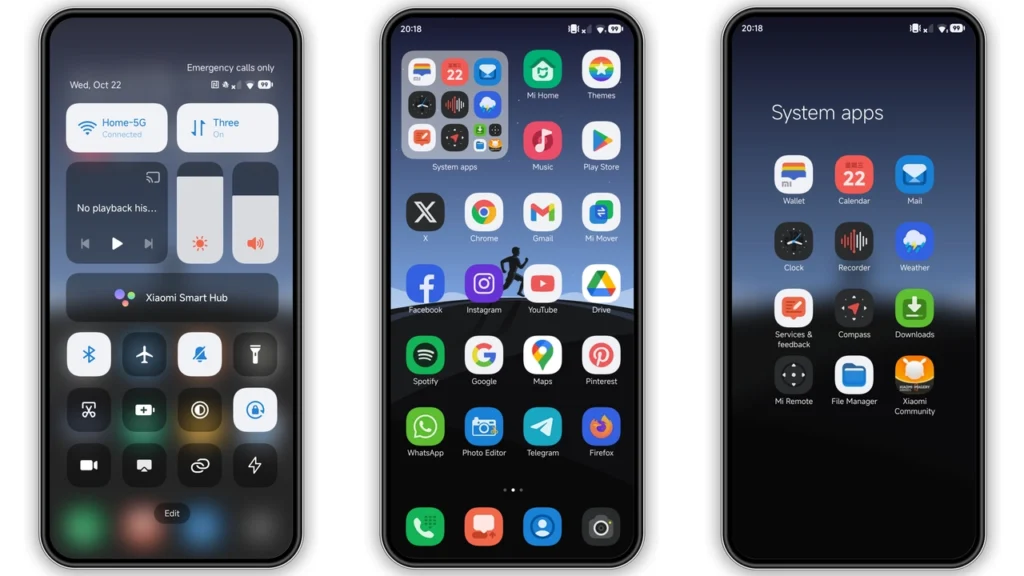
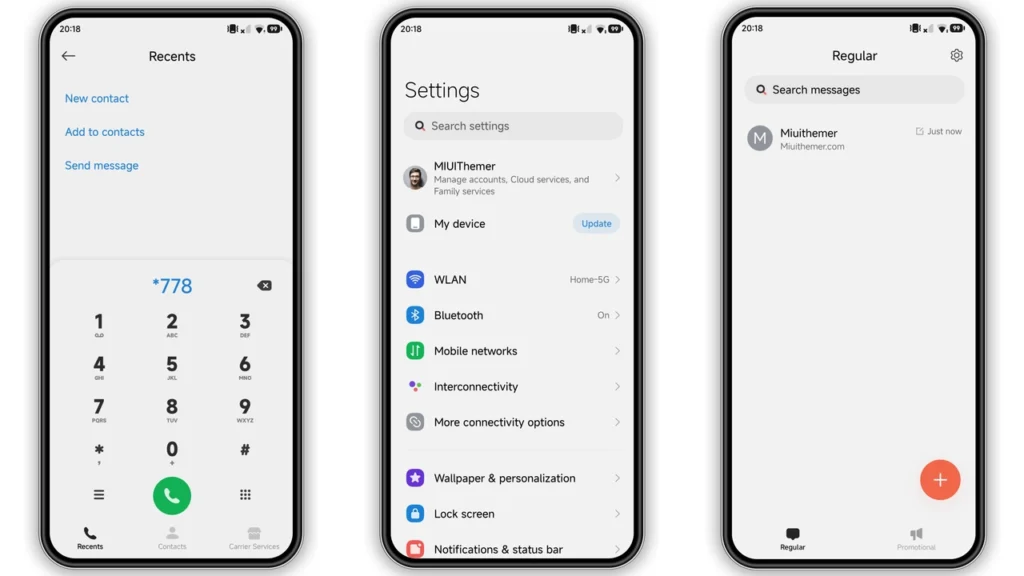
The RUN HyperOS theme boasts a stunning visual style that is both modern and sophisticated. The theme features a well-designed icon pack, fresh wallpapers, and a cool lock screen that will give your device a distinctive look. The Always-on Display is also stylishly designed, making it a great addition to the overall visual experience. The theme's color scheme is carefully chosen to provide a visually appealing experience, making it perfect for those who want a unique and stylish look for their device.
Who May Like the RUN HyperOS Theme
The RUN HyperOS theme is perfect for anyone looking to give their device a fresh new look. It is especially suitable for those who want a modern and sleek design that stands out from the crowd. The theme's customizable features make it ideal for users who like to personalize their device to suit their individual style. Additionally, the theme's compatibility with HyperOS and MIUI devices makes it a great option for users who want a consistent look across their devices.
Compatibility Notes
The RUN HyperOS theme is compatible with HyperOS and MIUI devices, including Xiaomi, Redmi, and POCO smartphones. It is also compatible with HyperOS 2.0, making it a great option for users who have upgraded to the latest version of the operating system. However, it is essential to note that the theme may not be compatible with all devices, so it is crucial to check the compatibility before downloading and installing the theme.
Install Expectations
Installing the RUN HyperOS theme is a straightforward process. Once you have downloaded the theme, you can install it using the Theme Store APP. The theme is available in both MTZ and backup file formats, making it easy to install and apply. However, it is essential to follow the installation instructions carefully to ensure that the theme is installed correctly. Additionally, it is recommended to restart your device after applying the theme to ensure that all features are working correctly.
Practical Download Notes
The RUN HyperOS theme is available for download in both MTZ and backup file formats. The MTZ file is the recommended format for installation, as it is easy to install and apply using the Theme Store APP. The backup file format is also available, which can be used to restore the theme in case you need to reset your device. It is essential to download the theme from a trusted source to ensure that you get a genuine and virus-free copy.
Downloading and Installing the Theme
To download and install the RUN HyperOS theme, follow these steps: 1. Download the theme in MTZ or backup file format from a trusted source. 2. Open the Theme Store APP on your device. 3. Tap on the "Themes" option and swipe to the bottom. 4. Click on the "Import" option and select the MTZ file you downloaded. 5. Apply the theme and restart your device to ensure that all features are working correctly.
Conclusion
The RUN HyperOS theme is a stunning and modern theme that is perfect for Xiaomi, Redmi, and POCO smartphones. Its sleek design, fresh wallpapers, and customizable features make it a great option for users who want a unique and personalized look for their device. With its compatibility with HyperOS and MIUI devices, the theme is a great option for users who want a consistent look across their devices. Whether you are looking for a modern and sophisticated look or a fresh new design, the RUN HyperOS theme is definitely worth considering.
Final Thoughts
The RUN HyperOS theme is a great addition to the world of Xiaomi themes. Its unique visual style, customizable features, and compatibility with HyperOS and MIUI devices make it a great option for users who want a personalized look for their device. With its easy installation process and availability in both MTZ and backup file formats, the theme is easy to download and install. Whether you are a seasoned theme user or just starting out, the RUN HyperOS theme is definitely worth checking out.
Labels
Theme Preview
Download Links
Use the buttons below to open the theme file and the supporting link.
RUN Theme mtz File
RUN Theme Backup File
Helpful links
More Theme Updates
For more curated HyperOS and MIUI theme updates, visit Hyper OS x MIUI .


