
If you want your Xiaomi, Redmi, or POCO device to feel lighter, faster, and visually cleaner without losing functional depth, Orijin Six V2 delivers that balance. Moving away from heavy, over-engineered modifications, this skin focuses on subtle refinements: gentle curves, clean contrast, and a cohesive interface layer from the lock display down to system toggles.
Theme Specifications
Parameter · Value
Designer · TTQD
Size · 19.18 MB
Format · .MTZ
Compatibility · HyperOS, HyperOS 2.0, MIUI
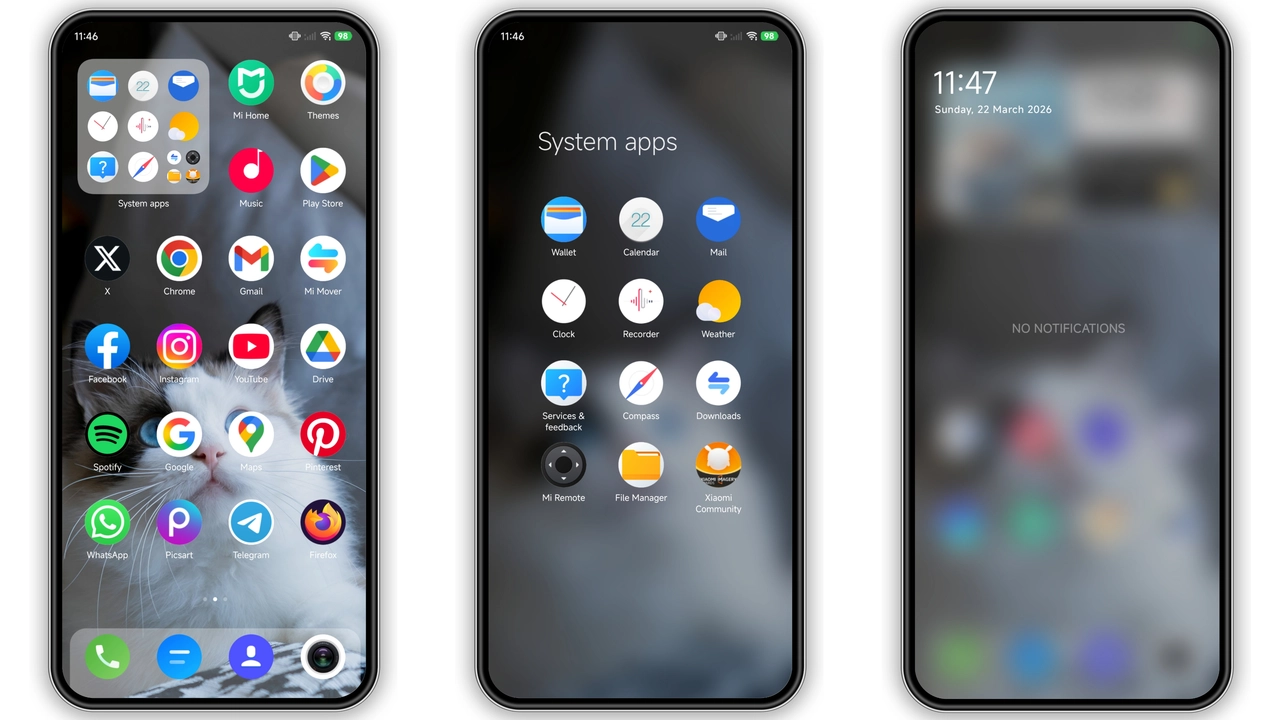
Refined Visual Hierarchy and Rounded Iconography
The central highlight of Orijin Six V2 is its rounded app drawer and home screen aesthetic. System applications feature uniform shapes with smooth corner radiuses, eliminating the awkward visual clutter often seen in stock icons.
Third-party apps receive clean masking containers, preventing mismatched designs from breaking continuity. The launcher interface adopts generous spacing between grid elements, giving your wallpaper space to breathe while keeping essential utilities accessible. App labels remain crisp, using balanced font weights that avoid distracting contrast.
Suggested Read: Jiyan Bubble HyperOS Theme Review: Fresh 3D Bubbles for Xiaomi & Redmi Phones
Custom Lock Screen and Ambient Interface Tweaks
The lock screen pairs functional minimalism with quick utility access. The default clock layout features modern typography that aligns cleanly with basic notification banners. Essential interactions—such as the flashlight toggle, quick camera trigger, and battery percentage monitors—blend directly into the wallpaper background rather than sitting inside clunky containers.
Transition animations between the lock state and the unlocked home screen are smooth and low-latency. If your hardware supports an Always-On Display (AOD), Orijin Six V2 carries over this lightweight design footprint to display vital indicators without unnecessary battery drain.
Functional Status Bar and Control Center Revamp
Pulling down the notification shade reveals modified quick settings tiles with enhanced readability. The system battery indicator, signal meters, and Wi-Fi status icons on the top edge adopt tighter geometric profiles, freeing up valuable notification real estate along the status bar.
Active control toggles feature soft highlights rather than neon glows. This prevents visual fatigue during low-light sessions while maintaining high contrast. Readouts for system volume, brightness sliders, and media players fit naturally within the standard card interface.
Daily Usability and Target Audience
Orijin Six V2 is built for users who prioritize uncluttered workflows over extreme graphic modifications. It avoids bulky widgets, heavy shadow drop-effects, or neon color palettes that slow down rendering engines.
• Ideal for Minimalists: Users who prefer clean, breathable layouts that emphasize productivity and visual calm.
• Suited for Mid-Range Hardware: The 19.18 MB footprint ensures background launcher caches run smoothly without stutter on budget Redmi or POCO chips.
• Great for Night Use: Neutral tone accents work well alongside system-wide Dark Mode without blowing out contrast levels.
Installation Behavior and Practical Considerations
Applying Orijin Six V2 via the MTZ importer on custom firmware (such as Xiaomi.eu) produces instant, system-wide changes. If you install the package directly through official distribution pipelines, remember that system permissions may require an immediate reboot to refresh your status bar cache completely.
Pros and Cons
• Pros:
• Ultra-lightweight footprint (under 20 MB) prevents launcher lag.
• Clean, uniform icon masking for both stock and third-party apps.
• Elegant lock screen typography that preserves wallpaper visibility.
• Stable compatibility across modern HyperOS and legacy MIUI builds.
• Cons:
• Minimalist design may feel too subtle for users wanting heavy visual overhauls.
• Custom lock screen widgets offer limited deep-link customization options.
• Requires a manual restart on select firmware builds to resolve minor status bar icon overlap.
Orijin Six V2 succeeds by doing just enough. It cleans up the interface, unifies rogue system elements, and stays out of your way during everyday tasks.
Theme Preview
Download Links
Use the buttons below to open the theme file and the supporting link.
Orijin Six V2 Theme mtz File
Helpful links
More Theme Updates
For more curated HyperOS and MIUI theme updates, visit Hyper OS x MIUI .


