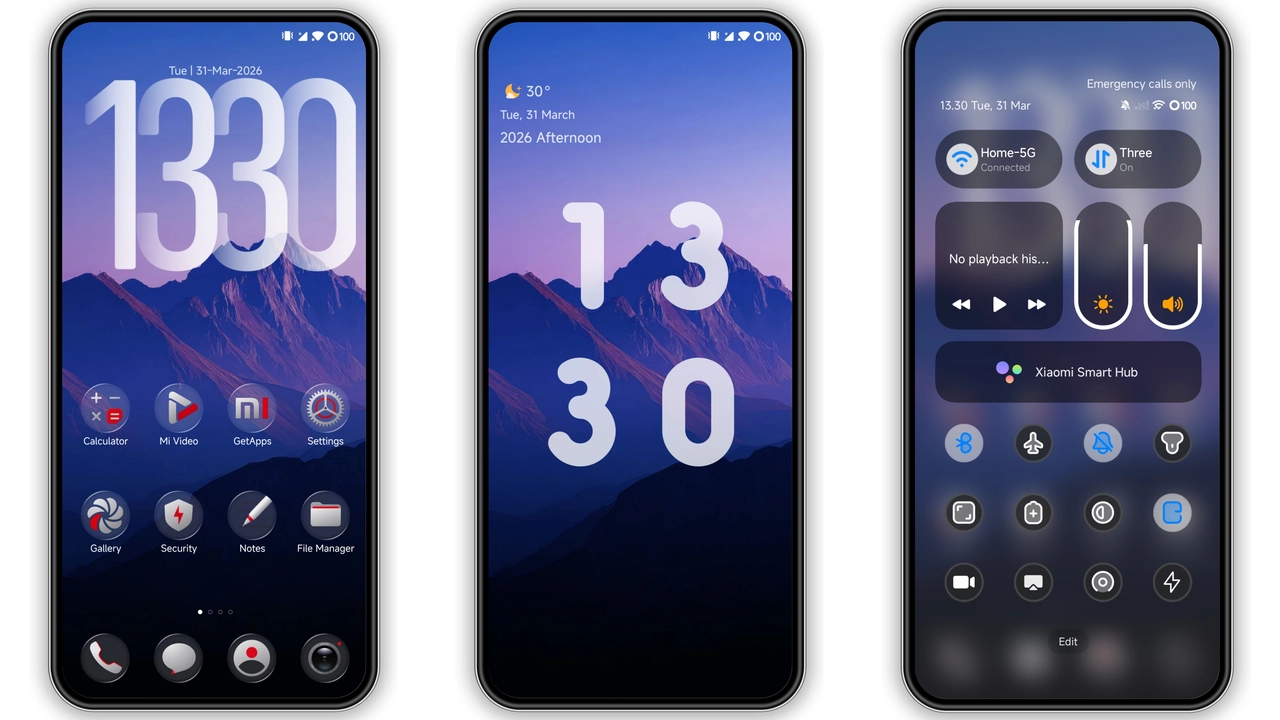
Theme Metadata
Parameter · Value
Designer · -
Size · 19 MB
Format · MTZ
Compatibility · HyperOS (with Minimal Black Icon Pack)
---
Monochrome Elegance: Pure Black‑White Contrast
Putih Hitam delivers a clean, high‑contrast visual language that strips away unnecessary flair. Backgrounds stay stark white, while system bars, widgets, and menus adopt a deep, matte black. The result feels both modern and timeless, reminiscent of classic minimalism but tuned for today’s OLED displays. Text remains crisp, icons gain weight, and overall readability improves, especially under bright sunlight.
Suggested Read: HyperOS MTZ Theme for Redmi Note – Bold Look, Quick Setup
Minimal Black Icon Pack: Seamless Integration
The theme pairs the base UI with a purpose‑built Minimal Black Icon Pack. Every app icon is re‑styled in a flat, silhouette form, eliminating glossy gradients. This unifies the look across the launcher, settings, and quick‑access panels. The icon set respects original shapes, ensuring recognizability while reinforcing the theme’s austere aesthetic. The pack also includes adaptive icons for newer apps, preserving the monochrome vibe.
Who’ll Love This Theme?
• Minimalist enthusiasts who crave a distraction‑free home screen.
• Dark‑mode fans seeking a true black backdrop without the typical purple tint.
• Power users who want clearer readability for long‑reading sessions.
• Design‑savvy owners of Xiaomi or Redmi devices running HyperOS, looking for a cohesive visual overhaul.
If you enjoy a stark, professional appearance—think business‑class UI rather than playful skins—this theme fits perfectly.
Installation Walkthrough
1. Download the MTZ file – Grab the 19 MB package from the provided link.
2. Open the Themes app – Launch the pre‑installed Themes application on your HyperOS device.
3. Import the file – Tap the three‑dot menu, select Import, locate the downloaded MTZ, and confirm.
4. Apply the theme – Once imported, tap Apply and watch the system transition.
5. Restart if needed – Occasionally, UI elements may overlap; a quick reboot resolves any glitches.
For custom ROM users, the steps mirror the above, but you’ll need to enable the Import option within the Themes app’s settings first.
Pros and Cons
• Pros
• Sharp black‑white contrast enhances readability.
• Minimal Black Icon Pack creates visual consistency.
• Lightweight (19 MB) ensures fast download and low storage impact.
• Fully compatible with HyperOS and MIUI‑style custom ROMs.
• Cons
• No color accents; users preferring vibrant palettes may find it too stark.
• Lacks animated wallpapers; static backgrounds only.
• Requires manual import for non‑official store installations.
---
Overall, Putih Hitam offers a refined, no‑frills aesthetic that elevates the HyperOS experience for users who value clarity over color. Its straightforward installation and tight integration with the Minimal Black Icon Pack make it a reliable choice for anyone looking to refresh their device without diving into complex tweaks.
Theme Preview
Download Links
Use the buttons below to open the theme file and the supporting link.
Download Putih Hitam MTZ File
Helpful links
More Theme Updates
For more curated HyperOS and MIUI theme updates, visit Hyper OS x MIUI .