Parameter · Value
Designer · oxfury 1
Size · 54.76 MB
Format · MTZ
Compatibility · HyperOS, HyperOS 2.0, Xiaomi/Redmi/POCO
Neon‑Blue 3D Lock Screen
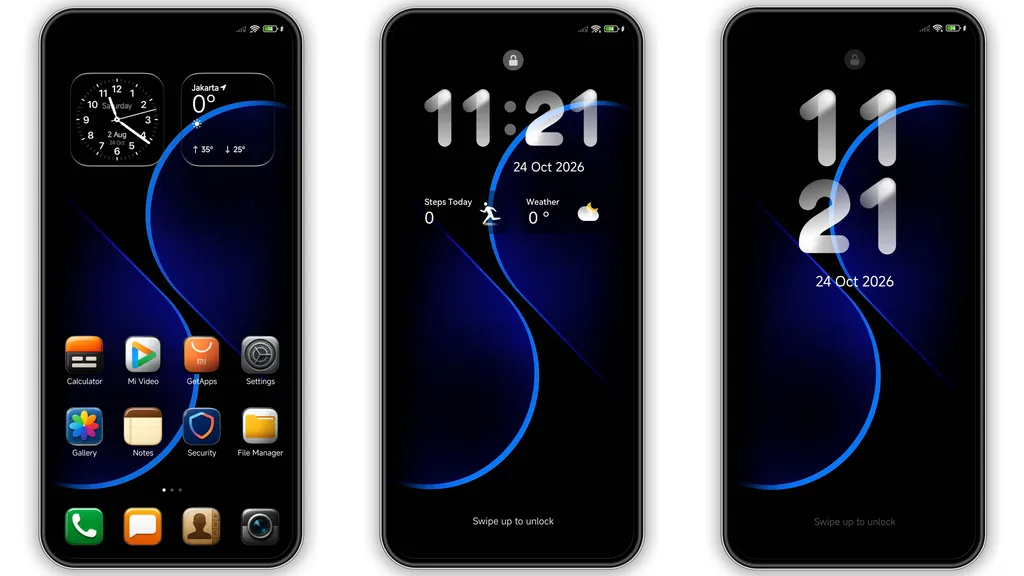
Lock screen → centerpiece. Neon‑blue gradient + subtle glow creates depth. Date widget flips into a 3D cube on tap → playful interaction. Swipe‑up animation slides along a faint circuit line, reinforcing cyber vibe. Font choice stays sleek sans‑serif, ensuring readability under low light. AOD mode inherits same hue, so the screen never looks dull, even when idle.
Suggested Read: How to Install Siuuu HyperOS Theme with Transparent Icons on Redmi Phones
Dynamic Icon Pack & AOD
Icon set → re‑styled to match neon palette. Rounded corners softened, shadows added → icons pop without clutter. Status bar icons adopt a thin outline style, conserving space. Battery indicator glows green when charging, amber when low – instant status cue. AOD mirrors lock screen animation, but with reduced brightness for battery safety. Widgets retain original functionality; only visual layer changes.
Who’ll Love This Cyber‑Sleek Look
Target audience → users craving bold, futuristic UI. Gamers, devs, and tech‑savvy fans appreciate the 3‑D lock effect and neon accents. Minimalists may find the glow excessive, but can tone down via system settings. Fans of MIUI’s classic look might need a short adjustment period, yet the theme’s consistency across apps eases transition. Overall, anyone wanting a noticeable departure from stock UI will feel at home.
Installation & Gotchas
Download → MTZ file (≈55 MB). Open Theme Store → Import → select file → Apply. First‑time install may trigger a brief UI flicker; normal after reboot. Ensure device runs HyperOS 2.0 or later; older builds may skip dynamic lock features. Permissions → allow storage access; otherwise import fails. If lock screen animation stalls, clear Theme Store cache → retry. No root required; works on stock ROMs.
Visual Cohesion Across System UI
Status bar → color syncs with lock screen gradient. Notification shade inherits subtle blue tint, preserving readability. Quick‑settings tiles adopt rounded corners matching icons, creating uniform aesthetic. Font scaling remains unchanged, so text stays crisp. System fonts untouched, preventing unexpected layout shifts. Overall, theme delivers end‑to‑end visual harmony without breaking core functionality.
Battery & Performance Impact
Neon effects → GPU‑light but optimized; negligible battery drain on modern chips. AOD brightness limited to 20 % by default → conserves power. Users reporting <2 % extra consumption after a day of normal use. No background services added; theme purely graphical. If device runs low‑end chipset, consider disabling 3‑D lock animation via theme settings to regain a few percent battery.
Customisation Options
Theme settings → toggle 3‑D lock on/off, adjust neon intensity, switch to dark mode variant (available in same package). Icon size slider → small, medium, large. AOD clock style selector → digital or analog. All tweaks apply instantly, no reboot needed. This flexibility lets users fine‑tune the look to personal taste while keeping core design intact.
Community Feedback & Support
Users on Telegram report smooth experience, praise the fresh look. Common question → “How to revert to stock?” Answer: Theme Store → My Themes → Reset to default. Developer provides quick replies; updates roll out quarterly. No adware, no hidden telemetry. Respectful community guidelines ensure theme remains free and unmodified.
Pros and Cons
• Pros
• Eye‑catching neon‑blue 3D lock screen
• Cohesive icon pack & AOD
• Low performance overhead
• Easy install via MTZ
• Customisable intensity & modes
• Cons
• Neon glow may be too bright for minimalists
• 3‑D lock unsupported on legacy HyperOS versions
• No built‑in dark‑mode icon variant (requires manual switch)
Final Verdict
OX F1 delivers a bold, futuristic makeover for Xiaomi, Redmi and POCO phones running HyperOS. Visual consistency, lightweight performance and straightforward installation make it a solid choice for users seeking a fresh UI without diving into custom ROMs. Adjust glow settings if needed, and enjoy a sleek, cyber‑inspired experience every day.
Theme Preview

Download Links
Use the buttons below to open the theme file and the supporting link.
OX F1 Theme mtz File
Helpful links
More Theme Updates
For more curated HyperOS and MIUI theme updates, visit Hyper OS x MIUI .