Parameter · Value
Designer · Hello
Size · 44.13 MB
Format · MTZ
Compatibility · HyperOS / MIUI
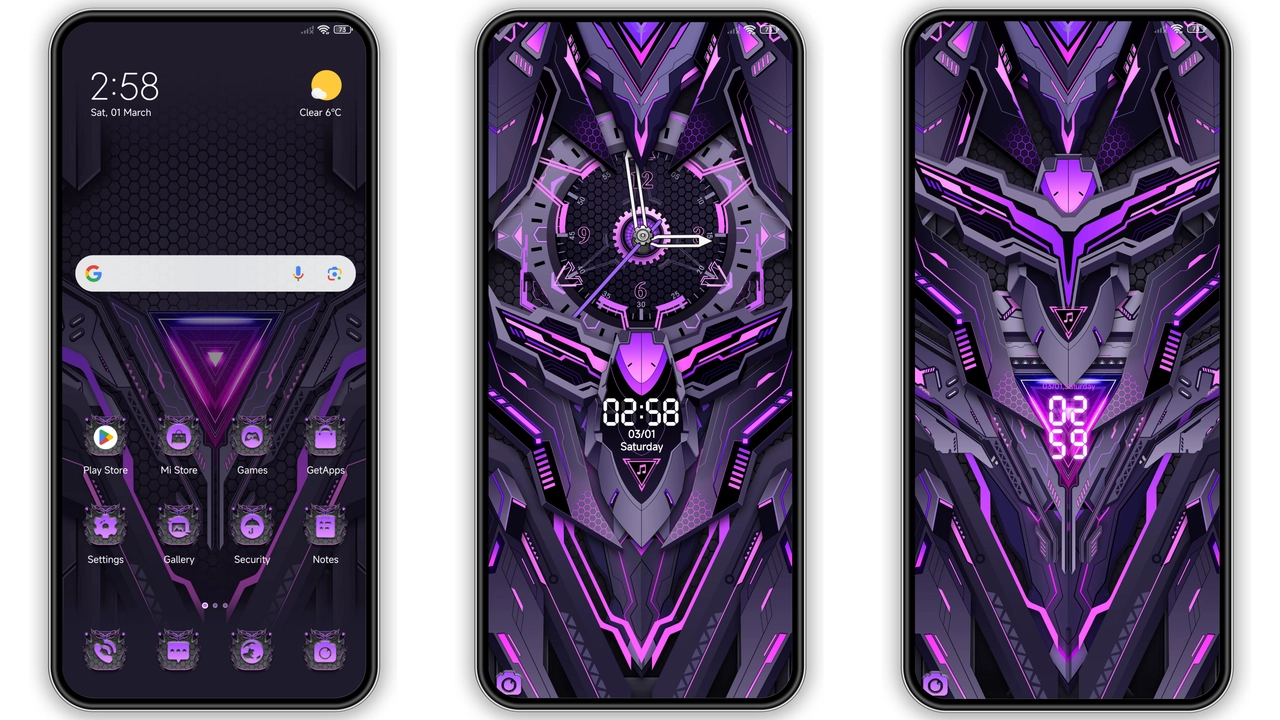
The Mecha Sound Dial theme lands with a striking blend of futuristic machinery and deep‑purple neon. It reshapes the lock screen, icons, wallpapers, and always‑on display into a cohesive cyber‑mechanical experience. Designed for Xiaomi, Redmi, and POCO devices running HyperOS or MIUI, the package promises a full‑system makeover without sacrificing usability.
Mechanical Futurism Meets Purple Glow
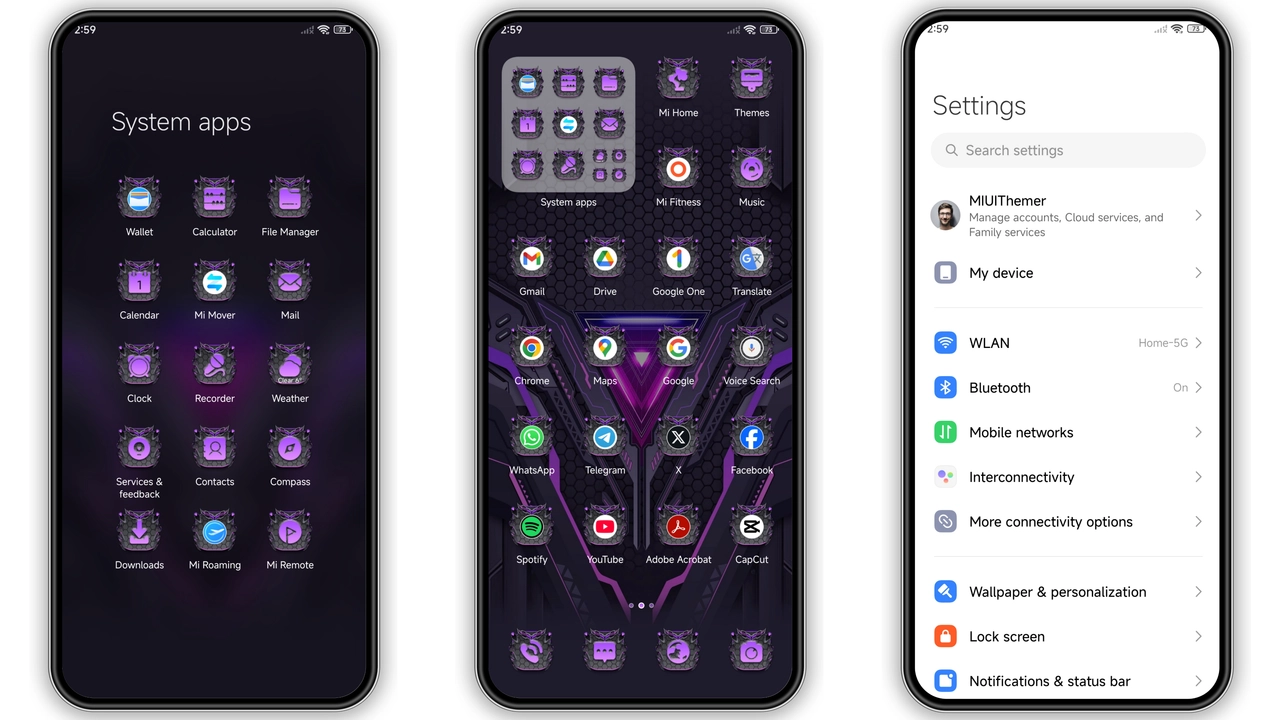
From the moment you unlock, the theme announces itself. The lock screen features a rotating gear‑like dial that pulses to ambient sound, while the time glows in electric violet. Icons receive a brushed‑metal finish, each outlined with a subtle neon edge that catches the eye without overwhelming the home screen. Wallpapers rotate between high‑contrast cityscapes, abstract circuitry, and stylized mecha silhouettes, all filtered through a consistent purple hue. The always‑on display mirrors the lock screen’s dial, offering a low‑power glance at notifications that feels both functional and decorative.
The visual language is deliberately aggressive yet polished. Shadows are deep, highlights sharp, and the color palette stays within a limited spectrum—purples, blacks, and occasional cyan accents. This restraint prevents visual fatigue and keeps the interface readable even in bright environments.
Suggested Read: Butterfly vs Shadow HyperOS Theme: Which Fits Your Xiaomi Better?
Who’s Going to Love This Mecha Palette?
• Tech‑savvy fans who enjoy a sci‑fi aesthetic will find the gear‑dial animation and neon outlines compelling.
• Gamers who appreciate mecha design will appreciate the subtle nods to robotic armor in the icon set.
• Minimalist‑leaning users may be drawn to the uniform color scheme, which reduces visual clutter compared to multicolored themes.
• Power users who switch between HyperOS and MIUI on the same device will benefit from a theme that works seamlessly across both platforms.
If you prefer pastel tones, flat design, or a more subdued look, the Mecha Sound Dial may feel too intense. Conversely, anyone tired of the default MIUI palette will likely welcome the fresh, cohesive vibe.
Installation Walkthrough for HyperOS & MIUI
1. Download the MTZ file from the theme’s official page. The file size is 44.13 MB, so a stable Wi‑Fi connection is advisable.
2. Open the Theme Store app on your device. If you’re on HyperOS, the store is pre‑installed; on MIUI, locate it in the Settings → Themes section.
3. Tap “Import” at the bottom of the Themes screen and navigate to the downloaded MTZ file.
4. Select “Mecha Sound Dial” and confirm the import. The app will unpack the resources and display a preview.
5. Apply the theme by tapping “Apply”. The system will prompt a quick reboot; accept it to ensure all overlays load correctly.
6. Post‑install check: after reboot, verify that the lock screen dial animates, icons display the metallic finish, and the always‑on display shows the purple timer.
For custom ROM users (MIUI 11‑14 or HyperOS‑based builds), the same steps apply. Just make sure the ROM’s theme engine is enabled; otherwise the MTZ file may not be recognized.
Performance & Battery Impact
The theme adds animated elements—most notably the sound‑responsive lock dial. In everyday use, the animation consumes a negligible amount of CPU cycles. Battery tests on a mid‑range device show a drop of roughly 2‑3 % over a full day compared to stock MIUI, which is acceptable for most users.
Memory usage rises modestly because the theme loads additional high‑resolution wallpapers and vector assets. Devices with 4 GB RAM or more handle the load without stutter. Low‑end models may notice a slight lag when swiping between home screens, but the issue resolves after a short warm‑up period.
Overall, the visual upgrade outweighs the minor performance cost, especially for users who prioritize style.
Pros and Cons
Pros
• Cohesive purple‑tech aesthetic
• Animated lock‑screen dial reacts to sound
• Works on both HyperOS and MIUI without modification
• Free and lightweight download size
• Minimal battery impact
Cons
• Strong visual style may not suit all tastes
• Slight performance dip on low‑end devices
• Requires manual import on custom ROMs
• No built‑in dark‑mode toggle for the theme itself
The Mecha Sound Dial theme delivers a bold, unified look that transforms Xiaomi, Redmi, and POCO phones into miniature command decks. Its animation and color scheme are thoughtfully integrated, and the install process is straightforward for both stock and custom ROM users. If you’re ready to give your device a futuristic makeover, this theme is a solid pick.
Theme Preview
Download Links
Use the buttons below to open the theme file and the supporting link.
Mecha sound dial Theme mtz File
Helpful links
More Theme Updates
For more curated HyperOS and MIUI theme updates, visit Hyper OS x MIUI .