Ever feel like your phone's interface is just... there? Like it's doing its job, but not really reflecting your style? That's where a fantastic theme like Luxury VK for HyperOS and MIUI comes in. It's not just a coat of paint; it's a complete mood shift for your Xiaomi, Redmi, or POCO device, promising to inject a dose of modern flair and dynamic interaction right into your daily digital life. If you're tired of the same old stock look and crave something that truly stands out, Luxury VK might just be the fresh breath of air your smartphone needs.
Parameter · Value
Designer · Luxury VK
Size · 27.03 MB
Format · MTZ
Compatibility · HyperOS / MIUI
Dive Into Dynamic Blue: Lock Screen & Wallpapers
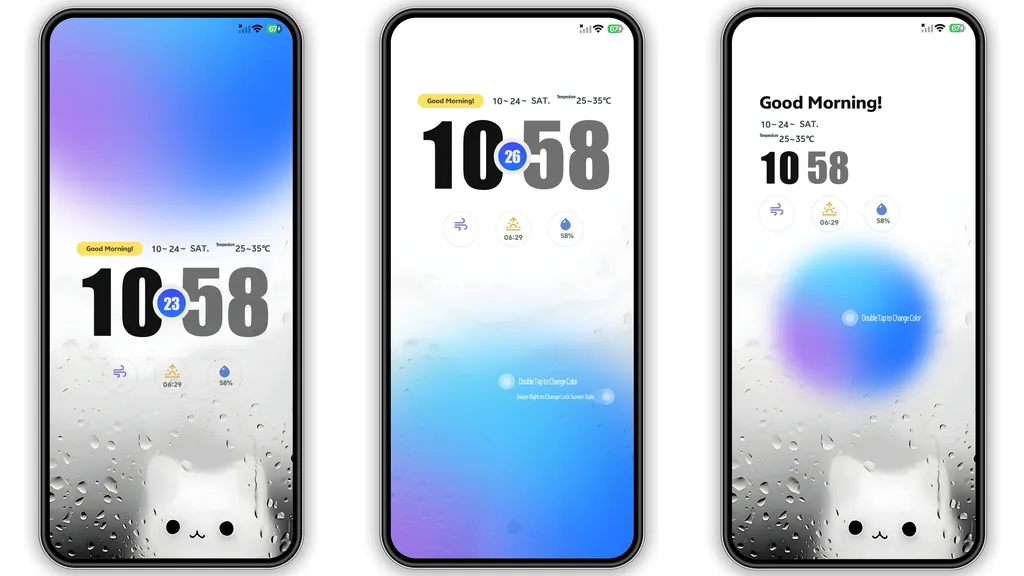
The first thing that grabs your attention with Luxury VK is its incredibly vibrant and interactive lock screen. We're talking about a dynamic display bathed in a captivating blue, offering more than just a static image. Imagine double-tapping to instantly cycle through different color palettes, giving you a quick visual refresh whenever the mood strikes. And it doesn't stop there; a simple swipe allows you to switch between entirely different lock screen styles, keeping things fresh and engaging. This level of customization right on the lock screen is a game-changer, making every unlock feel unique and personal.
Beyond the dynamic elements, the theme features a truly charming rainy glass wallpaper, complete with a cute cat observing the world from behind the misty pane. It's a subtle touch of warmth and personality amidst the modern aesthetics, providing a delightful contrast. The overall visual language is bold and contemporary, ensuring your device doesn't just function, but also makes a statement. From the moment you wake your phone, Luxury VK sets a distinctive tone that carries through the entire interface.
Suggested Read: Sleek Dark Cat Theme khusus Redmi Note & Poco: A Fresh Look for HyperOS
Neon Glow & Frosted Elegance: Icons & Control Center
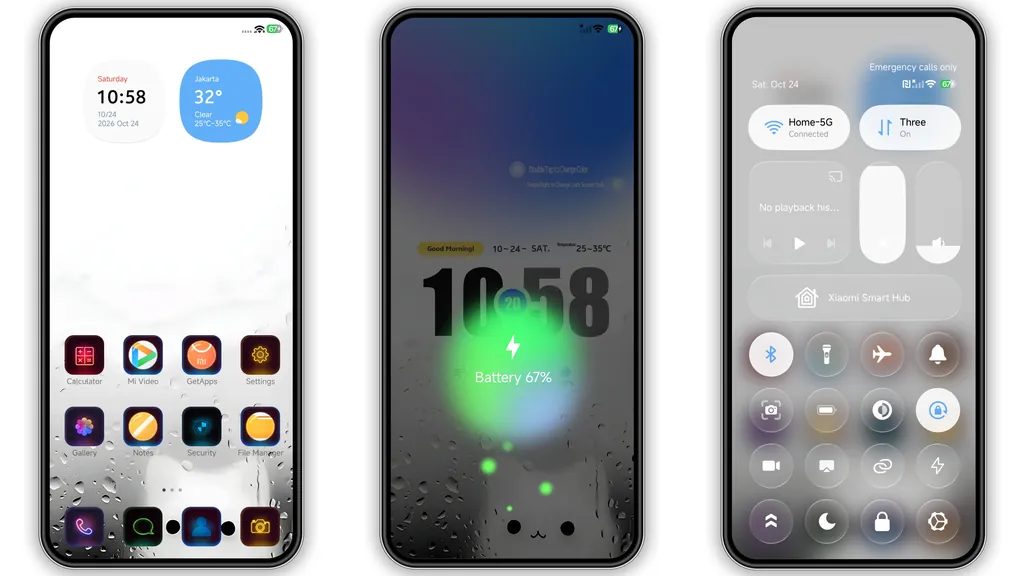
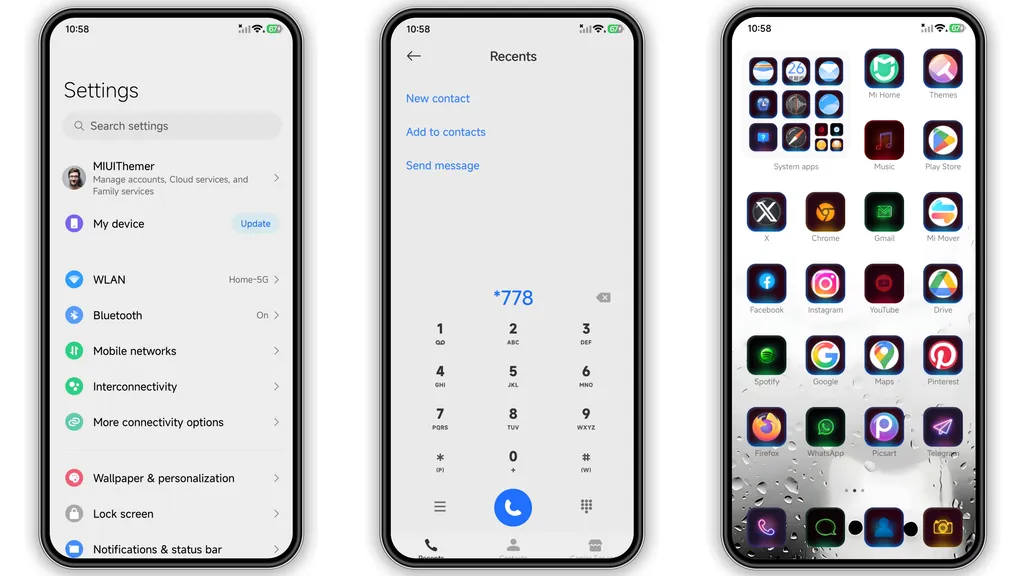
Moving past the lock screen, Luxury VK continues to impress with its cohesive design language. The icons, for instance, are a standout feature. They boast a striking neon outline style that pops against darker backgrounds, giving your app drawer and home screen a futuristic, energetic feel. Each icon is meticulously designed, ensuring that even familiar apps take on a new, stylish persona without losing their recognizability. This isn't just a generic icon pack; it's a thoughtful reinterpretation that elevates the entire user experience.
Complementing the neon icons are the soft home widgets, which seamlessly integrate with the overall aesthetic. These widgets are designed to be functional yet visually appealing, providing quick access to information without cluttering your screen. And then there's the control center – transformed with a sophisticated frosted glass effect. This gives your quick toggles and sliders a premium, translucent look that's both modern and elegant. It's these consistent design choices, from the smallest icon to the overarching control panel, that make Luxury VK feel like a truly premium and well-thought-out theme.
Making it Yours: Applying the Luxury VK Theme
Getting Luxury VK onto your Xiaomi, Redmi, or POCO device is a straightforward process, though it varies slightly depending on whether you're running a stock Global Stable ROM or a custom ROM. Regardless, the theme is completely free to use, making it an accessible upgrade for anyone looking to personalize their phone.
For those on HyperOS or MIUI Global Stable ROMs, the primary method involves using the official Theme Store. You'll typically find a link that directs you to the theme within the store. Sometimes, this link might open a page in a foreign language (often Chinese). Don't fret! Look for an option, usually three dots in the corner, and select "Open in app." This will launch the theme directly within your device's Theme Store application, where you can easily download and apply it. A quick tip: some users find that using browsers like Chrome or the default Xiaomi browser works best for these links, as other browsers occasionally run into compatibility hiccups. Once downloaded, simply hit "Apply," and your phone will transform.
If you're rocking a custom ROM like Xiaomi EU ROM, MIUIRoom, or other MIUI/HyperOS-based custom firmware, you'll likely be working with the .mtz theme file directly. First, download the Luxury VK .mtz file. Then, open your device's Theme Store app, navigate to the "Themes" option, and scroll down until you find the "Import" button. Tap this, select the .mtz file you just downloaded, and once it's imported, you can apply it just like any other theme. It's always a good practice, regardless of your ROM, to restart your device after applying a new theme. This helps ensure all elements load correctly and prevents any visual overlaps or glitches, giving you the full, unblemished Luxury VK experience.
Is Luxury VK Your Next Theme? Weighing the Pros and Cons
Luxury VK offers a compelling package for anyone looking to refresh their phone's interface. Its blend of dynamic elements, striking iconography, and elegant transparency creates a cohesive and modern look. However, like any theme, it comes with its own set of considerations.
Pros:
• Highly Dynamic Lock Screen: Offers interactive color changes and style switching, keeping your phone's front fresh.
• Unique Aesthetic: The combination of neon outline icons, frosted control center, and rainy glass cat wallpaper creates a distinct and memorable visual identity.
• Modern & Bold: Delivers a contemporary and stylish look that stands out from typical stock interfaces.
• Comprehensive Theming: Goes beyond just wallpapers and icons, touching the status bar, Always-on Display, and widgets for a complete overhaul.
• Free to Use: Offers premium features and design without any cost.
• Broad Compatibility: Works across various Xiaomi, Redmi, and POCO devices running HyperOS and MIUI.
Cons:
• Specific Style: The bold blue and neon aesthetic might not appeal to everyone, especially those preferring a more subtle or natural look.
• Learning Curve for Lock Screen: While dynamic, some users might need a moment to discover the double-tap and swipe gestures for the lock screen customizations.
• MTZ Installation for Custom ROMs: While simple, it requires a few extra steps compared to direct Theme Store downloads for stock ROMs.
• Potential for Browser Issues: The official Theme Store link can sometimes be finicky with certain web browsers, requiring a specific browser for seamless access.
In conclusion, Luxury VK is a fantastic option if you're drawn to its vibrant, dynamic, and modern aesthetic. It's a theme that truly personalizes your device, making every interaction a little more exciting. Whether you're a long-time theme enthusiast or just starting to explore customization, Luxury VK offers a robust and visually engaging experience that's definitely worth a try.
Theme Preview
Download Links
Use the buttons below to open the theme file and the supporting link.
Luxury VK Theme mtz File
Helpful links
More Theme Updates
For more curated HyperOS and MIUI theme updates, visit Hyper OS x MIUI .


