Parameter · Value
Designer · agit77
Size · 42.44 MB
Format · MTZ
Compatibility · HyperOS / MIUI
Midnight‑Tinted Icons Redefine the Grid
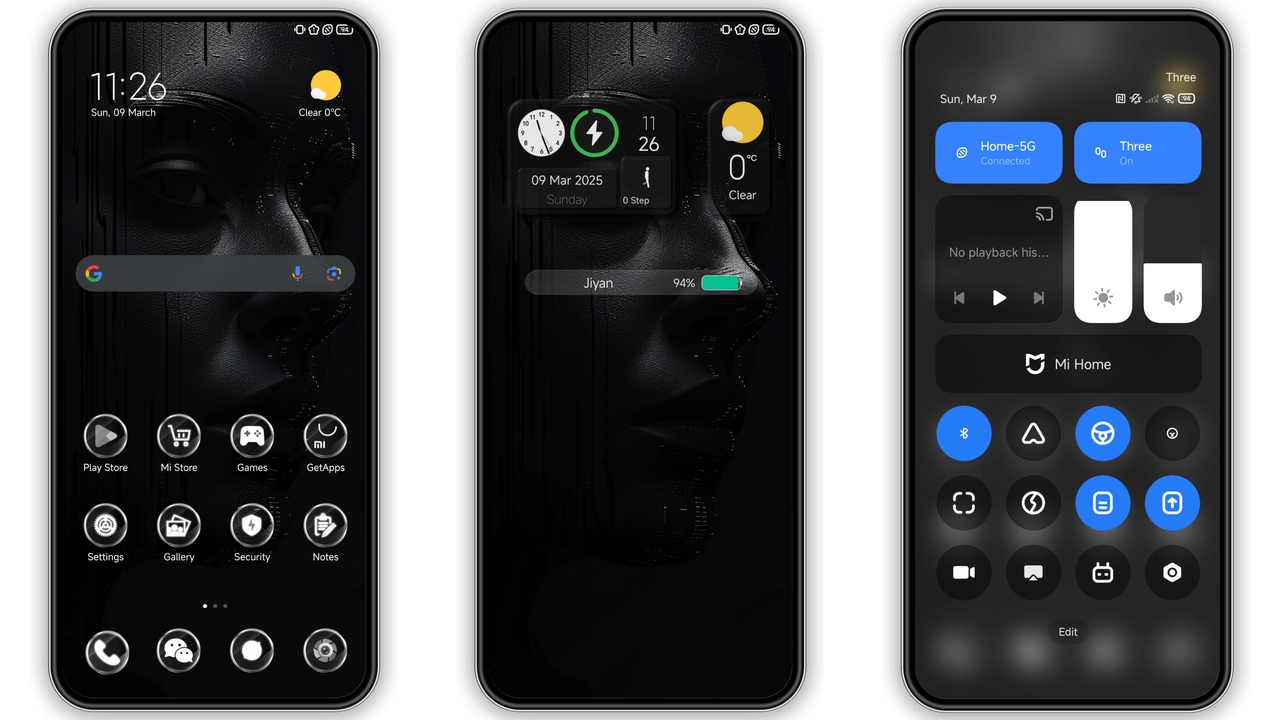
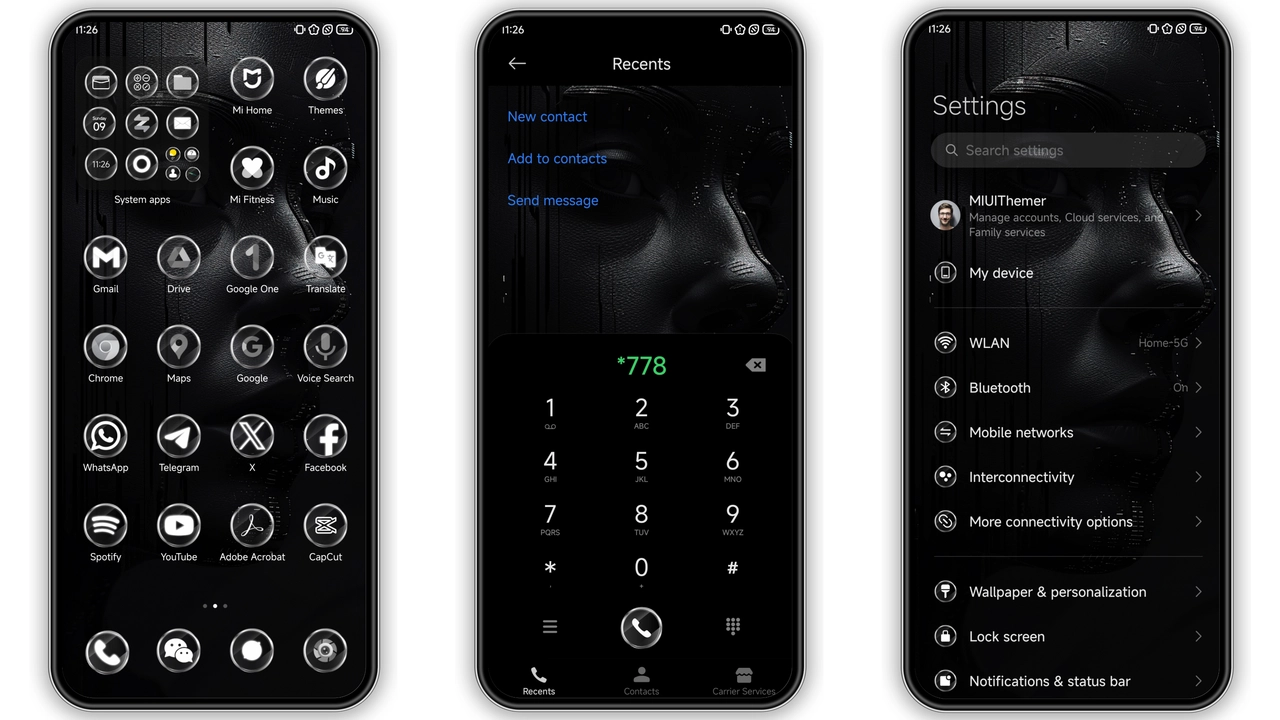
Jiyan BlackV2 arrives as a bold statement for HyperOS devices. Its palette leans fully into black, punctuated by subtle neon accents. The icon set reinterprets classic Xiaomi symbols in matte black. Corners are softened, giving a tactile feel. Contrast remains high, ensuring readability on dark backgrounds. Notification dots retain their vivid hue, standing out without clashing. App folders inherit the same silhouette, creating a uniform grid.
Suggested Read: Macaron Style Kit – Fresh Look for Redmi Note & Poco Series
Dynamic Lock Screen That Reacts to Touch
The lock screen receives a dynamic overlay. Swiping up triggers a smooth fade, revealing the time in thin white type. Background wallpaper shifts subtly with ambient light, adding depth. Unlock animation respects the dark aesthetic, avoiding bright flashes. The lock screen widgets adopt the same black frame, preserving consistency. Ripple effects appear in muted cyan, echoing the accent used elsewhere. This subtlety prevents visual noise while still providing tactile confirmation.
Always‑On Display That Stays Subtle Yet Visible
Always‑On Display adopts a minimalist layout. Time appears in large, centered digits, surrounded by thin line accents. Battery indicator glows in soft amber, matching the theme’s accent color. The AOD remains legible under sunlight thanks to high contrast. Users can toggle AOD visibility in settings without breaking the theme.
Installation, Compatibility & Who’s It For
The theme declares support for HyperOS and MIUI. It works on devices that run the global stable ROM. Custom ROM users can also apply the MTZ file via the Theme Store import function. After installation, a quick device restart clears any residual caches. This step ensures that shadows and overlays render correctly. The MTZ file is 42.44 MB, modest for a full system theme. Download speed depends on network, but most users complete it within minutes. No additional zip extraction is needed; the Theme Store handles unpacking.
Open the Theme Store app, navigate to “My Themes,” tap the import icon, and select the downloaded MTZ. Confirm the prompt, then apply the theme. The system will ask to restart; comply to finalize changes. If the official store link fails, use a browser that supports direct file download, then repeat the import.
Who will appreciate Jiyan BlackV2? Dark‑mode enthusiasts who crave a fully black experience. Users who prefer a uniform look across system UI and third‑party apps. Fans of minimalist design who avoid cluttered iconography. Those who enjoy subtle motion in lock screen and AOD. Conversely, users who need high‑visibility icons for accessibility may find the deep black challenging.
Potential pitfalls: older MIUI versions may ignore some dynamic lock screen features. In such cases, the lock screen falls back to a static image. Battery consumption remains normal; the dark palette actually reduces AMOLED power draw.
Pros
• Cohesive black aesthetic across UI
• High‑contrast icons improve readability
• Dynamic lock screen adds subtle flair
• Minimalist AOD stays legible in bright light
• Compatible with HyperOS, MIUI, and many custom ROMs
• Small file size for a full‑system theme
Cons
• Deep black may hinder visibility for low‑vision users
• Limited accent colors restrict personalization
• Some dynamic elements require newer OS builds
• No light‑mode variant included
Theme Preview
Download Links
Use the buttons below to open the theme file and the supporting link.
Jiyan BlackV2 Theme mtz File
Helpful links
More Theme Updates
For more curated HyperOS and MIUI theme updates, visit Hyper OS x MIUI .