
Theme details
- Designer
- Tk Tofik
- Size
- 20.72 MB
- Compatibility
- HyperOS
- Region
- Global
- Style
- UI, Dark, Dynamic lock screen, New icons
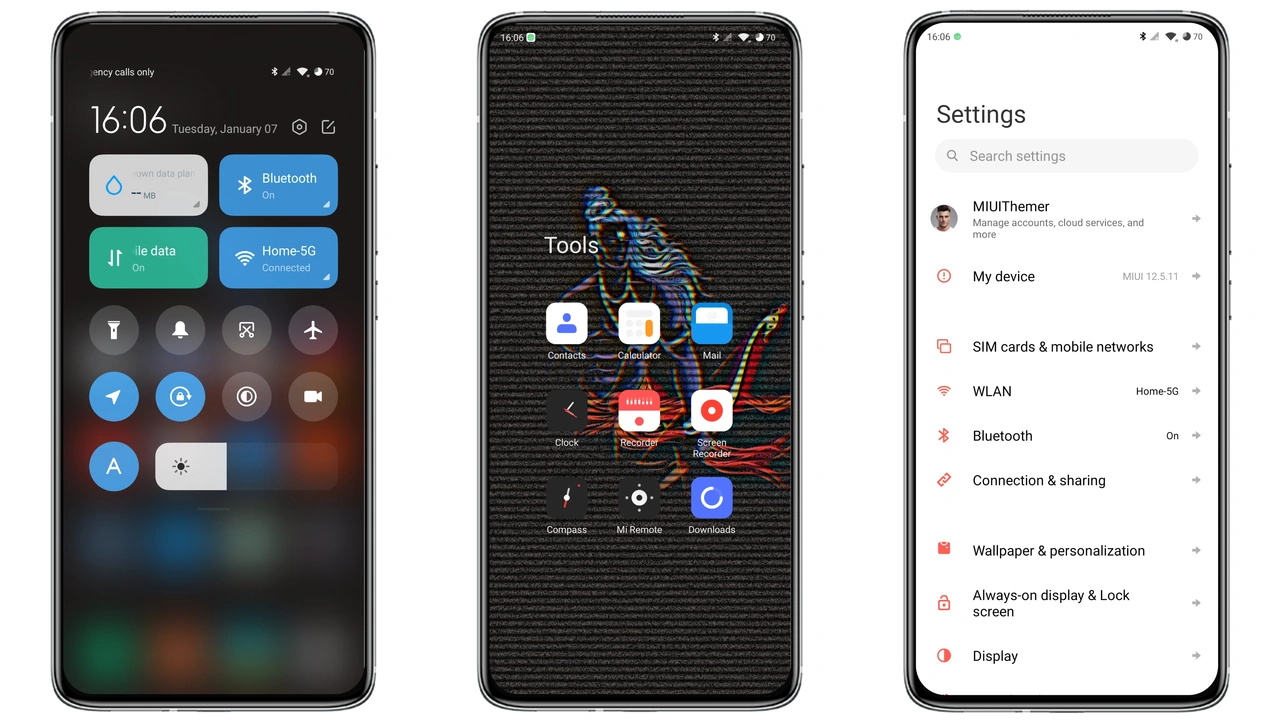
Inspire Icon is one of those HyperOS themes that does not shout. It swaps the stock look for a cleaner icon set, a lockscreen that shifts with the clock, and a dark palette that holds together across the whole system. It is free, it is built for HyperOS, and it covers the parts of the phone you actually stare at every day.
The Icon Pack Does Most of the Work
Icons are where most themes fall apart. A wallpaper can be gorgeous and the whole thing still feels cheap if the app grid looks like a patchwork. Inspire Icon avoids that by shipping a full replacement icon pack rather than a partial skin.
The shapes are consistent, the spacing is even, and the set reads as one family instead of a collection of borrowed logos. That matters more on HyperOS than people give it credit for, because the launcher draws icons at a size where mismatched corner radii are instantly visible. Here the grid stays calm and uniform.
If you have ever applied a theme, loved the lockscreen, then quietly switched back to stock icons because the app drawer looked messy, this is the part that will keep you on Inspire Icon.
Suggested Read: HyperBlack Review: Best Minimalist Dark Setup for HyperOS
Dynamic Lockscreen, Clock Styles, and Always-On Display
The lockscreen is the showpiece. Inspire Icon includes a dynamic lockscreen with multiple clock styles, so the time presentation can change rather than sitting in one fixed layout forever. The theme also carries a styled Always-On Display, which keeps the same visual language alive when the screen dims.
That combination is what makes a theme feel finished. A lockscreen that looks great but hands off to a plain AOD feels like two different phones. Inspire Icon keeps the typography and spacing consistent between the two, so the transition from locked to glanceable stays smooth.
Worth noting: dynamic elements are the first thing to check after applying. Give the lockscreen a minute, lock and unlock a couple of times, and confirm the clock style you want is the one sticking.
Control Center and Status Bar Rework
The changelog lists a new dynamic control center design, and it is the second thing people notice after the icons. Pulling down the shade gives you restyled toggles that match the rest of the theme instead of the default HyperOS tiles.
The status bar gets the same treatment. Small changes here — icon weight, spacing, the way indicators sit against the background — add up quickly, because the status bar is on screen almost constantly. Inspire Icon tightens it without making anything harder to read, which is the right trade.
Dark Wallpapers and a Cohesive Dark UI
Inspire Icon is tagged as a dark theme, and it commits to that. The package includes dynamic dark wallpapers that shift the mood of the home screen without breaking the icon contrast. The UI itself is customized to match, so settings panels, system surfaces, and the launcher all sit in the same tonal range.
This is the theme's strongest argument for anyone who uses their phone at night. A genuinely dark setup reduces the glare of a bright home screen, and because the wallpapers are part of the package, you are not hunting for a background that happens to fit.
The theme description also notes lower memory utilization as part of the update. Treat that as the designer's claim rather than a measured benchmark — it is a reasonable expectation for a lightweight theme package, not something to plan your storage around.
Who Will Like Inspire Icon
- Minimalist users. Consistent icons, restrained colors, no visual noise.
- Dark mode regulars. Wallpapers, UI, and status bar all lean dark together.
- Lockscreen tinkerers. Multiple clock styles and a styled AOD to match.
- Anyone bored of stock. A full visual pass without changing launcher or ROM.
It is less suited to people who want loud, maximalist theming with heavy illustration. Inspire Icon is quiet by design.
Compatibility and Install Expectations
Inspire Icon is built for HyperOS and is listed for Xiaomi, Redmi, and POCO devices running it. The theme's own description also references MIUI, but the compatibility line in the theme details points to HyperOS — so if you are on an older MIUI build, do not assume a clean result.
On stock HyperOS or MIUI Global Stable ROMs, the usual route is the official Theme Store listing. Open the page in Firefox, use the three-dot menu, choose Open in app, and let the Themes Store handle the download and apply. If that link misbehaves, try Chrome or the default Xiaomi browser — other browsers often fail on the handoff.
On custom ROMs such as Xiaomi EU or MIUI-based builds, the MTZ file is the way in. Open the Themes app, go to Themes, scroll to the bottom, tap Import, select the downloaded MTZ, and apply.
One habit worth keeping: restart the phone after applying. Overlapping or invisible elements after a theme change are almost always a stale cache, and a reboot clears it.
Pros and Cons
Pros
- Complete icon pack with consistent shapes
- Dynamic lockscreen with multiple clock styles
- Styled Always-On Display that matches the lockscreen
- Redesigned control center and status bar
- Dynamic dark wallpapers included
- Small download, free to use
Cons
- HyperOS-focused; older MIUI builds are not guaranteed
- Dark-only direction, no light variant
- Dynamic elements need a post-install check
- Stock ROM users depend on the Theme Store handoff working
Final Take
Inspire Icon is a well-rounded HyperOS theme rather than a one-trick wallpaper pack. The icon set, the dynamic lockscreen, the control center, and the dark wallpapers all pull in the same direction, and that coherence is what separates a theme you try for an hour from one you keep installed. If your phone currently looks like every other Xiaomi on the shelf, this is a low-effort way to change that.
Download Links
Use the buttons below to open the theme file and the supporting link.
Inspire Icon Theme mtz File
Helpful links
More Theme Updates
For more curated HyperOS and MIUI theme updates, visit Hyper OS x MIUI .


