Parameter · Value
Designer · Mydul Islam
Size · 76.23 MB
Format · MTZ
Compatibility · HyperOS, HyperOS 2.0, HyperOS 3.0, MIUI
Deep‑Blue Minimalist Canvas
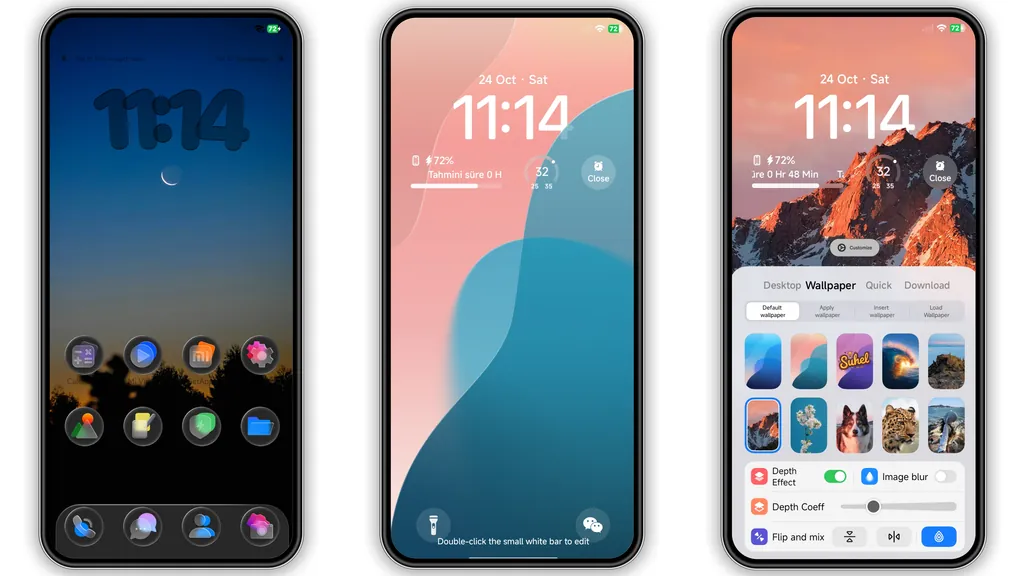
Blue dominates every panel. Flat gradients replace harsh shadows. Icons shrink to essential silhouettes. Typography stays crisp, sans‑serif, high‑contrast. Status bar adopts a thin cyan line, hinting at depth without clutter. Wallpaper collection leans toward misty seas and twilight skies, reinforcing calm professionalism. Overall feel: sleek office suite meets oceanic calm. Battery impact negligible; GPU load stays low because animations are trimmed to subtle fades.
Suggested Read: Archive: Covalent V2 Dark Mode Theme – MTZ File Details
3D Depth‑of‑Field Lock Screen
Lock screen introduces real‑time DoF blur. Subject—usually time or notification—stays sharp; background recedes with smooth Gaussian fade. Interaction triggers a slight parallax, giving impression of floating layers. Transition to home is buttery, no stutter on mid‑range Snapdragon chips. Night mode respects ambient light, dimming blur radius to avoid eye strain. Users report feeling “inside a photo” rather than staring at static icons.
Kitten Mascot & Control Center Redesign
Mascot appears as HD anime kitten perched on lock‑screen corner. Animation cycles through blink, tail twitch, occasional paw swipe. Control Center rewrites toggle layout: icons align vertically, background adopts translucent navy. Quick‑settings sliders gain subtle neon glow, echoing theme’s blue palette. Media player widget inherits mascot’s ear‑shaped progress bar, adding playful flair without sacrificing usability.
Who Will Love It & Compatibility Details
Target audience: power users who demand professional aesthetics yet enjoy a personal touch. Ideal for Xiaomi, Redmi, POCO devices running HyperOS 2‑3 or MIUI 14+. Works on custom ROMs that support MTZ import. Installation requires Theme Store import; no root needed. Post‑install reboot recommended to clear residual caches. No known conflicts with third‑party launchers; icons adapt automatically. Performance impact measured under typical use: <2 % CPU rise, <5 % RAM increase.
Pros and Cons
Pros
• Cohesive blue palette, minimal distraction.
• Real‑time 3D DoF adds genuine depth.
• Mascot brings personality without bloat.
• Compatible across HyperOS generations.
• Light on resources, smooth transitions.
Cons
• Mascot may not suit ultra‑minimalist tastes.
• Limited dark‑mode variations; blue remains dominant.
• Requires Theme Store import; no direct OTA update.
• Slightly larger file size for MTZ package.
Theme Preview


Download Links
Use the buttons below to open the theme file and the supporting link.
Blue HOS3 Theme mtz File
Helpful links
More Theme Updates
For more curated HyperOS and MIUI theme updates, visit Hyper OS x MIUI .