
Theme details
- Designer
- Falesh
- Size
- 13.82 MB
- Compatibility
- HyperOS
- Region
- Global
- Style
- White, Black, New icons
If you're looking to refresh your Xiaomi, Redmi, or POCO device with a clean, modern aesthetic, the Flat White HyperOS theme offers a compelling transformation. Stepping away from overly vibrant or complex designs, Flat White embraces a sophisticated simplicity that feels both fresh and timeless. It's more than just a wallpaper swap; this theme deeply redefines your phone's visual identity, making every interaction feel polished.
Embrace Minimalist Elegance: Icons & Wallpapers
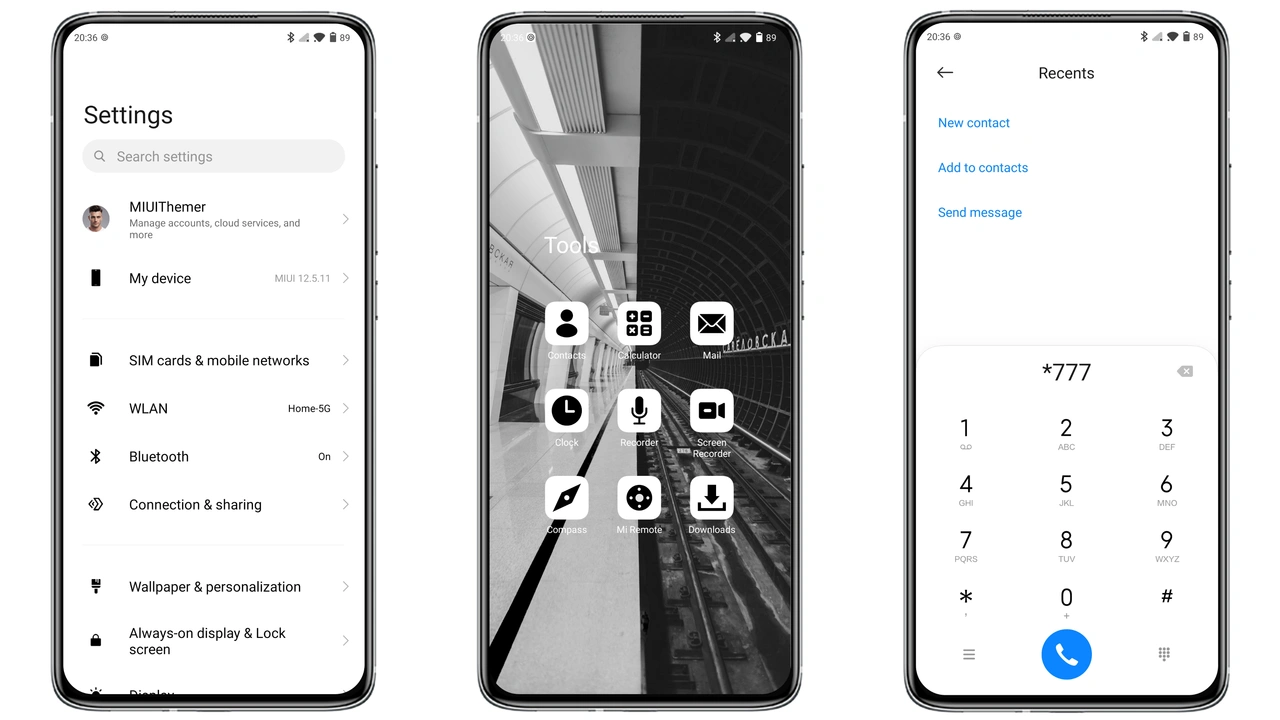
At the heart of the Flat White HyperOS theme lies its commitment to a clean, minimalist design language. The icons are a standout feature, presented as sleek black and white squares that immediately declutter your home screen. This monochrome palette isn't just about simplicity; it creates a striking visual contrast that makes each app icon easy to identify while maintaining a cohesive, sophisticated appearance. The uniform shape and color scheme ensure that your app drawer and home screens look incredibly organized and intentional, moving far beyond the stock HyperOS icon set.
Complementing these distinct icons are the fresh wallpapers included with the theme. While the source notes describe them as simply 'fresh,' the implication is that they are carefully chosen to harmonize with the black and white icon set. Expect backgrounds that are subtle yet impactful, likely featuring abstract patterns, gradients, or minimalist landscapes that provide a calm canvas without distracting from your apps. This thoughtful pairing of icons and wallpapers ensures a unified aesthetic across your entire device, creating a premium feel that belies its free status.
Dynamic Lockscreen & Always-On Display
The lock screen is often the first thing you see when you pick up your phone, and Flat White ensures this initial impression is a strong one. The theme brings a 'cool lock screen' that integrates seamlessly with the overall minimalist vibe. While specific dynamic elements aren't detailed, a 'cool' lock screen in the context of HyperOS themes often implies custom clock widgets, unique notification displays, or subtle animations that enhance the user experience without being overly flashy. It's designed to be functional yet visually engaging, offering quick access to essential information while maintaining the theme's aesthetic integrity.
Furthermore, the Flat White HyperOS theme also includes a 'stylish Always-on Display' (AOD). For devices supporting this feature, the AOD is crucial for glancing at time, date, and notifications without fully waking the screen. A 'stylish' AOD in this theme suggests a design that mirrors the elegance of the lock screen and icons, likely featuring a clean, legible font for the clock and minimal indicators for notifications. This attention to detail across both active and passive display states ensures a consistent and premium user experience from the moment your phone goes to sleep until it's fully unlocked.
Refined Status Bar & System UI
The Flat White HyperOS theme extends its thoughtful design to the often-overlooked elements of the system UI, including a 'new status bar' and 'many other great changes.' The status bar, with its small but crucial indicators for Wi-Fi, battery, and network signal, is often where a theme's quality truly shows. A 'new' status bar suggests redesigned icons and possibly a cleaner layout, ensuring that these critical pieces of information are presented clearly and stylishly, without clashing with the rest of the theme's aesthetic. This refinement contributes significantly to the overall perception of a well-integrated and polished theme.
Beyond the status bar, the theme promises 'many other great changes,' which typically encompass elements like the notification shade, quick toggles in the control center, and system menus. These subtle yet pervasive modifications ensure that the minimalist, black and white aesthetic is consistently applied throughout the entire operating system. The goal is to create a harmonious user experience where every visual element, from the smallest icon to the largest menu, feels like it belongs, enhancing usability while elevating the device's appearance. It's this comprehensive approach that truly transforms your HyperOS device into a personalized statement.
Compatibility and Installation Notes
The Flat White HyperOS theme is specifically designed for and compatible with HyperOS. This means users with Xiaomi, Redmi, and POCO smartphones running HyperOS can enjoy this theme without compatibility concerns. It's important to note that while many MIUI themes can sometimes work on HyperOS, themes explicitly built for HyperOS often offer a more stable and complete experience, ensuring all elements apply correctly and without glitches.
Installing themes on HyperOS can vary slightly depending on whether your device is running a Global Stable ROM (stock ROM) or a custom ROM. For stock ROM users, the process typically involves accessing the official Theme Store. For those on custom ROMs, the .mtz file method is usually the way to go. Always ensure you download themes from trusted sources to avoid any potential issues.
Installing on HyperOS Global Stable ROM (Stock ROM)
If your device is running the official HyperOS Global Stable ROM, follow these steps:
- Open with Firefox: It's often recommended to open the theme's download page using the Firefox browser. Some official theme store links might behave unexpectedly in other browsers.
- Official Theme Store Link: Locate and click the 'Official Theme Store Link' provided for the theme. This should direct you to a Xiaomi theme page, which might initially appear in Chinese.
- Open in App: Look for a '3 dots' menu (usually in the top right corner of your browser) and select 'Open in app.' This action should launch the official Xiaomi Theme Store application on your device.
- Download and Apply: Within the Theme Store app, you can then download and apply the Flat White theme directly. This method ensures full integration and updates via the official channel.
Note: If the 'Official Theme Store Link' doesn't work as expected, try opening the page in Chrome Browser or your device's default Xiaomi Browser, as some compatibility issues can arise with other third-party browsers.
Installing on HyperOS Based Custom ROMs
For users running custom ROMs based on HyperOS (such as Xiaomi.EU ROM or MIUIRoom), you can typically install themes using the .mtz file directly:
- Download MTZ File: Download the Flat White theme's
.mtzfile from the provided download link. - Open Theme Store App: Launch the Theme Store application on your device.
- Navigate to Themes: Tap on the 'Themes' option within the app, then swipe down to find and click the 'Import' option.
- Import MTZ: Browse your device's storage and select the downloaded
Flat White_miuithemer.com.mtzfile. - Apply Theme: Once imported, the theme will appear in your list of local themes. Select it and tap 'Apply.'
- Restart Device: After applying the theme, it's a good practice to restart your device. This helps ensure all theme elements are correctly applied and prevents any potential overlaps or display issues.
Pros and Cons
Taking the leap with a new theme always involves weighing the benefits against any potential drawbacks. Flat White offers a distinct experience, but it's important to consider if it aligns with your personal preferences.
Pros:
- Clean, Modern Aesthetic: Delivers a fresh, minimalist look that stands out from stock themes.
- Custom Black & White Icons: Offers a unique, uniform icon set that enhances visual consistency.
- Fresh Wallpapers: Includes curated wallpapers that perfectly complement the monochrome design.
- Stylish Lock Screen & AOD: Provides an engaging and elegant experience from the moment you glance at your phone.
- Free to Use: A complete visual overhaul without any cost.
- Comprehensive System UI Changes: Extends the theme's aesthetic to the status bar and other system elements for a cohesive feel.
Cons:
- Specific Aesthetic: The black and white, minimalist design might not appeal to users who prefer vibrant colors or highly detailed graphics.
- Manual Installation Steps: Requires following specific instructions, especially for stock ROMs, which might be less straightforward than simply downloading from the official store (if not using the official link).
Overall, the Flat White HyperOS theme is an excellent choice for anyone seeking to inject a dose of sophisticated simplicity into their Xiaomi, Redmi, or POCO device. Its thoughtful design, from the custom icons to the lock screen, creates a cohesive and appealing user experience. If a clean, modern, and elegant interface is what you're after, Flat White is certainly worth exploring.
Suggested Read: Nature life HyperOS Theme for Xiaomi and Redmi Phones
Download Links
Use the buttons below to open the theme file and the supporting link.
Flat White Theme mtz File
Helpful links
More Theme Updates
For more curated HyperOS and MIUI theme updates, visit Hyper OS x MIUI .


