
Theme details
- Designer
- Saktie
- Size
- 16.64 MB
- Compatibility
- HyperOS / MIUI
Dive into the captivating world of HyperBlue, a HyperOS theme meticulously crafted to infuse your device with an undeniable urban charm. This isn't just another theme; it's a complete aesthetic transformation, painting your smartphone screen with the tranquil yet vibrant hues of a city at dusk. If you're seeking a personalization experience that blends a sophisticated cityscape with bold, attention-grabbing accents, HyperBlue delivers a standout visual journey.
Format · MTZ
Immersive Twilight Cityscape & Dynamic Lockscreen Aesthetics
The moment HyperBlue graces your screen, you're greeted by a stunning twilight city skyline wallpaper. Tall, modern buildings stand silhouetted against a deep blue and warm orange dusk sky, creating an atmosphere of serene urban beauty. This isn't a static image; it's a mood setter, perfectly capturing the essence of city life as day transitions to night. The wallpaper's depth and color palette are truly exceptional, offering a visual treat every time you unlock your device.
What truly elevates the lockscreen experience is the bold red clock accent. This striking element isn't just a time display; it's a focal point that pops against the cool blues and oranges of the background. The contrast is dramatic and intentional, making the time instantly legible while adding a modern, energetic touch. This dynamic lockscreen goes beyond mere utility, transforming your device's initial interaction into an artistic statement. For those who appreciate thoughtful design, the interplay between the serene city and the vibrant red clock is a masterclass in visual balance. The Always-on Display also adopts this sophisticated aesthetic, ensuring a consistent and stylish look even when your screen is off.
Suggested Read: Kawaii Gloom Kitty vs Neon Pulse: Which Theme Wins on HyperOS & MIUI
Sleek Teal Icons & Cohesive UI Overhaul
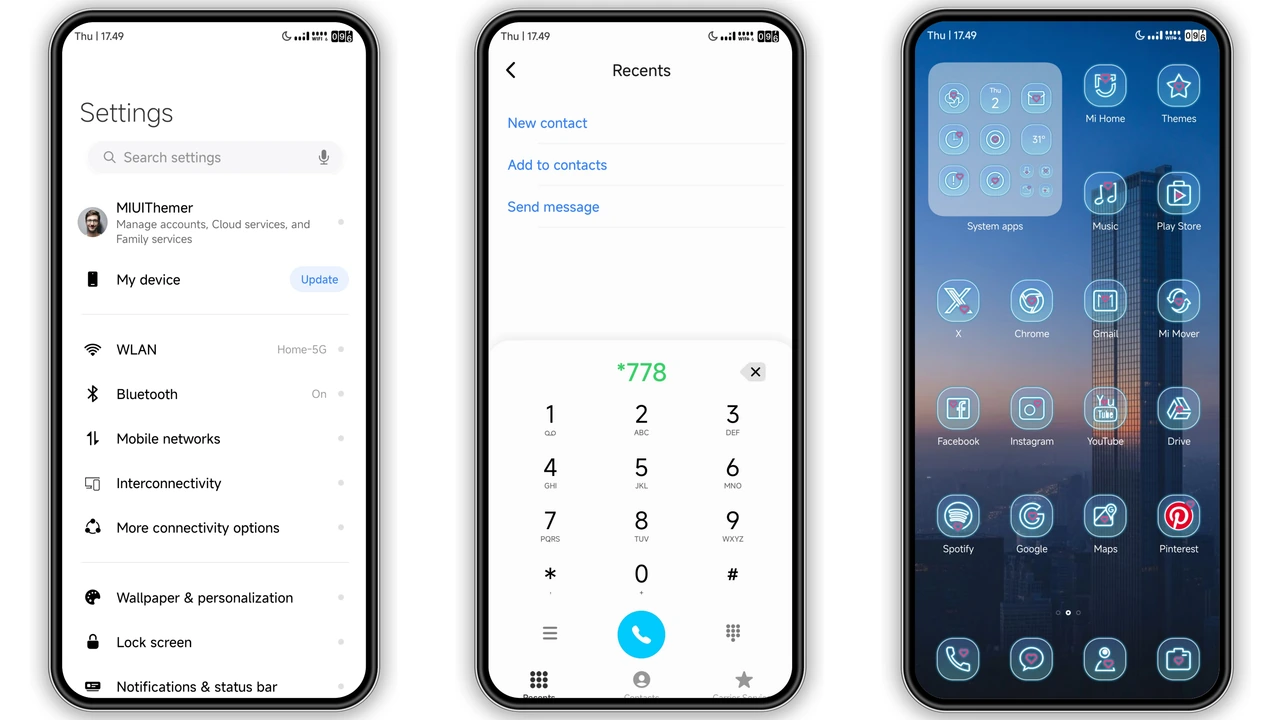
Beyond the captivating lockscreen, HyperBlue extends its design philosophy across the entire user interface. A sleek, circular icon pack, predominantly in a sophisticated teal hue, replaces your default app icons. These icons are not just redesigned; they are reimagined to complement the urban theme, offering a clean, unified look that feels both modern and intuitive. Each icon is crafted with precision, ensuring visual harmony across your app drawer and home screens.
The theme's commitment to a cohesive experience is evident in its full UI theming. From the status bar, which adopts a minimalist and refined appearance, to the notification shade and quick settings panel, every element is meticulously designed. The Control Center setup receives a subtle yet impactful overhaul, aligning its appearance with the overall dark, urban aesthetic. This ensures that navigating your device feels consistent and polished, enhancing the premium feel of HyperOS. The attention to detail extends to system apps like the dialer and messages, where the color scheme and typography are adjusted to maintain HyperBlue's distinctive style. It's this comprehensive approach that truly makes HyperBlue feel like a native part of your HyperOS Global device, rather than just a superficial layer.
Who Will Love HyperBlue? The Urban Aesthetic Enthusiast
HyperBlue is tailor-made for those who resonate with the energy and beauty of cityscapes, especially during the magical twilight hours. If you're someone who appreciates a modern, sophisticated look with a touch of bold flair, this theme is an absolute must-try. It appeals to users who are tired of generic themes and crave a unique visual identity for their Xiaomi, Redmi, or POCO device. City dwellers, design enthusiasts, and anyone looking to inject a 'cool vibe' into their smartphone will find HyperBlue incredibly appealing. It’s perfect for those seeking a dark mode experience that isn't just black, but rich with atmospheric color and striking contrasts. If you've been searching for a theme that gives your HyperOS device an iOS-style polish but with a distinct urban edge, HyperBlue certainly delivers a compelling alternative.
Seamless Integration: HyperOS & MIUI Compatibility
HyperBlue is designed with broad compatibility in mind, ensuring a smooth experience across various Xiaomi, Redmi, and POCO smartphones running HyperOS and MIUI. Whether your device is on the latest HyperOS or an earlier MIUI version, this theme aims to provide a consistent visual upgrade. Here’s how to get this stunning theme onto your device:
For HyperOS / MIUI Global Stable ROMs (Stock ROMs):
- Open your browser (Firefox, Chrome, or the default Xiaomi browser are recommended for best results). Some other browsers might not handle the theme store link correctly.
- Locate the official theme store link (if available) for HyperBlue. This will typically open a page, possibly in Chinese.
- Look for a
Download Links
Use the buttons below to open the theme file and the supporting link.
HyperBlue Theme mtz File
Helpful links
More Theme Updates
For more curated HyperOS and MIUI theme updates, visit Hyper OS x MIUI .


