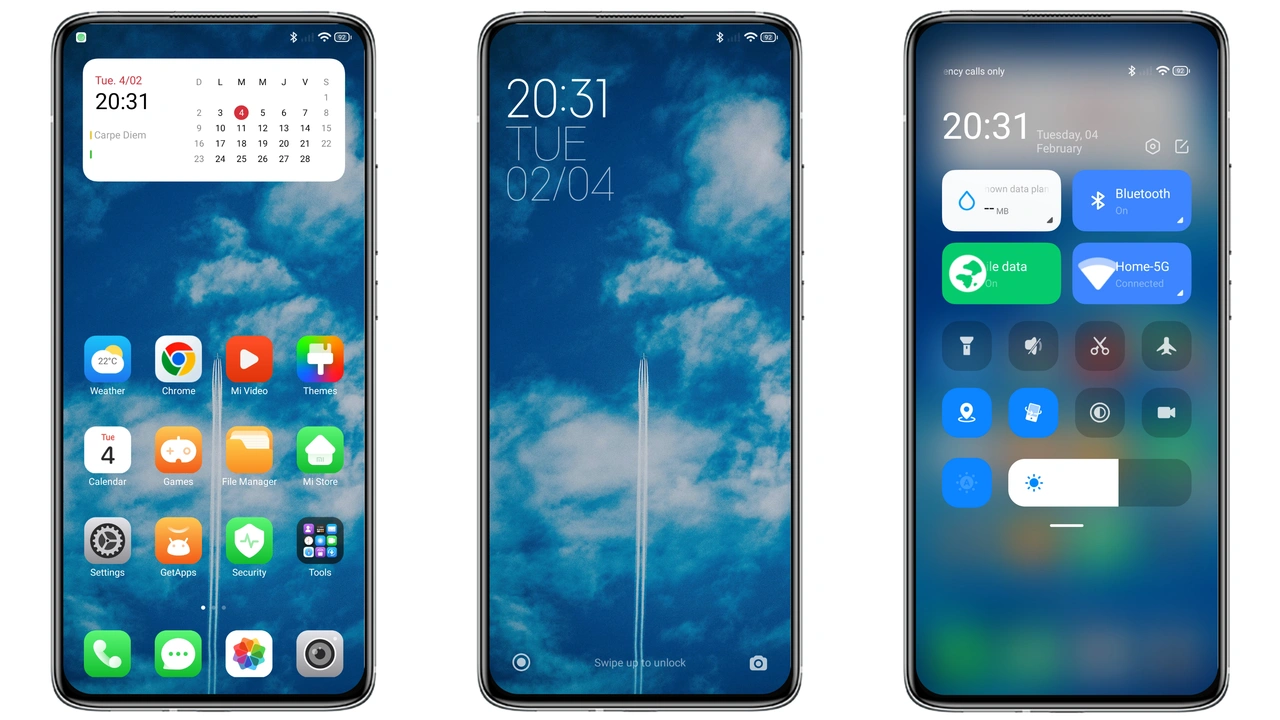
Theme details
- Designer
- Bnet+
- Size
- 16.41 MB
- Compatibility
- HyperOS
- Region
- Global
- Style
- Blue, Cloud, New icons, Simple
Breaking_V10 is one of those HyperOS themes that doesn't try too hard. No flashy neon gradients, no cluttered widgets fighting for attention. Just a soft blue palette, a cloud motif, and a tidy icon set that makes your Xiaomi phone feel lighter the moment you unlock it.
If you've been scrolling through the Theme Store looking for something calm rather than loud, this one deserves a spot on your shortlist. It's free, it's lightweight, and it covers the parts of the interface you actually stare at every day.
A Blue, Cloud-Soft Visual Identity
The first thing you notice with Breaking_V10 is the color story. Blue dominates, but not in an aggressive way. Think pale skies, gentle gradients, and soft cloud textures that give the home screen a relaxed, airy feel. It sits somewhere between minimalist and atmospheric, which is a tricky balance to pull off without looking empty.
The wallpapers lean into that cloud theme, and they pair well with the overall tone of the theme rather than fighting it. If you like your phone to look composed and quiet instead of busy, the aesthetic here lands in the right place. It's the kind of look that works on a Redmi Note just as well as it does on a flagship POCO, because it doesn't depend on dramatic visual tricks.
Suggested Read: How to Install Colorand HyperOS Theme: Fresh Look for Xiaomi Global
New Icons That Stay Readable
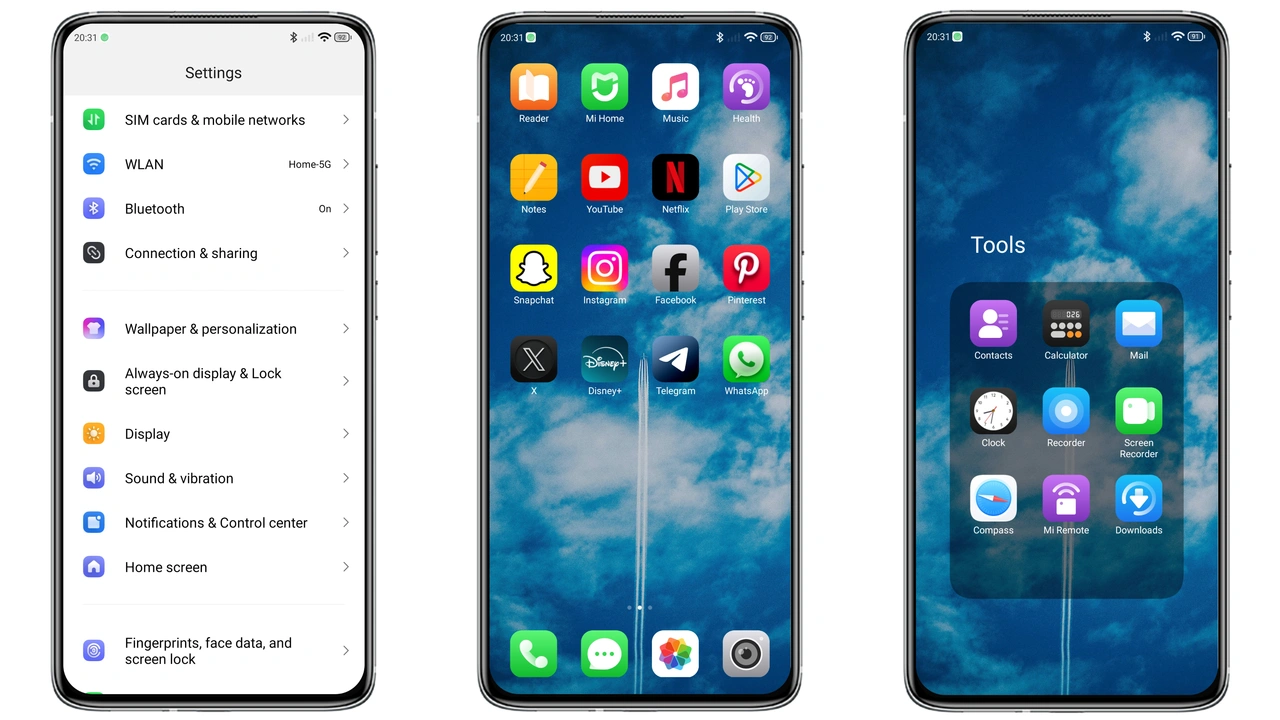
Icon packs make or break a theme, and Breaking_V10 ships a redesigned set that keeps things simple. Shapes are clean, the blue tint carries through consistently, and the icons avoid the over-stylized trap where you can't tell what an app actually does anymore.
That consistency matters more than people give it credit for. When every icon shares the same visual language, your home screen stops looking like a patchwork of third-party apps and starts looking intentional. The new icons here are the strongest argument for applying the theme — they're the detail you'll notice every single time you pick up the phone.
Lockscreen, Status Bar, and Always-On Display
Breaking_V10 refreshes the lockscreen with a cool, clean layout that matches the blue cloud direction of the rest of the theme. The status bar gets a new look too, so the top of your screen doesn't feel like it was left behind while everything else got a makeover.
The Always-on Display is styled to fit the same mood — subtle, readable, and consistent with the overall palette. Together, these pieces mean the theme feels complete rather than half-finished. You're not applying a wallpaper and calling it a day; the interface elements move together.
Who Will Actually Enjoy This Theme
Breaking_V10 suits a specific kind of user. If you're tired of dark, heavy themes and want something that feels open and calm, this is a strong fit. It's also a good choice if you prefer simple over flashy — the theme's own description calls it simple, and that's accurate.
It's less ideal if you want maximum visual drama. There's no chaotic energy here, no bold statement design. This is a theme for people who want their phone to feel refreshed and organized, not transformed into something unrecognizable.
Compatibility and Install Expectations
This theme is built for HyperOS. That's the compatibility line, and it's worth respecting — don't assume it will behave identically on older MIUI builds just because the install process looks similar.
On stock HyperOS, the usual route is through the official Theme Store link, which opens the Themes app and lets you download and apply directly. On custom ROMs, the MTZ file is the way in: download it, open the Themes app, scroll to the bottom, tap Import, select the file, and apply. A restart afterward is a sensible habit in case any element overlaps or doesn't render correctly on first load.
At 16.41 MB, the download is small enough that you won't be waiting around. Applying a theme is also easily reversible — you can switch back to stock whenever the mood changes, so there's little risk in trying it.
Pros and Cons
Pros
- Soft blue, cloud-inspired aesthetic that feels calm and modern
- Consistent new icon set that keeps apps easy to recognize
- Refreshed lockscreen, status bar, and Always-on Display
- Small download size at 16.41 MB
- Completely free to use
- Works across Xiaomi, Redmi, and POCO devices running HyperOS
Cons
- Limited to HyperOS — not intended for older MIUI versions
- The simple, understated style won't appeal to anyone wanting a bold, dramatic look
- Custom ROM users need to import the MTZ manually rather than using the store link
Final Take
Breaking_V10 is a well-rounded HyperOS theme from Bnet+ that earns its place through consistency rather than spectacle. The blue cloud direction, the clean icons, and the refreshed system elements all pull in the same direction, and the result is a phone that feels lighter without losing usability. If calm and simple is what you're after, apply it, restart, and enjoy the change.
Download Links
Use the buttons below to open the theme file and the supporting link.
Breaking_V10 Theme mtz File
Helpful links
More Theme Updates
For more curated HyperOS and MIUI theme updates, visit Hyper OS x MIUI .


