Theme details
- Designer
- Saktie / Boom
- Size
- 16.18 MB
- Compatibility
- HyperOS, HyperOS 2.0, MIUI 14
Format · .MTZ
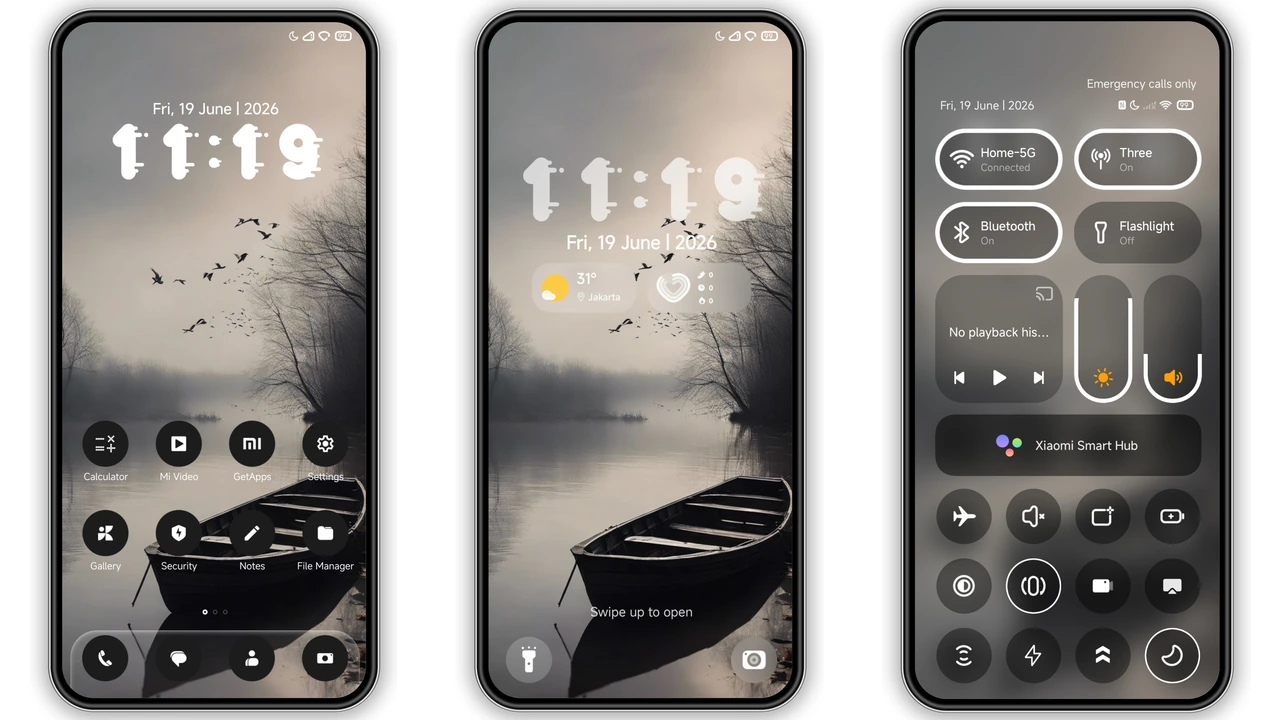
Finding a dark setup that transcends basic black backgrounds can be challenging on modern Android skins. Many designers rely on high-saturation neon accents or overly flashy glyphs to create contrast. The Boom theme takes an entirely different direction. It leans heavily into moody atmospheric depth, combining silent monochrome visuals with deliberate, understated structural elements across Xiaomi, Redmi, and POCO handsets.
Rather than competing for your attention, this configuration recedes into the background while keeping essential daily utilities accessible. It changes standard system interfaces into an intentionally quiet environment built around muted reflections, fog-laden horizons, and deeply contrasted system iconography.
Atmospheric Lockscreen and Broken-Glass Typography
The centerpiece of the lockscreen presentation is an expansive misty lake flanked by skeletal, bare-tree silhouettes. The overall palette stays firmly within charcoal, silver, and deep shadow. This creates a subdued cinematic feel reminiscent of Nordic noir cinema or bleak alpine photography.
Instead of the standard digital sans-serif clock face found on stock HyperOS builds, the designer introduced a cracked, stencil-style numerical display. The segmented digits look fractured, offering an industrial, tactile edge against the soft fog of the lake behind it. Notification cards preserve readable white-on-black typography with softened margins, ensuring incoming alerts do not ruin the atmospheric visual balance. Swiping into the quick-access shortcuts reveals minimal toggles that drop secondary glow animations in favor of flat, high-contrast outlines.
Suggested Read: Sleek Anime Rain Theme for Redmi Note & Poco – HyperOS Ready
Monochromatic Icon Geometry and Visual Balance
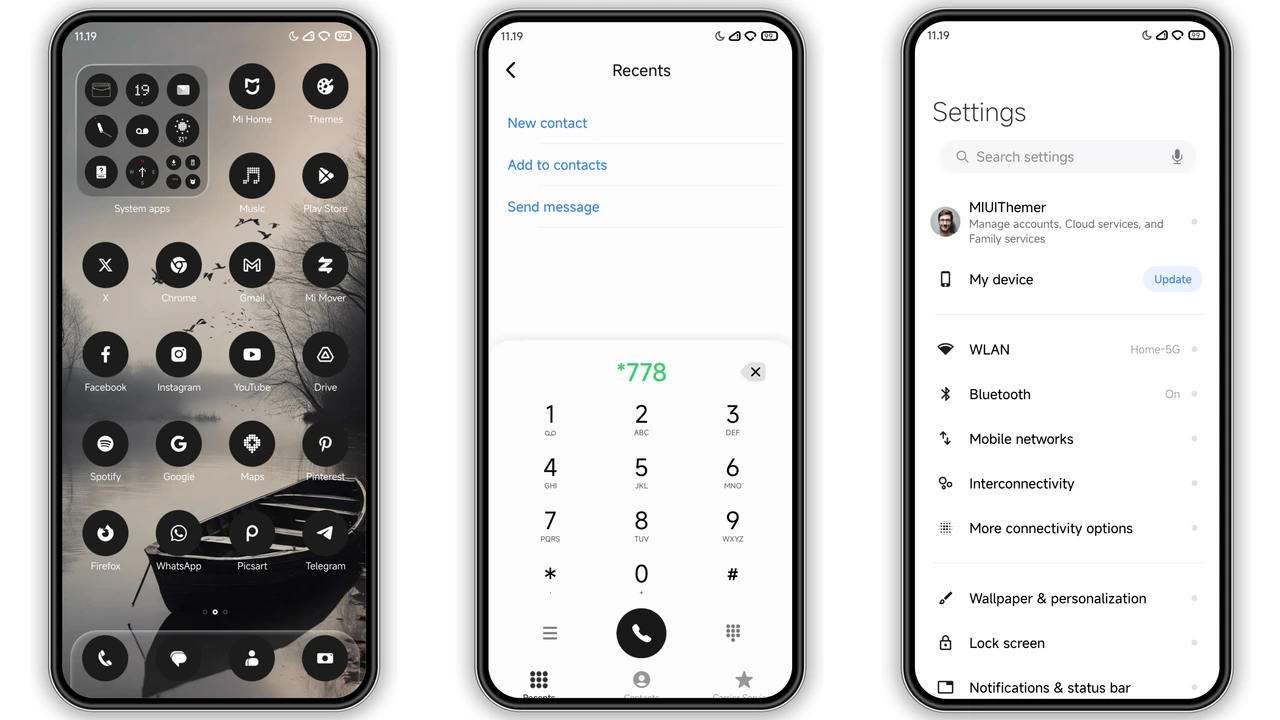
App icons represent one of the hardest design hurdles in custom Xiaomi theming. Third-party packages often leave system drawers mismatched, pairing custom graphics alongside untouched square icons from unoptimized third-party developers. Boom tackles this consistency challenge by wrapping application glyphs inside uniform pitch-black circular masks.
Inside each circle sits a crisp, stark-white vector illustration. Stock tools like Phone, Messages, Gallery, Camera, and Settings look unified, while third-party tools fall back gracefully into matching circular frames. The deep blacks blend into dark wallpaper setups, creating the visual impression that only the white operational symbols hover over your launcher grid. The absence of colorful badge clutter significantly reduces notification anxiety and keeps the homescreen uncluttered throughout prolonged screen time.
System UI Integration and Notification Control Center
Beyond surface-level wallpaper swaps, Boom applies subtle modifications across core system surfaces. The HyperOS Control Center receives a restrained layout cleanup, trading saturated blur highlights for smoky, semi-translucent glass panels. Bright accent colors on connectivity tiles—such as Wi-Fi, Bluetooth, and Mobile Data—are traded for sleek, desaturated indicators that switch states cleanly without harsh color flashes.
The volume slider overlay, settings menu dividers, and dialer buttons also feature the monochromatic aesthetic. In the Settings application, system category icons are reworked with fine line weights, eliminating the standard multi-colored bubbles found in standard MIUI distributions. The notification shade handles dense message grouping well, using micro-borders to demarcate distinct apps without relying on heavy box shadows.
Tailored for AMOLED Panels and Low-Light Environments
Because true black (#000000) pixels deactivate individual diode emitters on modern OLED and AMOLED hardware, this setup operates as a practical battery saver during heavy day-to-day screen-on sessions. Power-hungry tasks like reading feeds, organizing folders, and scrolling through system settings consume noticeably less juice compared to light or multi-colored themes.
Users who spend extensive hours working on their devices in dim settings, night shifts, or low-light office conditions will appreciate the complete reduction of blue-light exposure and harsh glare. Boom targets enthusiasts who prefer visual restraint, tactical simplicity, and cinematic minimalism over playful designs or vibrant color washes.
Installation Expectations and Setup Advice
Applying the Boom theme across international Xiaomi variants depends on the software version powering your device:
- Stock HyperOS / MIUI Global: When utilizing standard distribution builds, themes downloaded outside regional store fronts may encounter framework rollbacks or verification limits. Ensure your account is signed into the Theme application prior to loading visual packs. Applying individual components—such as selecting only the icons or the lockscreen via the customizer menu—often bypasses unexpected interface conflicts.
- Custom HyperOS ROMs (Xiaomi.eu, Elite, or similar): Devices running unlocked developer ROMs have native MTZ import support enabled directly inside the stock theme manager. Simply import the file from internal storage, tap apply, and reboot.
- Reboot Recommendation: System UI components, status bar icons, and battery indicators on HyperOS sometimes cache previous assets in memory. Perform a clean device restart immediately after applying the theme to prevent overlapping text layers or misaligned status indicators.
Pros and Cons
- Pros:
- Cohesive cinematic aesthetic with great atmospheric mood.
- True-black circular icon pack creates exceptional homescreen symmetry.
- Distinctive cracked-stencil typography on the lockscreen clock.
- Excellent battery efficiency profile on AMOLED and OLED panels.
- Restrained control center modifications without eye-straining colors.
- Cons:
- Monochromatic icon scheme makes color-based app hunting slower at first.
- Heavy dark aesthetic might feel too bleak for users who enjoy bright, vibrant setups.
- May require a manual device restart to properly align status bar icons on select global firmware.
Download Links
Use the buttons below to open the theme file and the supporting link.
Boom Theme mtz File
Helpful links
More Theme Updates
For more curated HyperOS and MIUI theme updates, visit Hyper OS x MIUI .


