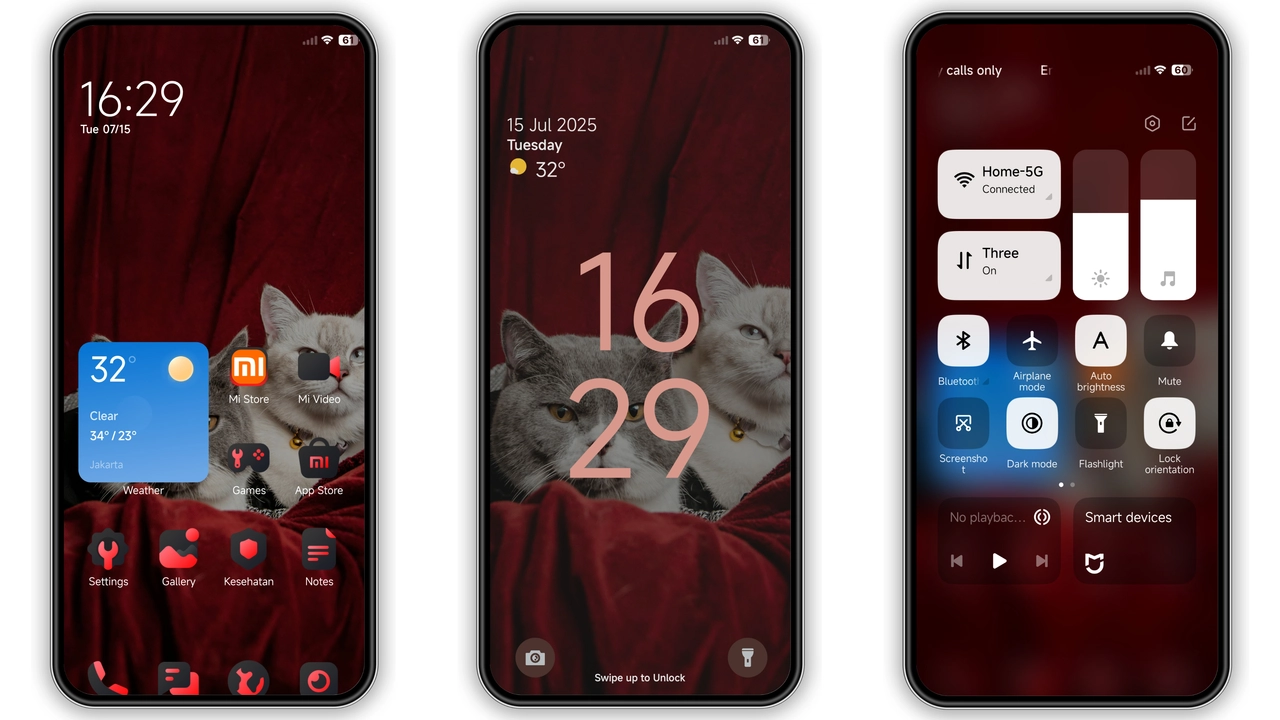
Theme details
- Designer
- dhanz.tm
- Size
- 40.94 MB
- Compatibility
- MIUI 14, MIUI 13, MIUI 12
- Region
- Global
- Style
- Dark, Black, Red, Dynamic lock screen
Bawaan MIUI Theme: Dark Red Styling for Xiaomi
Aesthetic Highlights
Dynamic Lockscreen
Bawaan offers a dynamic lockscreen with a sleek black and red design. The lockscreen clock and icons blend seamlessly with the dark theme, providing a modern and eye-catching look. The dynamic nature of the lockscreen ensures that your phone's appearance changes based on the time of day, adding a layer of personalization.
iOS-Style Icons
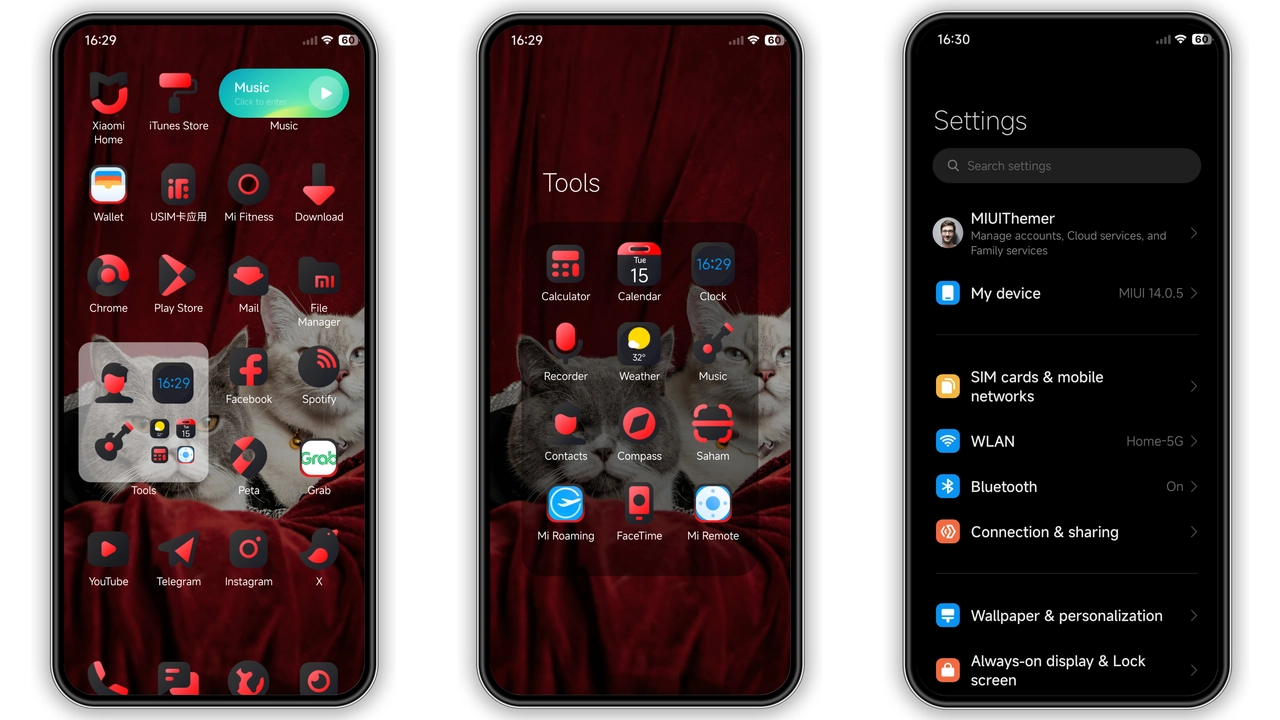
The Bawaan theme features a set of iOS-style icons that give your Xiaomi or Redmi a fresh and modern look. These icons are designed to be sleek and minimalistic, with a focus on functionality and aesthetics. The iOS-style icons complement the dark red theme, creating a cohesive and visually appealing interface.
Status Bar
The status bar in Bawaan is designed to be minimalistic and functional. It features a dark red background with white icons, providing a clean and modern look. The status bar is designed to be unobtrusive, allowing you to focus on the content on your screen.
Wallpapers
Bawaan comes with a set of stunning wallpapers that complement the dark red theme. These wallpapers are designed to be high-resolution and visually appealing, providing a great backdrop for your icons and widgets. The wallpapers are designed to be versatile, allowing you to use them on your home screen, lock screen, or both.
Suggested Read: Neon Dark Theme for Redmi Note & Poco – HyperOS Ready
Who Might Like This Theme
Tech Enthusiasts
Tech enthusiasts who love to customize their devices will appreciate the Bawaan MIUI theme. The theme offers a range of customization options, allowing you to personalize your Xiaomi or Redmi to your liking. Whether you're looking to change the icons, status bar, or wallpapers, Bawaan has something for everyone.
Minimalists
Minimalists who appreciate a clean and uncluttered interface will find the Bawaan MIUI theme to be a great fit. The theme features a minimalistic design with a focus on functionality and aesthetics. The dark red theme provides a sleek and modern look, while the iOS-style icons and minimalistic status bar ensure that your device remains clutter-free.
Dark Mode Fans
Fans of dark mode will appreciate the Bawaan MIUI theme. The theme features a dark red background with white icons, providing a visually appealing and easy-on-the-eyes interface. The dynamic lockscreen and minimalistic status bar further enhance the dark mode experience, making it easy to use your device in low-light conditions.
Compatibility Notes
Bawaan is compatible with MIUI 14, MIUI 13, and MIUI 12. This means that you can use the theme on a wide range of Xiaomi and Redmi devices, from the latest models to older ones. However, it's important to note that the theme may not be compatible with all custom ROMs, so it's always a good idea to check the compatibility before downloading and installing the theme.
Install Expectations
When you install the Bawaan MIUI theme, you can expect a range of visual changes to your Xiaomi or Redmi. The dynamic lockscreen, iOS-style icons, and minimalistic status bar will all contribute to a fresh and modern look. The wallpapers are also designed to be visually appealing and versatile, providing a great backdrop for your icons and widgets. Overall, the Bawaan MIUI theme is designed to provide a cohesive and visually appealing interface that enhances the user experience.
Pros and Cons
Pros
- Dynamic Lockscreen: The dynamic lockscreen provides a modern and eye-catching look, with the appearance of your phone changing based on the time of day.
- iOS-Style Icons: The iOS-style icons provide a sleek and minimalistic look, complementing the dark red theme and enhancing the overall user experience.
- Minimalistic Status Bar: The minimalistic status bar provides a clean and unobtrusive look, allowing you to focus on the content on your screen.
- Stunning Wallpapers: The wallpapers are designed to be high-resolution and visually appealing, providing a great backdrop for your icons and widgets.
Cons
- Compatibility Issues: The theme may not be compatible with all custom ROMs, so it's always a good idea to check the compatibility before downloading and installing the theme.
- Limited Customization Options: While the theme offers a range of customization options, it may not be as customizable as some other themes available in the Theme Store.
- Potential Overlapping Issues: After applying the theme, you may experience some overlapping or visibility issues, which can be resolved by restarting your device.
Conclusion
The Bawaan MIUI theme is a great option for Xiaomi and Redmi users who want to customize their devices with a sleek and modern look. The theme features a dynamic lockscreen, iOS-style icons, a minimalistic status bar, and stunning wallpapers, all of which contribute to a cohesive and visually appealing interface. While the theme may not be compatible with all custom ROMs and may have some overlapping issues, it's a great option for those who want to enhance their user experience with a dark red aesthetic.
Download Links
Use the buttons below to open the theme file and the supporting link.
Bawaan Theme mtz File
Helpful links
More Theme Updates
For more curated HyperOS and MIUI theme updates, visit Hyper OS x MIUI .


