Parameter · Value
Designer · AkshayS
Size · 23.8 MB
Format · MTZ
Compatibility · HyperOS 3.0, MIUI
Electric Neon Aesthetic
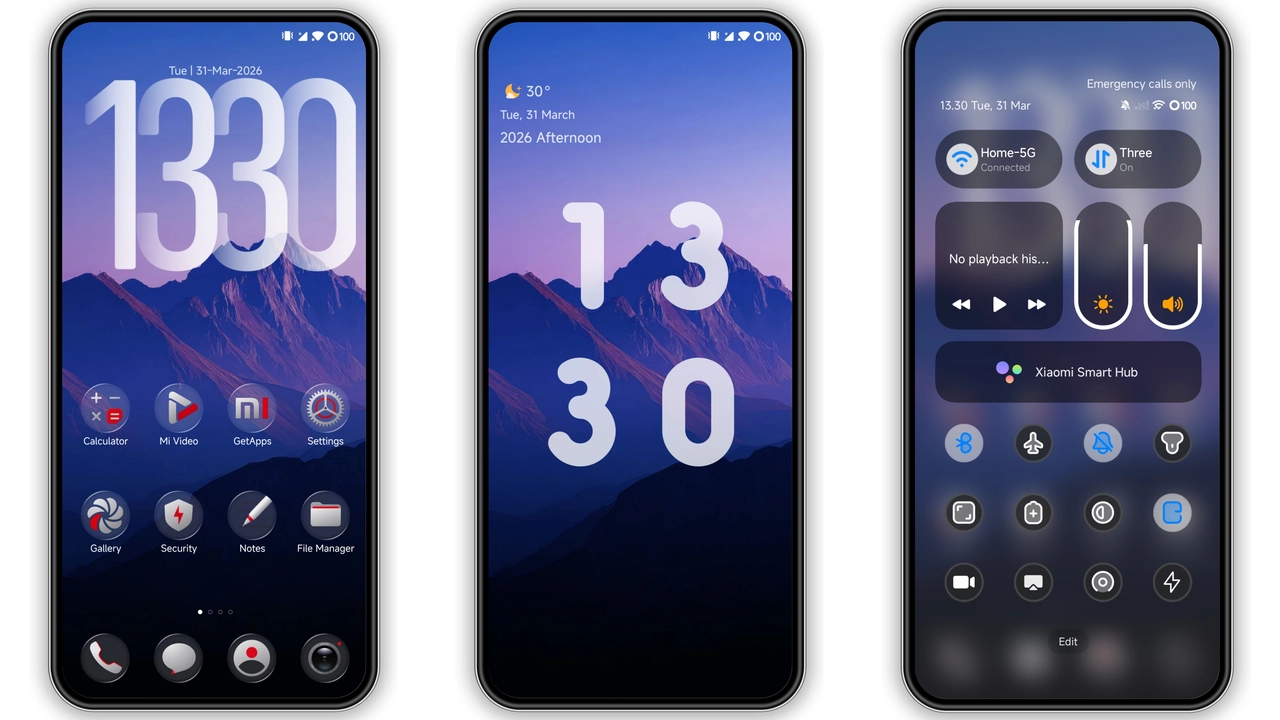
Neon Dark floods the UI with electric pinks, blues, and purples. Icons glow against a deep black backdrop. Lock screen adopts a kinetic grid that pulses with subtle motion. Control Center receives a neon border that frames shortcuts. Typography stays crisp; contrast maximized for readability. Animations speed up, giving the feel of a cyber‑city at night. The theme respects the system’s dark mode, never reverts to light tones. Overall vibe: futuristic, bold, unapologetically bright.
Suggested Read: Trending Beach‑Vibe MTZ Theme: Summer Fun on HyperOS & MIUI
Ideal Users & Use Cases
Night‑owl gamers gravitate to the high‑contrast palette. Creators who stream under low light appreciate the reduced glare. Users seeking a departure from stock minimalism find the neon flare refreshing. Fans of cyber‑punk aesthetics feel at home. The theme also suits professionals who need clear iconography in dark environments. If you love customizing lock screens, you’ll enjoy the layered layouts. Those who prefer muted tones may find it overwhelming.
Installation Walkthrough
Download the MTZ file from the official Theme Store link. Open the Themes app, tap “Import,” locate the file, confirm. Apply the theme, then enable Dark Mode in system settings. Restart the device for full effect. For custom ROM users, open Themes app, select “Import,” browse file manager, choose the MTZ, wait for import, then activate. No root required. Ensure at least 30 % battery before starting to avoid interruption.
Performance & Battery Impact
Neon Dark adds minor GPU load due to richer animations. Most devices handle the extra draw calls without lag. Battery drain is negligible on modern hardware; expect a 2‑3 % increase during heavy UI interaction. Power‑saving mode reduces animation frequency, preserving stamina. Users reporting overheating see no correlation beyond normal usage spikes.
Visual Consistency Across Apps
System apps—Dialer, Settings, Messages—inherit the neon accent color on headers. Third‑party launchers retain their own icon packs unless overridden. Some apps with custom UI (e.g., WhatsApp) keep their native colors, but the surrounding background adopts the theme’s dark tone. Overall experience feels cohesive, with only a few outliers.
Customization Flexibility
Theme includes a set of alternate icon packs: classic neon, pastel neon, and monochrome. Users can toggle between them in the Themes app. Lock screen layout offers three presets: grid, carousel, and minimal. Control Center size can be adjusted via the theme’s settings panel. All options are applied instantly, no reboot needed beyond the initial restart.
Community Feedback Snapshot
Early adopters praise the visual punch and smooth transitions. Complaints focus on occasional icon misalignment after OS updates; a simple re‑apply fixes the issue. No reports of crashes or data loss. Support thread remains active, with the designer releasing minor patches when needed.
Pros and Cons
Pros
• Striking neon palette that stands out.
• Full Dark Mode integration.
• Broad device compatibility (Xiaomi, Redmi, Poco).
• Easy import process for both stock and custom ROMs.
• Low performance overhead.
Cons
• Brightness may be too intense for low‑light lovers.
• Some third‑party apps retain original colors, breaking uniformity.
• Minor icon shift after major OS updates.
Final Verdict
Neon Dark delivers a bold, futuristic makeover without sacrificing stability. If you crave a high‑energy look and are comfortable tweaking a few settings, the theme is a solid choice. Its lightweight footprint and straightforward installation make it accessible for newcomers and veterans alike. Turn on Dark Mode, restart, and let the neon glow transform your device.
Theme Preview


Download Links
Use the buttons below to open the theme file and the supporting link.
Download AS Neon MTZ File
Helpful links
More Theme Updates
For more curated HyperOS and MIUI theme updates, visit Hyper OS x MIUI .