
Theme details
- Designer
- Kartalbey
- Size
- 24.96 MB
- Compatibility
- HyperOS, HyperOS 2.0, MIUI
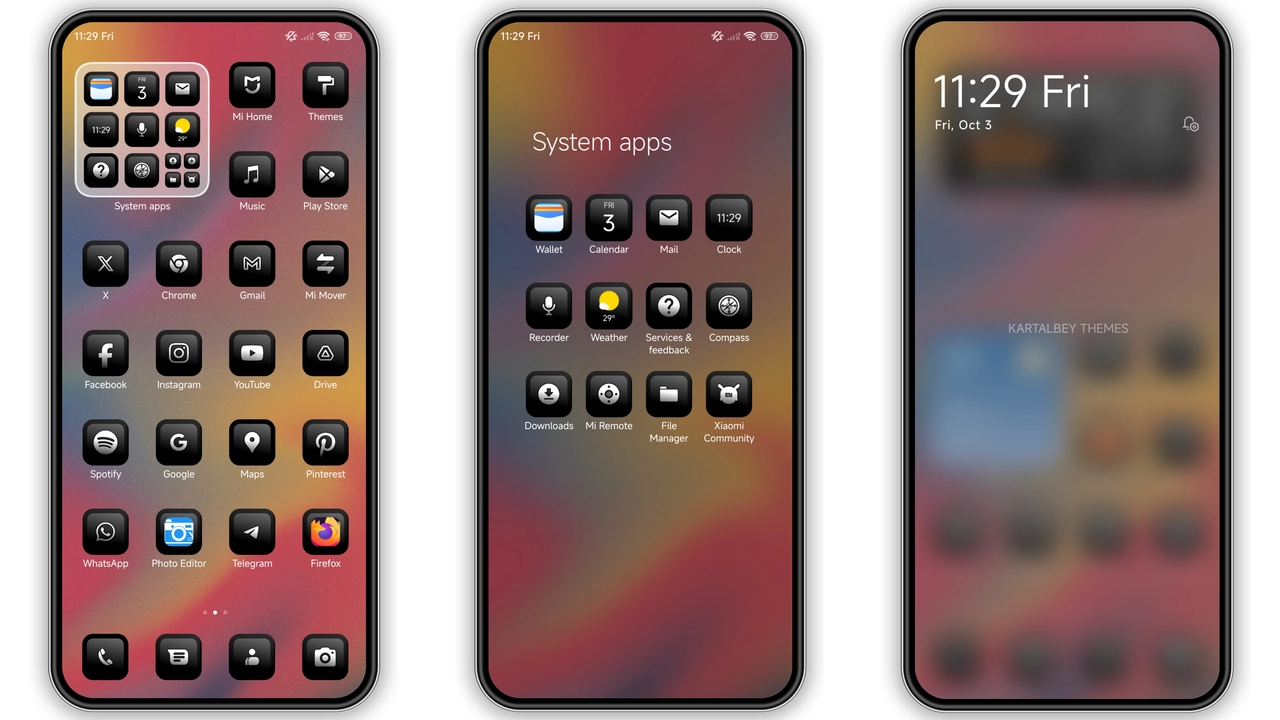
Finding a theme that strikes a balance between sleek minimalism and expressive visual design can transform everyday smartphone interaction. The abstract_v2 HyperOS Theme, crafted by designer Kartalbey, brings a contemporary dark aesthetic to Xiaomi, Redmi, and POCO handsets. By combining deep charcoal and jet-black backdrops with fluid, multi-layered 3D render art, this theme delivers an interface that feels clean, futuristic, and unobtrusive.
Whether you run HyperOS or an updated MIUI build, abstract_v2 strips away visual clutter while upgrading system elements from the lockscreen to the control center.
Format · MTZ / Official Theme Store
---
Fluid 3D Aesthetics and Minimalist Dark Elements
The visual anchor of abstract_v2 is its abstract digital art. Instead of flat color fills or busy photographic backdrops, the theme uses smooth 3D surfaces with subtle light gradients. These sculptural curves create visual depth without overwhelming app labels or desktop widgets.
Because the palette favors true black and muted shadow tones, abstract_v2 is ideal for AMOLED and OLED panels. Pixels in darker regions switch off completely, helping extend battery endurance during prolonged screen-on time. The gentle highlights around the 3D curves ensure interface elements remain distinct and readable even under bright ambient light.
Users who appreciate clean dark workspaces, industrial design, or minimalist digital art will find this visual atmosphere coherent and easy on the eyes.
Suggested Read: Uniswap HyperOS Theme Archive: 3D Glossy Icons and Lockscreen Setup
Dynamic Lockscreen Visuals and Typography
The lockscreen serves as the showcase area for the abstract_v2 experience. It replaces the stock layout with a balanced, typographical clock arrangement that pairs modern geometry with clean sans-serif numericals. Date, battery percentage, and active notification badges sit neatly framed beneath the primary time display.
Fluid transitions greet you when waking the display. Subtle motion and glow effects give the dynamic lockscreen an elevated, responsive feel. The lockscreen retains quick access shortcuts for system essentials like the camera and flashlight, ensuring practical utility remains intact alongside the stylistic overhaul.
Polished App Icons and Status Bar Refinement
A common issue with custom themes is icon inconsistency, where third-party apps look out of place next to themed system tools. The abstract_v2 theme tackles this with a uniform squircle container style finished in muted slate tones with crisp internal glyphs.
- System Icons: Phone, Messaging, Settings, Gallery, and File Manager feature bespoke vector art matching the abstract aesthetic.
- Third-Party Masking: Popular social, streaming, and productivity apps fit neatly inside standardized frames, preserving desktop grid alignment.
- Status Bar Tweaks: The battery gauge, Wi-Fi bars, and cellular reception indicators adopt a sharper, more compact silhouette, reducing status bar clutter at the top of the display.
Control Center and Notification Panel Overhaul
Pulling down the control center reveals comprehensive styling updates. Toggle buttons receive distinct accent colors when active, set against frosted translucent background layers. The brightness and volume sliders handle smoothly, matching the curves seen across the wallpaper artwork.
Notification cards benefit from revised spacing and subtle border outlines. Incoming alerts sit legibly on semi-transparent backgrounds without text clipping or awkward wrapping. This level of contrast tuning keeps message previews and media controls readable at a glance.
Installation Notes and Setup Workflow
Installing abstract_v2 can be completed through official theme repositories or manual MTZ importing, depending on your device configuration:
- Official Theme Store: Search for the theme name or designer profile directly in your built-in Themes application. Apply the entire package or customize specific components (such as applying only the icon pack or lockscreen).
- MTZ File Import (Custom ROMs): If you use custom firmware builds like Xiaomi.eu, download the MTZ package, open the Themes app, navigate to your offline library, select Import, and pick the downloaded file.
- Post-Install Reboot: After applying the theme, perform a quick system restart. A fresh reboot clears leftover UI cache files and prevents graphical overlapping in the status bar or control center.
Pros and Cons
Pros
- Deep dark color palette optimized for battery conservation on OLED screens.
- Cohesive 3D abstract visual identity applied across wallpapers and interface elements.
- Balanced, legible lockscreen layout with modern typography.
- Polished icon masks keep third-party apps looking uniform.
- Lightweight package size under 25 MB ensures smooth system performance.
Cons
- Extreme dark tones may feel too muted for users who prefer bright, colorful palettes.
- Custom font weights on the lockscreen cannot be adjusted independently without third-party tweaks.
For Xiaomi, Redmi, and POCO owners looking to move away from default stock styling, abstract_v2 provides a mature, cohesive, and battery-friendly interface overhaul that elevates the daily smartphone experience.
Download Links
Use the buttons below to open the theme file and the supporting link.
abstract_v2 Theme mtz File
Helpful links
More Theme Updates
For more curated HyperOS and MIUI theme updates, visit Hyper OS x MIUI .


