Parameter · Value
Designer · maidul
Size · 68.5 MB
Format · MTZ
Compatibility · HyperOS 3.0, MIUI
Bold Dark Icon Pack That Pops
PEPE swaps stock icons for high‑contrast, neon‑tinged glyphs. Each icon retains recognisable silhouette while adopting deep‑black background. Accent colors cycle between electric green and magenta, giving UI a cyber‑punk vibe. Icons scale cleanly on HD and full‑HD screens. No extra font packages required; theme bundles its own SVG assets. Users who love dark aesthetics and want a unified look will appreciate the consistency.
Suggested Read: anime space HyperOS Theme for Xiaomi and Redmi Phones
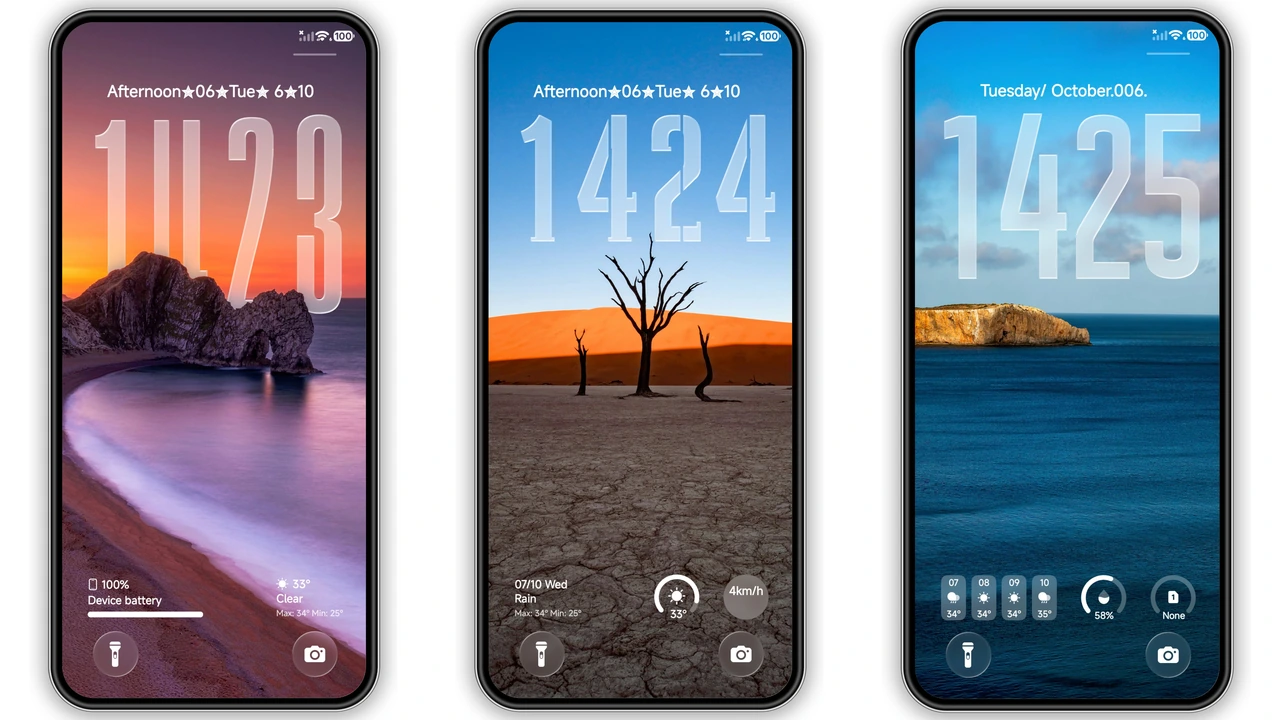
Lock‑Screen Redesign With Animated Flair
Lock screen receives full‑width wallpaper slot, plus animated clock overlay. Clock uses thin sans‑serif type, glows softly at night mode. Swipe gestures remain intact; fingerprint sensor area stays unobstructed. Animation runs at 30 fps, low battery impact. Ideal for users who customize lock screens frequently and enjoy subtle motion.
Widget & UI Overhaul for Power Users
Home screen widgets get new skins: weather widget shows gradient backdrop, battery widget displays circular progress with neon ring. System UI elements—dialer, settings, messages—adopt dark toolbar, rounded corners, and custom ripple effect. Control Center icons receive a matte finish, making quick toggles easier on eyes. Power users who tinker with layouts will find the theme’s widget pack a time‑saver.
Compatibility & Installation Expectations
Theme declares compatibility with HyperOS 3.0 and MIUI 14‑based builds. Works on Xiaomi, Redmi, and Poco devices that run the official Global ROM. For custom ROMs (Xiaomi.eu, MIUIRoom, HyperOS CN) use the MTZ file import method. Installation steps: open Theme Store → tap “Import” → locate PEPE.mtz → apply → restart if UI glitches appear. Download size 68.5 MB; requires ~100 MB free storage for unpacking. No root needed. After apply, minor animation lag may occur on low‑end CPUs; a quick reboot usually resolves.
Who Should Try PEPE?
• Dark‑mode enthusiasts seeking cohesive look.
• Users who enjoy animated lock screens.
• Power users who customize widgets.
• Anyone with HyperOS 3.0‑compatible device.
Not ideal for: users on very low‑RAM devices (≤2 GB) who may notice slowdown.
Pros and Cons
Pros
• Striking dark icons with neon accents.
• Animated lock‑screen clock adds flair.
• Comprehensive widget redesign.
• Seamless integration with HyperOS UI.
• No root required.
Cons
• Slight performance dip on budget chips.
• OTA updates may revert theme.
• No official light‑mode variant.
• Limited to HyperOS 3.0/MIUI 14 builds.
Theme Preview


Download Links
Use the buttons below to open the theme file and the supporting link.
Download PEPE MTZ File
Helpful links
More Theme Updates
For more curated HyperOS and MIUI theme updates, visit Hyper OS x MIUI .