Parameter · Value
Designer · oxfury
Size · 20.8 MB
Format · MTZ
Compatibility · HyperOS, MIUI
Midnight‑Black Canvas with Subtle Depth
Theme drapes entire UI in pure black. Contrast spikes on text, panels, and widgets. Shadows linger under status bar, giving depth without clutter. Color accents disappear, letting icons shine. Dark mode enthusiasts find comfort instantly. Battery saver mode benefits from reduced pixel illumination.
Suggested Read: VK Dark Glass HyperOS Theme – Perfect Fit for Redmi, Poco & Mi Phones
3D Icon Set that Pops on Dark Background
Icons rebuild in low‑poly 3D style. Light source mimics system ambient, creating realistic shading. Each app silhouette lifts from background, adding tactile feel. High‑resolution assets scale across Redmi screens without pixelation. Icon pack covers system apps, popular third‑party tools, and shortcuts. Users notice immediate visual upgrade.
Optimized for Redmi Devices and HyperOS Features
Theme targets Redmi hardware profiles. Resource usage stays under 5 % CPU during idle. RAM footprint stays below 30 MB, preserving multitask performance. HyperOS control center inherits dark palette, matching system tones. Lock screen adopts custom gradient that fades into black, preserving biometric overlay clarity. Notification shade retains readability with white text on black.
Installation Walkthrough and Post‑Install Tips
Open Theme Store, locate Black OX, tap download. For custom ROMs, import MTZ via Theme Store → Import → file manager. Confirm import, apply, then restart device. Restart clears UI cache, preventing ghost elements. After reboot, verify icons align; misalignment may need a quick cache clear in Settings → Apps → Theme → Clear Data.
Who Will Love This Theme?
Minimalist fans seeking pure darkness. Users who enjoy 3D visual depth without neon overload. Redmi owners who want a cohesive look across HyperOS and MIUI. Gamers appreciating sharp icon edges for quick recognition. Designers needing a neutral canvas for custom widgets.
Visual Style Summary
Black backdrop dominates. Subtle gradients appear only on lock screen. Icons float, casting soft shadows. System fonts stay untouched, preserving legibility. Overall vibe: sleek, professional, slightly futuristic.
Pros and Cons
Pros
• Deep black UI reduces eye strain.
• 3D icons add tactile depth.
• Low resource consumption on Redmi hardware.
• Seamless integration with HyperOS control center.
• Easy install via Theme Store or MTZ import.
Cons
• No light‑mode variant; unsuitable for bright environments.
• Custom icon set may clash with non‑standard launchers.
• Minor alignment issues reported on rare custom ROMs.
• Lack of animated wallpapers; theme focuses on static UI.
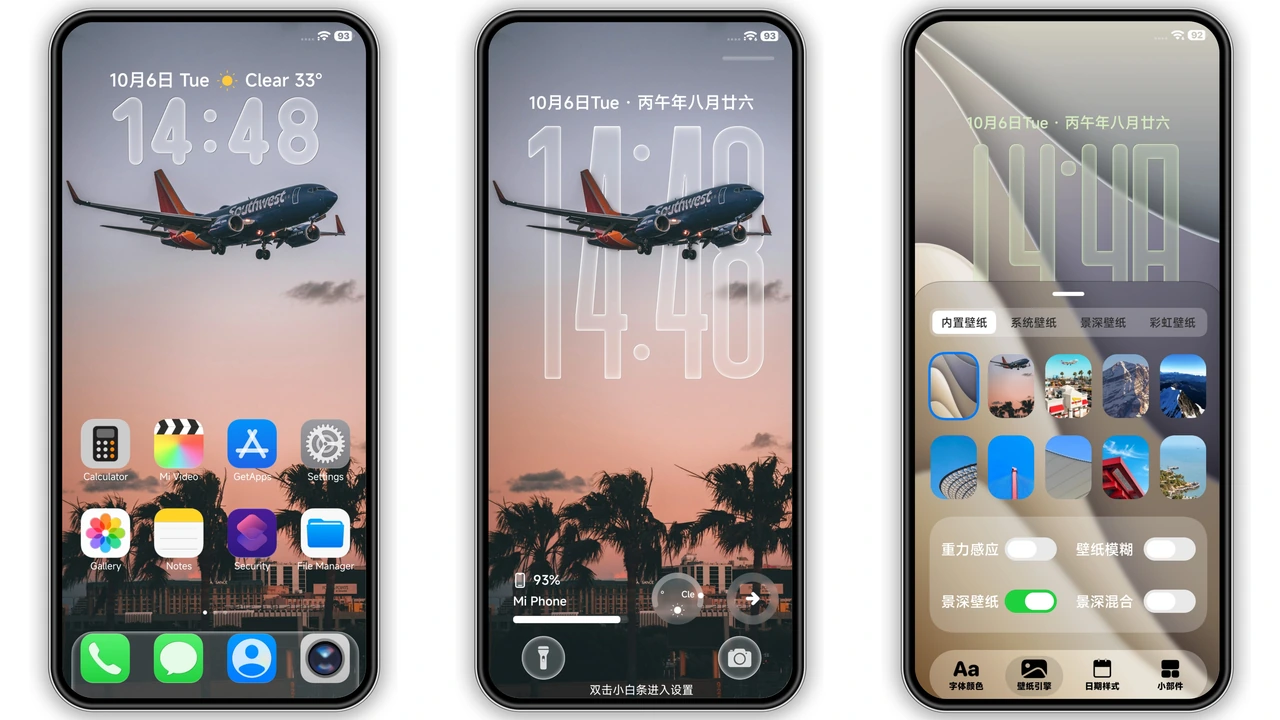
Theme Preview


Download Links
Use the buttons below to open the theme file and the supporting link.
Download Black OX MTZ File
Helpful links
More Theme Updates
For more curated HyperOS and MIUI theme updates, visit Hyper OS x MIUI .