Parameter · Value
Designer · maidul
Size · 57.4 MB
Format · MTZ
Compatibility · HyperOS / MIUI
Crystal‑Clear Iconography that Pops
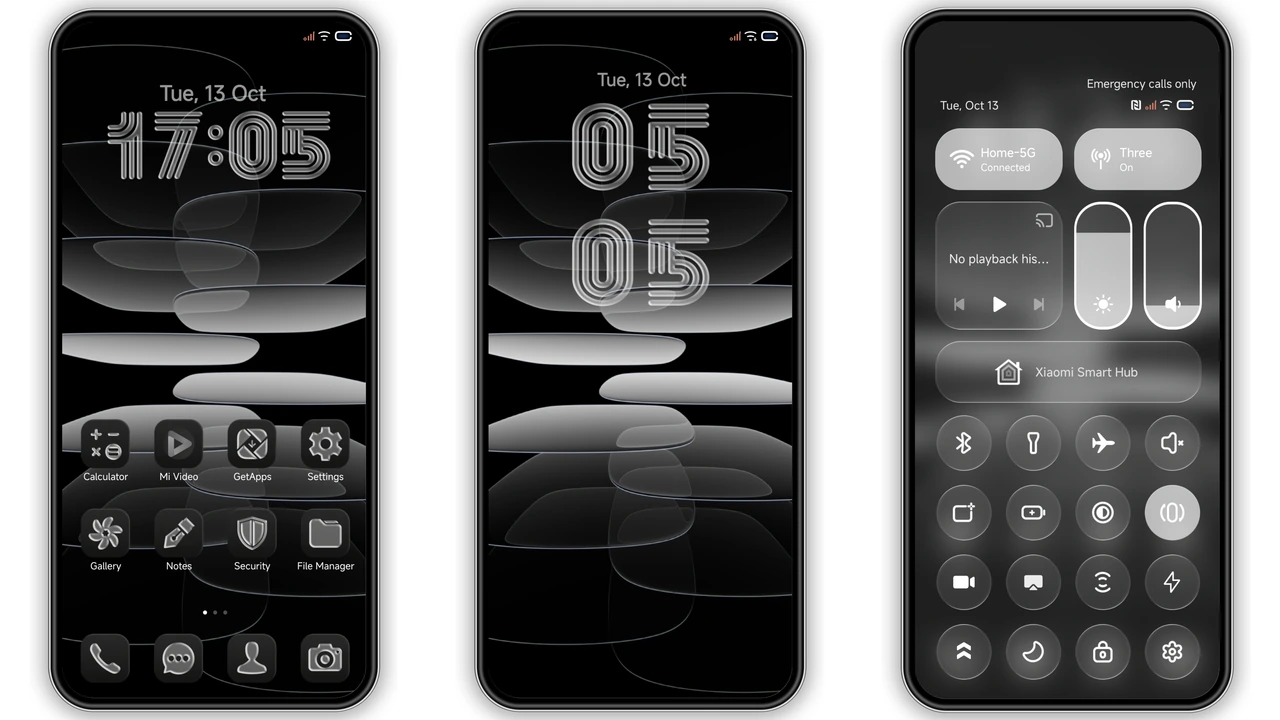
LINEA treats every app icon like a pane of polished glass. Rounded corners catch ambient light, while subtle gradients give a three‑dimensional feel without overwhelming the home screen. The icon set stays consistent across system, settings, and third‑party apps, so the visual language never breaks. Even the notification dots adopt the same translucent style, creating a unified look that feels both modern and tactile.
Suggested Read: Lucky Cat Chime MTZ Theme for Redmi Note Series
Lock‑Screen Layouts that Feel Futuristic
The lock‑screen redesign is the theme’s headline feature. Time is displayed in a thin, sans‑serif typeface that hovers above a faint glass overlay. Swipe gestures reveal a hidden widget area where you can place weather, calendar, or quick‑launch shortcuts. The lock‑screen animation slides in smoothly, echoing the glass motif with a soft fade‑in effect. Users who enjoy customizing every pixel will appreciate the extra depth and the optional “minimal” layout that strips away all but the essentials.
Who’ll Love LINEA’s Premium Glass Aesthetic
• Design enthusiasts: If you collect themes for their visual polish, LINEA’s glass treatment stands out among flat, pastel packs.
• Power users: The theme touches system UI—dialer, messages, control centre—so you get a cohesive experience without hunting for separate tweaks.
• Device owners: Works on Xiaomi, Redmi, and Poco models running HyperOS 3.0 or compatible MIUI builds. No need for custom kernels; the MTZ package handles the heavy lifting.
• Minimalists with a twist: The design is clean yet offers subtle depth, satisfying those who want elegance without clutter.
Installation Walkthrough for Stock & Custom ROMs
Stock HyperOS/MIUI
1. Open the Theme Store app.
2. Tap the “Official Theme Store” button.
3. Locate LINEA in the listing and hit Download.
4. Apply the theme, then restart for UI elements to refresh.
Custom ROM (Xiaomi.eu, MIUIRoom, etc.)
1. Download the LINEA MTZ file from the provided download section.
2. Launch the Theme Store app → Import.
3. Browse to the MTZ file and confirm import.
4. The theme appears in your library; select Apply.
5. Reboot if any UI glitches appear.
Both methods require roughly 57 MB of storage and a stable internet connection for the initial download. The theme does not modify system partitions, so you can safely switch back to the stock look at any time.
Pros and Cons
• Pros
• Stunning glass‑styled icons
• Cohesive lock‑screen redesign
• Wide device compatibility
• Easy install via Theme Store or MTZ import
• Cons
• No built‑in dark‑mode toggle (relies on system setting)
• Slightly larger size than minimalist packs
• Minor animation lag on low‑end hardware
Overall, LINEA delivers a premium visual upgrade without demanding technical expertise. Its glass aesthetic feels fresh on HyperOS, making everyday interactions feel a touch more luxurious.
Theme Preview


Download Links
Use the buttons below to open the theme file and the supporting link.
Download LINEA MTZ File
Helpful links
More Theme Updates
For more curated HyperOS and MIUI theme updates, visit Hyper OS x MIUI .