
Introduction to Vibgyor HyperOS Theme
The world of Xiaomi themes is vast and diverse, offering users a wide range of customization options to personalize their devices. Among the numerous themes available, the Vibgyor HyperOS theme stands out for its unique blend of colors and sleek design. This theme, designed by oxfury, is not just a visual treat but also a testament to the creativity and versatility of HyperOS themes. In this article, we'll delve into the details of the Vibgyor theme, exploring its visual style, compatibility, installation process, and who might find this theme particularly appealing.
Visual Style and Aesthetics
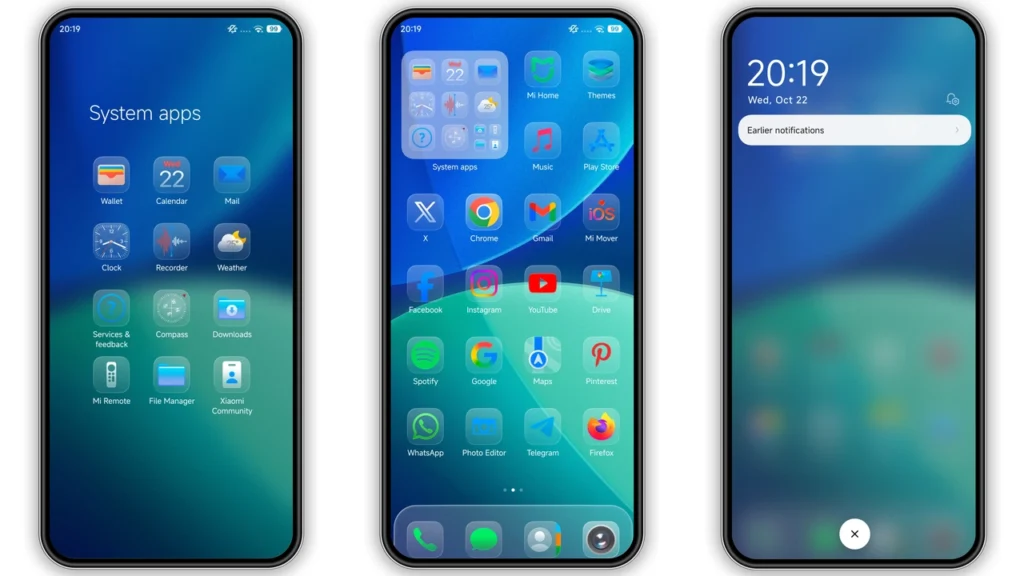
The Vibgyor HyperOS theme is characterized by its vibrant and dynamic visual style. The name 'Vibgyor' itself is a reference to the acronym for the colors of the rainbow (Violet, Indigo, Blue, Green, Yellow, Orange, Red), which gives a hint about the theme's colorful nature. Upon applying the theme, users are greeted with a fresh set of icons, wallpapers, and a redesigned status bar and lock screen that embody the spirit of the rainbow. The Always-on Display feature is also stylized to match the theme's aesthetic, ensuring a coherent visual experience across the device.
The theme's design is not just about splashing colors; it's about creating a harmonious and appealing visual environment. The icons are well-designed, with each one carefully crafted to fit the theme's color palette without compromising on clarity or usability. The wallpapers provided with the theme are of high quality and complement the overall design, ensuring that the home and lock screens look stunning.
Who May Like the Vibgyor Theme?
The Vibgyor HyperOS theme is likely to appeal to a wide range of users, but particularly those who enjoy vibrant and dynamic visuals. Younger users or those who are young at heart and prefer a lively, colorful interface might find this theme especially enticing. Additionally, users who are looking for a theme that stands out from the more common minimalistic or dark themes might appreciate the unique aesthetic that Vibgyor offers.
Moreover, the theme's compatibility with HyperOS and its derivatives makes it an excellent choice for users who value the flexibility and customization options that these operating systems provide. For users who are accustomed to the stock MIUI experience but wish to add a personal touch without straying too far from the familiar, the Vibgyor theme offers a perfect balance.
Compatibility Notes
The Vibgyor theme is designed to be compatible with HyperOS and works seamlessly on Xiaomi, Redmi, and POCO smartphones. This compatibility extends to various versions of HyperOS, including HyperOS 2.0, ensuring that users across different device models and software versions can enjoy the theme.
For users with MIUI Global Stable ROM (Stock ROM), applying the theme involves a straightforward process that utilizes the Theme Store APP. The theme's compatibility with both HyperOS and MIUI ecosystems makes it accessible to a broad user base, catering to different preferences and device configurations.
Installation Expectations
Installing the Vibgyor HyperOS theme is a relatively straightforward process, especially for those familiar with applying themes on Xiaomi devices. For users with HyperOS or MIUI Global Stable ROM, the process involves downloading the theme file (available in.mtz format) and then applying it through the Theme Store APP.
Users with custom ROMs based on MIUI 11, 12, 13, or 14, or those running HyperOS-based custom ROMs like Xiaomi EU ROM, can also install the theme using the.mtz file. The process involves importing the theme file into the Theme Store APP and then applying it. It's recommended to restart the device after applying the theme to ensure that all changes are properly implemented and to avoid any potential overlaps or visibility issues.
Practical Download Notes
The Vibgyor theme is available for download in.mtz format, which is compatible with the Theme Store APP on Xiaomi devices. Users can download the theme from the provided link and follow the installation instructions relevant to their device's software configuration.
It's essential to ensure that the download is from a trusted source to avoid any potential risks associated with downloading files from unknown sources. Additionally, users should be aware of the file size, which is approximately 66.77 MB, to plan their download accordingly, especially if they are on a limited data plan.
Conclusion
The Vibgyor HyperOS theme is a stunning addition to the world of Xiaomi themes, offering a unique and vibrant visual experience that is sure to captivate users. With its well-designed icons, beautiful wallpapers, and stylized lock screen and Always-on Display, this theme is perfect for those looking to add a personal touch to their device without compromising on usability.
The theme's compatibility with HyperOS and MIUI ecosystems, along with its straightforward installation process, makes it accessible to a wide range of users. Whether you're a fan of colorful themes, looking for a change from the usual minimalistic designs, or simply want to personalize your Xiaomi device, the Vibgyor HyperOS theme is definitely worth considering.
In the ever-evolving landscape of smartphone customization, themes like Vibgyor remind us of the importance of visual aesthetics and personalization. As Xiaomi continues to innovate and expand its ecosystem, themes such as Vibgyor HyperOS will play a crucial role in enhancing the user experience, offering a unique blend of style, functionality, and creativity that sets devices apart.
Theme Preview

Download Links
Use the buttons below to open the theme file and the supporting link.
vibgyor Theme mtz File
More Theme Updates
For more curated HyperOS and MIUI theme updates, visit Hyper OS x MIUI .


