
Poo-Dark is a dark HyperOS theme for Xiaomi, Redmi, and POCO phones that focuses on a clean everyday look rather than flashy effects. Designed by Eto, it gives your device a moodier interface with redesigned icons, a refreshed status bar, a polished lock screen, and a more stylish overall feel while still staying easy to live with day to day.
If you like dark themes that feel modern without becoming too aggressive, Poo-Dark has the right kind of balance. It does not try to overload the screen with visual noise. Instead, it leans into a simple UI style with darker surfaces, neat color accents, and interface tweaks that make the phone feel more refined. For many Xiaomi users, that is exactly the sweet spot: enough change to make the phone feel fresh, but not so much that it becomes distracting after a few days.
Visual style and overall feel
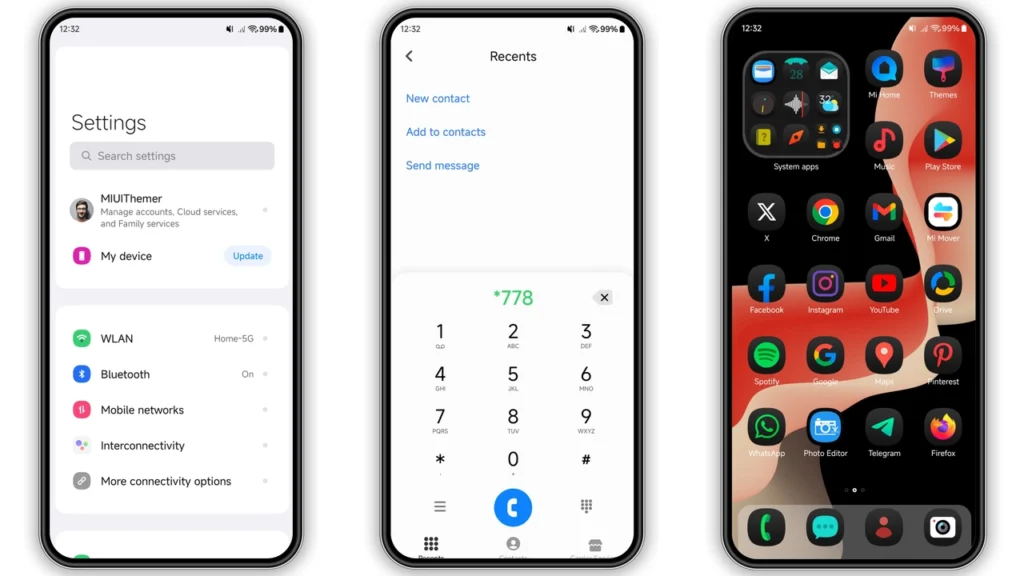
The main appeal of Poo-Dark is in its restrained design. This is not the sort of theme that screams for attention with oversized graphics or chaotic color combinations. It is built around a darker foundation, which gives the UI a cleaner, more premium mood across the system.
The icons appear more coordinated than the stock mix many users are used to. That matters more than people sometimes admit. Even a small improvement in icon consistency can make the home screen feel sharper and more intentional. On a dark setup, that visual consistency stands out even more, especially if you prefer minimalist wallpapers or a tidy app layout.
The status bar and system elements are also part of the charm here. A good dark theme is not only about black or gray backgrounds. It also needs to handle quick settings, notification shades, toggles, and smaller interface elements in a way that feels readable and polished. Poo-Dark seems to aim for that kind of complete visual pass, which is why it feels more like a full-device makeover than a basic wallpaper-and-icons swap.
The lock screen is another area where this theme adds personality. It is described as having a dynamic lock screen and a stylish Always-on Display, so users who enjoy seeing a little more character before even unlocking their phone will likely appreciate it. These touches can make the device feel newer without changing how you actually use it.
Who will enjoy using Poo-Dark
Poo-Dark makes the most sense for users who want a dark interface with a simple, practical tone. If you usually rotate between black, gray, AMOLED-friendly, or low-distraction themes, this one fits naturally into that lineup.
It should especially appeal to:
• Xiaomi users who prefer a darker UI throughout the day
• People who want a cleaner home screen with more unified icons
• Anyone bored with the stock HyperOS look
• Users who like subtle customization instead of exaggerated effects
• POCO and Redmi owners looking for a fresh but usable theme
This theme is also a nice pick for people who install themes often but end up going back to something simple after a few days. Some themes look exciting in preview images but become tiring in real use. Poo-Dark seems better suited for long-term daily use because its design language is calmer and more grounded.
If your usual preference is bright, colorful, cartoon-like, or heavily iOS-inspired skins, this may not be the most dramatic choice. But if your idea of a good theme is one that makes the phone look cleaner, darker, and slightly more premium, it is easy to recommend.
Compatibility with HyperOS, Xiaomi, Redmi, and POCO phones
Poo-Dark is meant for Xiaomi ecosystem devices, including Xiaomi, Redmi, and POCO phones. The listed compatibility points to HyperOS support, including newer HyperOS builds, so it is primarily aimed at users already on Xiaomi’s more current software experience.
For most people, the key thing to understand is that theme compatibility depends not only on the theme itself, but also on your ROM type. A theme can behave differently on:
• Official Global Stable ROM
• China-based theme links opened through the Themes app
• MIUI or HyperOS custom ROMs
• Older MIUI versions with MTZ import support
On supported HyperOS devices, the theme should apply the main visual components normally, but exact results can still vary slightly by software version, region, and device model. This is normal with Xiaomi theming. Some lock screen functions, status bar layouts, or Always-on Display details can look a bit different depending on your setup.
If you are using a custom ROM based on MIUI or HyperOS, the MTZ route is usually the more practical option. That gives you a more direct way to import and apply the theme without relying entirely on region-specific store behavior.
What to expect after installation
Once applied, expect changes across several visible parts of the interface rather than only one or two areas. The theme is described as bringing redesigned icons, fresh wallpapers, a new status bar, a cool lock screen, and a stylish AOD. In daily use, that usually means your phone will feel noticeably different as soon as you unlock it and start moving around the system.
That said, it is smart to keep expectations realistic. Xiaomi themes do not always transform every single app and every menu on the phone. Some parts of the UI may remain closer to stock, especially on newer software builds where theme engine behavior can be more limited than it used to be.
You may also notice that some third-party apps keep their own design language, even when the system theme changes nicely around them. That is not a flaw in this theme specifically. It is simply how theme support works across Xiaomi devices.
If something looks slightly misaligned right after applying the theme, a reboot is often enough to fix overlapping elements or visual leftovers from the previous theme. That is a common and very practical step with MIUI and HyperOS themes, especially when switching between very different styles.
Install expectations on stock ROM and custom ROM
For users on official HyperOS or MIUI stock ROM, applying a theme can sometimes depend on opening the Theme Store link in the right browser and then handing it off to the Themes app. On Xiaomi devices, this process is familiar but not always perfectly smooth in every browser. If one browser does not trigger the Themes app properly, trying the device’s default browser or Chrome usually works better.
For users on custom ROMs, the MTZ file is the important part. The usual process is straightforward:
1. Download the MTZ theme file. 2. Open the Themes app. 3. Go to the Themes section. 4. Scroll down and choose the import option. 5. Import the downloaded MTZ file. 6. Apply the theme and reboot if needed.
This makes Poo-Dark especially convenient for people who already know their way around theme imports. If you are the kind of user who flashes Xiaomi EU, MIUI-based custom builds, or other HyperOS-style ROMs, this is a routine install.
Download notes before you install
The listed MTZ file size is around 13.13 MB, so it is not a heavy download. That is small enough to grab quickly over mobile data, though it is always better to keep a local copy of theme files you really like. Good Xiaomi themes sometimes become harder to find later, and keeping the MTZ saved means you can reapply it without hunting for it again.
A few practical download tips:
• Make sure the file finishes downloading completely before trying to import it
• Keep the .mtz extension unchanged
• Do not rename the file in a way that removes its theme format
• Import it from local storage through the Themes app if store installation is inconvenient
• Restart the phone after applying if icons or overlays do not update cleanly
It is also worth remembering that theme previews can never show every detail perfectly. The real test is how the theme feels during regular use: checking notifications, unlocking the phone, browsing settings, and living with the icon style for a few days. Poo-Dark looks like one of those themes that makes its strongest impression in actual daily use rather than in overly dramatic preview shots.
Why Poo-Dark is worth trying
There are many dark themes for Xiaomi phones, but not all of them feel polished enough for long-term use. Some are too busy, some rely on gimmicks, and some only skin a few areas well. Poo-Dark stands out because it seems to understand what many HyperOS users really want: a darker phone that looks cleaner, sharper, and more personal without becoming messy.
That is the real value here. It is free, it supports Xiaomi-family devices, it offers the useful MTZ route for compatible setups, and it gives your phone a more stylish appearance with very little effort. If you have been looking for a simple dark HyperOS theme that still feels complete, Poo-Dark is an easy one to try.
Download
• Designer: Eto
• Compatibility: HyperOS, Xiaomi, Redmi, and POCO devices
• Theme style: Dark, simple UI, dynamic lock screen
• Download: Poo-Dark Theme mtz File
Theme Preview


Download Links
Use the buttons below to open the theme file and the supporting link.
Poo-Dark Theme mtz File
Helpful links
More Theme Updates
For more curated HyperOS and MIUI theme updates, visit Hyper OS x MIUI .


