
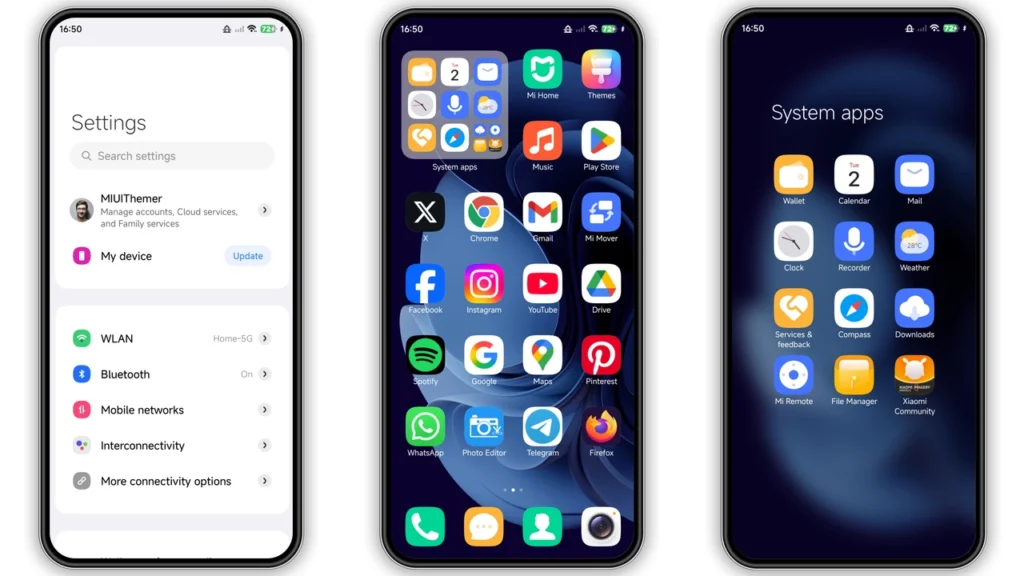
Tiago-wolf V15 gives Xiaomi, Redmi, POCO phones sharp blue makeover without heavy setup pain. Theme packs redesigned icons, new wallpaper mood, edited status bar, custom lock screen feel, stylish Always-on Display touches. Result: stock UI looks less plain, more modern, more "designed". If you like visible change day one, not tiny tweaks, this one hits mark.
Visual style and daily look
Tiago-wolf V15 runs clear design direction: abstract + blue + contrast. Not messy "everything changed" chaos. Not minimal monochrome either. Middle ground. Enough character for fun, enough structure for daily use.
Big visual points:
•Icons: cleaner shapes, more consistent edge treatment, stronger color separation.
•Wallpaper tone: cool-blue base, supports icons instead of fighting them.
•Status bar: tighter visual language. Feels more curated than stock mix.
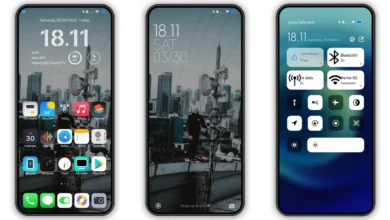
•Lock screen: more premium look, less default template vibe.
•AOD elements: extra style layer for OLED users who keep glance info active.
In hand, theme feels built for people who want phone to look "new" again after months on same setup. Blue accent gives energetic tone but not childish. Good for work + personal use mix.
Readability check matters. Good theme can look great in preview but fail in daily swipe. Tiago-wolf V15 stays usable in common screens: notification shade, home grid, app drawer areas, settings pages. Contrast holds up decently in normal light. If you run very bright wallpapers on top, keep eye on text clarity.
Who should try Tiago-wolf V15
Not every theme fits every user. Quick fit guide.
Best match:
• You wantvisible redesignwithout flashing ROM.
• You likeblue / abstractidentity.
• You rotate themes often and want fresh package with lock screen + icon change together.
• You use Xiaomi Themes app flow and know basic import/apply steps.
Maybe skip if:
• You want strict pure-black AMOLED minimal layout only.
• You prefer stock icon language with near-zero style drift.
• You dislike themed lock screens and want clean default system screen.
For many users, sweet spot here is "personality without losing utility." Theme looks custom, still practical for chat, maps, payments, work apps.
Compatibility notes before install
Core compatibility from release info:
•Platform: HyperOS, HyperOS 2.0 focus
•Also noted: MIUI 14 mix support
•Device families: Xiaomi, Redmi, POCO
•Region/Server: Global
•Theme size: 18.15 MB
•Designer: AMJAD ALY
Important reality check: theme behavior can vary by ROM branch, system app version, and region policy in Themes app. Same MTZ can look slightly different across devices.
Practical expectations by setup:
1.HyperOS / MIUI Global Stable (stock ROM)
• Best path often via official Themes app handoff.
• Some browser-to-app open actions fail in random browsers.
• Use browser/app combo that properly passes link into Themes app.
2.Custom ROMs based on MIUI/HyperOS (Xiaomi EU, MIUIRoom, others)
• MTZ import route usually easier.
• Works when Themes app keeps Import option enabled.
3.Older branch users (MIUI 11/12/13/14 custom bases)
• MTZ import still common path.
• Small visual mismatches possible in newer lock screen assets.
No fake promise: "works perfectly for everyone" never true in Android skin world. But this package sits in safe mainstream zone.
Install expectations: what happens after apply
After applying Tiago-wolf V15, expect these changes first:
• Home screen icon pack appears immediately.
• Wallpaper/theme palette updates.
• Status bar glyph style may shift.
• Lock screen assets load on next lock/unlock cycle.
• AOD components may need extra minute/system refresh.
If overlap or weird layering appears (common after theme swap), restart device once. Restart clears cached UI assets and fixes most oddities.
Normal post-install checklist:
• Open Settings, Notification shade, Dialer, Messages.
• Check text contrast in dark + light conditions.
• Verify lock screen shortcuts still mapped as expected.
• Check third-party widgets for visual clash.
If one part feels off, many Xiaomi theme engines let you mix components (icons from one, lock style from another). Advanced users can blend Tiago-wolf V15 with favorite minimal status bar theme for hybrid setup.
Practical download notes
Download package available as MTZ file:
•Label: Tiago-wolf V15 Theme mtz File
•Format:.mtz
Direct file route helps users outside region restrictions or users on custom ROMs with Import feature.
Safe handling tips:
• Keep original filename if possible.
• Store file in easy folder (`Download` fine).
• Do not unzip MTZ.
• Import through Themes app, not file manager random opener.
If Themes app shows no Import button, issue usually ROM policy, theme manager version, or region lock behavior. In that case, official store install path on stock ROM often more reliable.
Step-by-step install flows
Stock ROM (HyperOS / MIUI Global Stable)
1. Open theme page in browser that can hand off correctly to Themes app. 2. Tap official theme store entry. 3. If Chinese page opens in browser, use menu and choose option similar toOpen in app. 4. Themes app opens. 5. Download theme. 6. Apply theme.
If store link fails in one browser, retry with Chrome or default Xiaomi browser.
Custom ROM or MTZ import path
1. DownloadTiago-wolf V15_Hyper OS x MIUI.mtzfile. 2. OpenThemesapp. 3. Go toThemestab. 4. Scroll down. 5. TapImport. 6. Select downloaded.mtzfile. 7. Apply theme. 8. Restart phone once if UI overlaps or elements missing.
That restart step solves most post-theme glitches.
Performance and usability feel
Theme size 18.15 MB. Lightweight by current theme standards. Should not hit storage or RAM in meaningful way on modern Xiaomi/Redmi/POCO phones.
Still, animated lock assets and AOD styling can impact battery slightly on some devices, mainly if Always-on Display already active full-day. Not huge drain, but watch first 24 hours if you chase maximum endurance.
Gesture navigation, recent apps view, and core system panels remain familiar enough. Learning curve low. You get new skin, not new OS logic.
Final take
Tiago-wolf V15 strong pick for users bored by stock HyperOS look and wanting polished blue identity without complex modding. It changes enough areas to feel fresh: icons, lock screen, status bar, AOD, wallpaper tone. Compatibility footprint broad across Xiaomi, Redmi, POCO, with best success on HyperOS/MIUI stable paths or standard MTZ import on custom builds.
If you like abstract blue themes with modern edge and daily readability, this one worth install slot. Apply, reboot once if needed, run it for few days, then decide if it becomes your long-term daily driver.
Theme Preview
Download Links
Use the buttons below to open the theme file and the supporting link.
Tiago-wolf V15 Theme mtz File
Helpful links
More Theme Updates
For more curated HyperOS and MIUI theme updates, visit Hyper OS x MIUI .


