
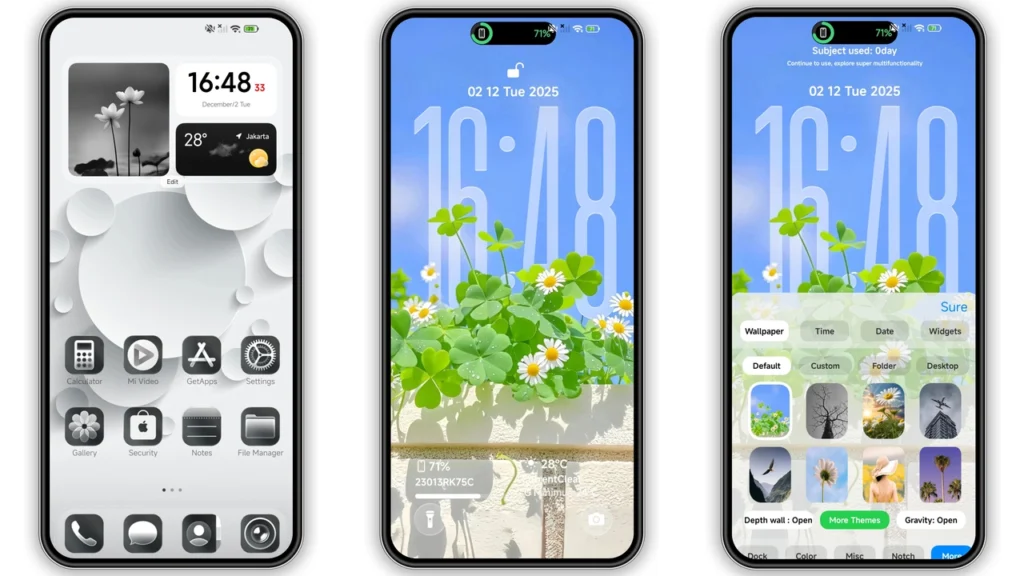
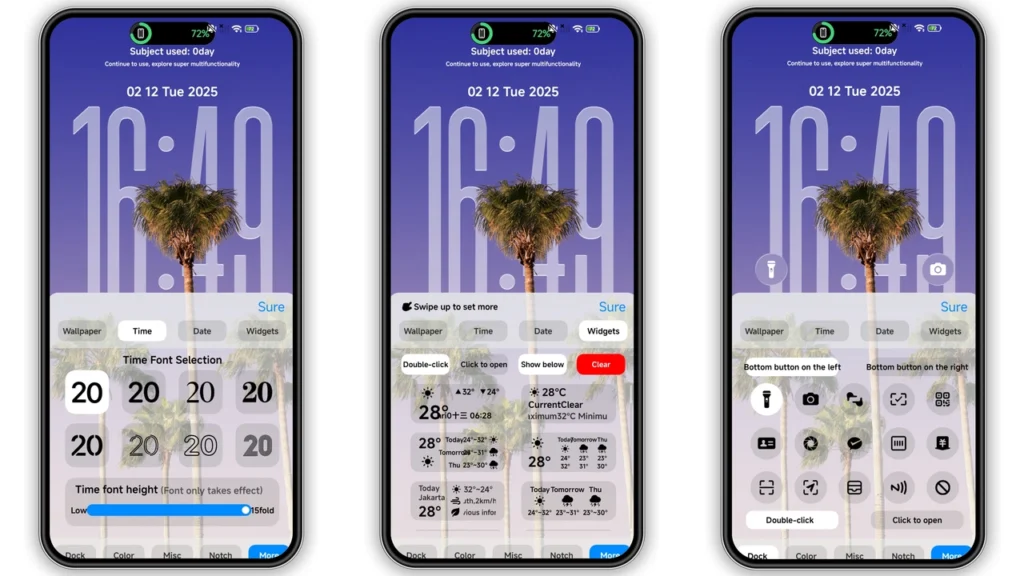
Super 26 Pro feels like one of those themes made by person who obsesses over every small layer. Big visual shift. Stock look gone fast. You get glossy icon pack, fresh wallpaper set, redesigned status bar, styled lock screen, and Always-on Display treatment that gives phone premium iOS-like mood without killing core Xiaomi identity. If you run HyperOS and want cleaner, richer, more “finished” UI, this one worth try.
Visual style and daily feel
Super 26 Pro pushes polished, high-contrast style. Not cartoon. Not flat-minimal either. Middle ground with depth effects and bright surface highlights.
Main vibe:
• Dark + glassy accents
• Premium icon edges with tighter glyph alignment
• More dimensional panels, not plain stock cards
• Lock screen built for “showpiece” first impression
• AOD tuned to look stylish, not noisy
Icons look redesigned with consistency in mind. Shape language feels controlled across system apps. Third-party icon masking not perfect on every app (normal in MIUI/HyperOS themes), but core set carries look well enough that home screen still feels unified.
Wallpaper pairing matters here. Theme works best with darker or gradient backgrounds where 3D depth effect can pop. On very bright wallpapers, status bar and widgets can lose some visual punch.
Notification shade and status elements feel more modern than stock. You will notice this most at night use: contrast and spacing improve quick-glance readability. Not drastic functional change, but visual fatigue lower over long use.
Who should use Super 26 Pro
Good fit for users who want “premium iOS energy” without cloning iPhone 1:1.
You will probably like this theme if you:
• switch themes often and want fresh look with minimal setup
• prefer glossy icons over flat Material style
• use lock screen as visual centerpiece
• care about social-ready screenshots/home screen aesthetics
• want custom look but still stable daily driver behavior
Maybe skip if you only like ultra-minimal monochrome packs or pure stock HyperOS language. Super 26 Pro has personality. It does not hide.
For content creators, students, and users who run lots of screen-on time, this theme gives device stronger “intentional design” feel. Not random mashup. Feels curated.
Compatibility notes before install
Core compatibility from theme side:
• HyperOS
• HyperOS 2.0
• Xiaomi phones
• Redmi phones
• POCO phones
Designer listed asMasuod(also seen as Masuod.B in theme details).
Real-world compatibility depends on ROM type:
1.Global/Stock HyperOS or MIUI builds: easiest path through Themes app using store deep-link flow. 2.Custom MIUI/HyperOS-based ROMs(MIUI 11/12/13/14 family, Xiaomi EU, MIUIRoom, similar): MTZ import flow works in most cases.
Theme size around79.72 MB, so first apply may take bit longer than lightweight packs. Normal behavior.
Important expectation: some modules may apply in layers (icons first, lock screen second, then status visuals). If elements look mixed right after apply, reboot once.
Install expectations on stock ROM
Stock ROM install has one common pain point: browser handoff to Themes app.
Expected behavior:
1. Open theme page in browser that handles Xiaomi theme deep links well. 2. Tap official store entry for theme. 3. If page opens in Chinese web view, use top-right menu and chooseOpen in app. 4. Themes Store app launches. 5. Download and apply.
If handoff fails, change browser. On many devices, Chrome or default Xiaomi browser works better than privacy-focused alternatives for this specific flow.
After apply:
• Check lock screen clock placement
• Check AOD visibility in low brightness
• Check notification text contrast in dark mode
If overlap or missing assets appears, restart device once. This fixes most post-apply cache glitches.
Install expectations on custom ROM with MTZ
If you run custom MIUI/HyperOS-based ROM, MTZ route usually fastest.
Basic flow:
1. Download.mtzpackage. 2. OpenThemesapp. 3. Go toThemestab. 4. Scroll down and tapImport. 5. Select downloaded.mtzfile. 6. Apply theme. 7. Reboot device if any UI layer looks broken.
Common result on custom ROMs: 90–100% visual apply, with occasional mismatch in niche system components depending on ROM framework edits. Not theme fault in many cases.
Download notes and file details
Available package:
•Super 26 Pro Theme mtz File
Use stable connection. File size not tiny. Interrupted downloads can produce broken import behavior.
Practical tips before import/apply:
• Keep at least 300 MB free storage for smooth unpack/apply process
• Do not rename.mtzextension
• Save file in easy folder (`Download/` ideal)
• Apply default theme first if current theme heavily modified
If import button missing, clear Themes app cache and reopen. On some ROMs, sign-in state in Xiaomi account also affects theme import visibility.
No password requirement indicated for package. If file asks password during unzip, you likely downloaded wrong mirror or corrupted archive. MTZ should import directly via Themes app without manual extraction.
What changes most after applying
Biggest visual wins users notice first day:
• lock screen style feels newer than stock
• status bar icons feel cleaner
• home screen icon set looks more cohesive
• wallpapers match icon tone well
• AOD looks intentionally designed, not afterthought
Performance impact should stay low on modern Xiaomi/Redmi/POCO hardware. Theme-heavy lock screen animations can feel slightly heavier on older budget devices, but still usable for daily setup.
Battery impact usually small. Main power draw still tied to brightness, refresh rate, signal, apps. If you use AOD aggressively, expect normal AOD battery cost regardless of theme.
Final take
Super 26 Pro strong pick for users chasing premium visual refresh on HyperOS without messy customization steps. Style sharp. Apply flow manageable. Compatibility broad across Xiaomi, Redmi, POCO when you use right method for your ROM type. If stock UI feels stale, this theme gives phone new identity fast and keeps daily usability intact.
Theme Preview
Download Links
Use the buttons below to open the theme file and the supporting link.
Super 26 Pro Theme mtz File
Helpful links
More Theme Updates
For more curated HyperOS and MIUI theme updates, visit Hyper OS x MIUI .


