
Introduction to Sdarkes HyperOS Theme
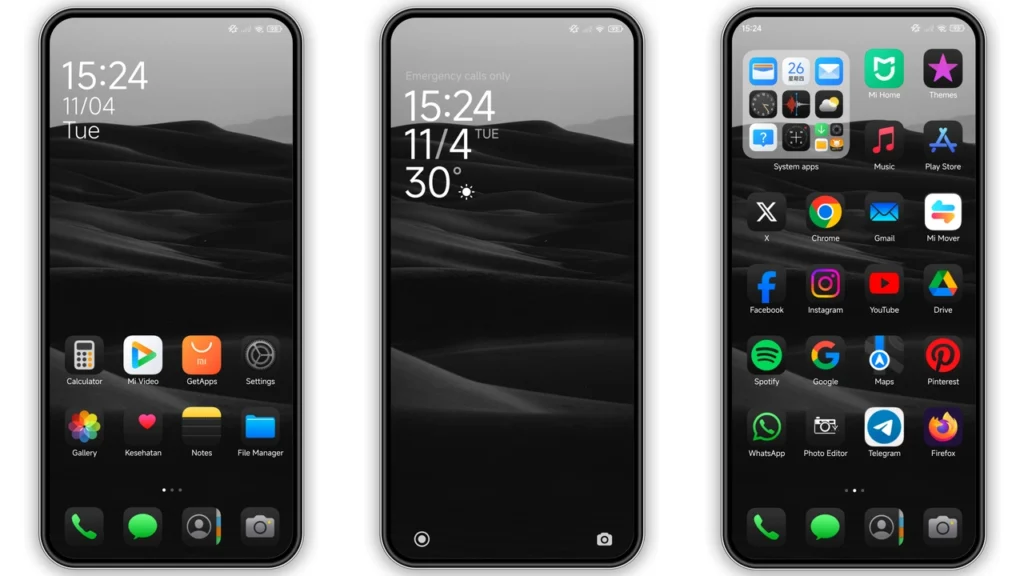
The Sdarkes HyperOS theme is a stunning, dark theme designed for Xiaomi and Redmi phones. Created by the talented designer Nata, this theme brings a fresh and modern look to your device. With its sleek, black color scheme and beautifully designed icons, the Sdarkes theme is perfect for those who want to give their phone a unique and stylish makeover.
Visual Style and Design
The Sdarkes theme features a predominantly black color scheme, which gives it a sleek and sophisticated look. The icons are carefully designed to match the theme's dark aesthetic, with a subtle sheen that adds a touch of elegance. The theme also includes a range of beautiful wallpapers that complement the dark color scheme perfectly. Whether you're a fan of abstract designs or prefer something more minimalist, the Sdarkes theme has something to offer.
Who May Like the Sdarkes Theme
The Sdarkes theme is perfect for anyone who wants to give their Xiaomi or Redmi phone a unique and stylish look. If you're a fan of dark themes, you'll love the Sdarkes theme's sleek and sophisticated design. The theme is also great for those who want to customize their phone's look without sacrificing performance. With its lightweight design and easy installation process, the Sdarkes theme is a great choice for anyone looking to personalize their device.
Compatibility Notes
The Sdarkes theme is compatible with HyperOS and works seamlessly on Xiaomi, Redmi, and POCO smartphones. If you're running a custom ROM on your device, you may need to follow additional installation steps to get the theme working properly. However, for most users, the installation process is straightforward and easy to follow.
Installation Expectations
Installing the Sdarkes theme is a relatively straightforward process. Once you've downloaded the theme file, you can follow the on-screen instructions to apply the theme to your device. The theme is designed to work seamlessly with HyperOS, so you can expect a smooth and hassle-free installation process. If you encounter any issues during installation, you can refer to the theme's documentation or seek help from the developer's support team.
Practical Download Notes
To download the Sdarkes theme, simply click on the download link and follow the on-screen instructions. The theme file is in MTZ format, which is compatible with most Xiaomi and Redmi devices. Once you've downloaded the theme, you can apply it to your device using the Theme Store app. Make sure to restart your device after applying the theme to ensure that all changes take effect properly.
Tips and Tricks
To get the most out of the Sdarkes theme, we recommend exploring the theme's various features and settings. The theme includes a range of customization options, including the ability to change the icon pack and modify the theme's color scheme. You can also use the theme's built-in wallpaper changer to switch between different wallpapers and keep your device looking fresh and new.
Conclusion
The Sdarkes HyperOS theme is a stunning, dark theme that's perfect for anyone looking to give their Xiaomi or Redmi phone a unique and stylish look. With its sleek, black color scheme and beautifully designed icons, the Sdarkes theme is a must-have for anyone who wants to customize their device. Whether you're a fan of dark themes or just looking for a fresh new look, the Sdarkes theme is definitely worth checking out.
Final Thoughts
In conclusion, the Sdarkes HyperOS theme is a great choice for anyone looking to customize their Xiaomi or Redmi phone. With its easy installation process, sleek design, and range of customization options, the Sdarkes theme is a must-have for anyone who wants to give their device a unique and stylish look. So why not give it a try today and see the difference for yourself?
Theme Preview
Download Links
Use the buttons below to open the theme file and the supporting link.
sdarkes Theme mtz File
Helpful links
More Theme Updates
For more curated HyperOS and MIUI theme updates, visit Hyper OS x MIUI .


