
Purple-Wave V15 is one of those HyperOS themes that instantly changes the mood of your phone without turning it into visual chaos. You get a purple-first style, refined icon work, a more modern status bar, and a lock screen setup that feels lively but still usable day to day. If you like colorful themes but hate clutter, this one lands in a nice middle zone: expressive, not exhausting.
Visual style: purple identity, clean structure
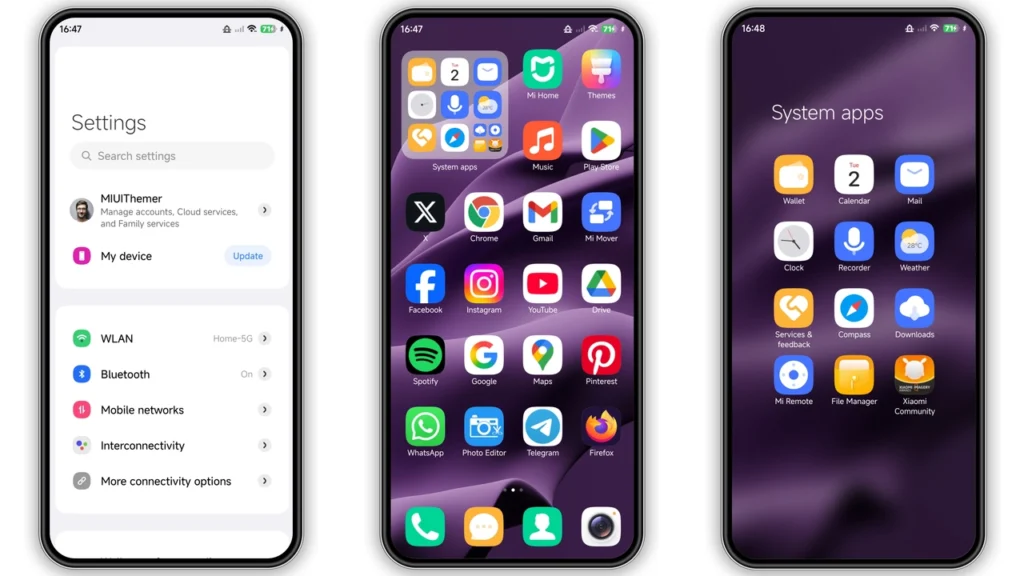
Purple-Wave V15 leans hard into violet tones, but not in a flat “one-color everywhere” way. It mixes gradients, darker accents, and abstract layers so the interface feels dynamic. Open app folders, notification shade, quick toggles, and lock elements all carry the same design language, so it looks cohesive instead of patched together.
Icon styling is a highlight. Shapes feel updated, with enough contrast to stay readable on busy wallpapers. This matters more than people admit. Some flashy themes look great in screenshots, then become annoying once you actually use them all day. Purple-Wave V15 keeps icon edges and symbol clarity strong, so app scanning stays fast.
Wallpaper pairing is also solid. The included visuals support both home screen and lock screen personality, and they don’t fight against widgets. If your current setup includes weather, calendar, or battery widgets, this theme usually blends well. On AMOLED panels, darker purple regions can look especially rich.
Status bar treatment is modern but not weird. Signal, battery, and indicator elements feel customized enough to notice, not so extreme that you spend a week relearning basic icons. That balance is where this theme wins.
Always-on Display styling adds another layer for users who care about idle-screen aesthetics. It complements the lock screen rather than feeling like a separate skin pack. Result: better continuity from screen-off → wake → unlock.
Who will like Purple-Wave V15 most
This theme fits users who want a personality upgrade with minimal setup pain. Good match if:
• You’re bored of default HyperOS visuals.
• You want color, but still need clean readability.
• You prefer modern icon packs over cartoon-heavy designs.
• You like lock screen polish and AOD touches.
• You switch wallpapers often and need flexible UI contrast.
It’s also a strong pick for people testing “daily driver” themes. Some themes are fun for 2 days, then get replaced. Purple-Wave V15 feels built for longer use because typography, icon contrast, and spacing stay practical.
If your taste is strict minimal monochrome, this may feel too vibrant. If your taste is full neon chaos, this may feel too restrained. It sits in the center: stylized + usable.
Compatibility: what works, what to check first
Core compatibility target is HyperOS devices across Xiaomi, Redmi, and POCO lines. Theme description also points to a HyperOS/MIUI 14 mixed design approach, so visual components may feel familiar to users migrating from MIUI 14 setups.
Quick compatibility expectations:
•Best fit:HyperOS, including newer HyperOS builds.
•Likely okay:MIUI 14-style environments depending on ROM behavior.
•Custom ROM path:MTZ import usually required.
ROM type changes install behavior:
•Global Stable / Stock ROM→ theme store route typically easiest.
•Custom ROM (Xiaomi EU, MIUIRoom, etc.)→ MTZ import path generally required.
Theme size is light enough for most devices (around 17 MB class), so download/storage impact is minimal.
One practical note: theme engines can render slightly differently per device model, Android base, and security patch level. So small UI variations are normal (especially icons in third-party apps, control center spacing, lock screen widget alignment).
Install expectations: smooth if you follow the right path
For most users, installation is straightforward. The key is using the correct method for your ROM.
Stock ROM (HyperOS / MIUI Global Stable)
Use the Theme Store app flow. In many cases, opening the store link in a compatible browser and then handing off to the Themes app works best. Once it opens in Themes, download → apply.
What to expect after apply:
• Home screen visuals change immediately.
• Icons + status bar update first.
• Lock screen/AOD elements may finalize after a quick screen off/on cycle.
Custom ROM users
Use MTZ import flow:
1. Download.mtzfile. 2. OpenThemesapp. 3. Go toThemessection. 4. Scroll down →Import. 5. Select downloaded.mtz. 6. Apply theme.
If overlays look incomplete, restart once. That usually resolves overlap, partial icon replacements, or text visibility glitches.
Practical download notes before you tap apply
Purple-Wave V15 is offered as a free theme package, which is great, but you still want to install smartly.
Checklist before downloading:
• Keep at least ~200 MB free storage for safe temp/cache operations.
• Update Themes app if it’s outdated.
• Disable battery/data restrictions on Themes app during install.
• Save current layout backup (widgets, icon grid, lock style) if you’re picky.
After applying:
• Give it 1–2 minutes to settle resources.
• Re-check lock screen shortcuts and notifications.
• Test readability in bright sunlight + dark room.
• If needed, mix components (icons from theme + stock lock screen) for hybrid setup.
Common minor issues + fixes:
•Some third-party icons stay stock→ normal; pack coverage differs per app.
•Lock screen text overlap→ restart device once.
•Theme store handoff fails→ retry with Xiaomi default browser or Chrome.
•Control center looks off→ reapply theme, then reboot.
Day-to-day feel: worth it?
Yes, if you want a confident purple aesthetic with real usability. Purple-Wave V15 doesn’t rely on gimmicks alone. Its strength is consistency: icons, status bar, lock screen, and AOD feel like one design system, not random mods.
For Xiaomi/Redmi/POCO users who rotate themes often, this is an easy recommendation for the “stylish daily” slot. You get visual freshness, recognizable UI structure, and low friction on install. That combo is rare.
If you’re curating a 2026 theme shortlist, Purple-Wave V15 deserves a place near the top of your color-theme picks—especially if you want something expressive that still behaves like a practical everyday interface.
Theme Preview
Download Links
Use the buttons below to open the theme file and the supporting link.
Purple-Wave V15 Theme mtz File
Helpful links
More Theme Updates
For more curated HyperOS and MIUI theme updates, visit Hyper OS x MIUI .


