
Introduction to Poo HyperOS Theme
The Poo HyperOS theme is a stunning visual package designed for Xiaomi and Redmi phones, aiming to revolutionize the user interface with its unique and captivating design elements. Created by the talented designer Eto, this theme promises to bring a fresh and exciting look to your smartphone, making it stand out from the standard stock themes. Whether you're a fan of minimalist designs, or you prefer something more vibrant and playful, the Poo HyperOS theme has something to offer, blending simplicity with elegance.
Visual Style and Design Elements
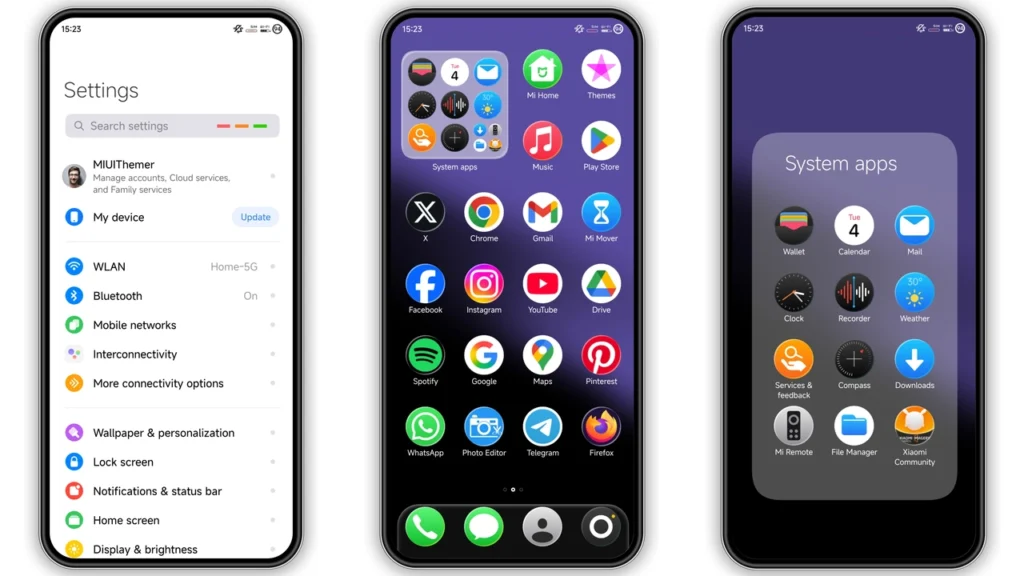
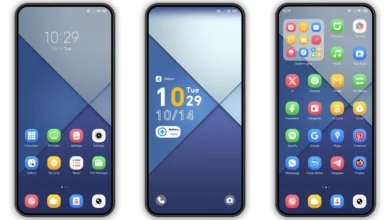
The Poo HyperOS theme boasts an array of design elements that contribute to its allure. It features well-designed icons that are not only aesthetically pleasing but also highly functional, making navigation through your phone's interface a seamless experience. The theme includes fresh wallpapers that can instantly elevate the mood of your home screen, along with a new status bar and a cool lock screen that adds to the overall visual appeal. One of the standout features of this theme is its stylish Always-on Display, which not only looks great but also provides essential information at a glance, keeping you updated without needing to unlock your phone.
For those who appreciate a more personalized look, the Poo HyperOS theme offers a dynamic lock screen, giving users the flexibility to customize their phone's appearance to suit their preferences. The incorporation of rounded icons adds a touch of modernity, ensuring that the theme stays in line with current design trends. The overall effect is a theme that is both visually striking and highly functional, making it an excellent choice for anyone looking to give their Xiaomi or Redmi phone a makeover.
Who May Like the Poo HyperOS Theme
The Poo HyperOS theme is likely to appeal to a wide range of users, given its versatile design. For starters, fans of iOS will appreciate the theme's iOS-inspired elements, which bring a taste of Apple's operating system to Xiaomi and Redmi devices. Individuals who prefer a clean and simple interface will enjoy the theme's minimalist approach, which avoids clutter and focuses on providing a seamless user experience.
Moreover, users who are looking for a theme that can offer a consistent look across different parts of their phone's interface will find the Poo HyperOS theme very appealing. The theme's attention to detail, from the icons to the lock screen, ensures a cohesive visual style that enhances the overall aesthetic of the phone. Whether you're a student, a professional, or simply someone who values a unique and personalized phone experience, the Poo HyperOS theme has the potential to meet your needs and exceed your expectations.
Compatibility Notes
One of the critical factors to consider when choosing a theme for your Xiaomi or Redmi phone is compatibility. The Poo HyperOS theme is designed to be compatible with HyperOS and works seamlessly on Xiaomi, Redmi, and POCO smartphones. This broad compatibility ensures that a wide range of users can enjoy the theme, regardless of their specific device model.
For users running HyperOS or MIUI Global Stable ROM (Stock ROM) on their devices, applying the theme is relatively straightforward. The theme's compatibility with HyperOS 2.0 is also a significant advantage, as it future-proofs the theme and ensures that it will continue to work well with upcoming updates and releases.
Install Expectations
Installing the Poo HyperOS theme is a relatively straightforward process, but it does require some steps to be followed carefully. For users with HyperOS or MIUI Global Stable ROM, the process involves opening the theme store link, downloading the theme, and then applying it through the Theme Store APP. It's essential to follow the provided instructions closely to ensure a smooth installation process.
For those with custom ROMs, such as Xiaomi EU ROM or MIUIRoom, the process might slightly differ. These users can install the theme using the MTZ file, which involves downloading the file, opening the Theme Store APP, importing the MTZ file, and then applying the theme. Regardless of the method, it's recommended to restart the device after applying the theme to ensure that all elements are properly loaded and visible.
Practical Download Notes
To download the Poo HyperOS theme, users can access the download link provided. The theme is available as an MTZ file, which is convenient for installation on compatible devices. The file size is approximately 10.78 MB, which is relatively modest and should not pose a significant challenge for most users in terms of download time or storage space.
It's worth noting that the theme is completely free to use, making it an excellent option for those who want to customize their phone's appearance without incurring additional costs. The fact that the theme is free also encourages users to try out different themes and find the one that best suits their preferences, all without any financial commitment.
Conclusion
The Poo HyperOS theme is a remarkable visual package that has the potential to transform the look and feel of your Xiaomi or Redmi phone. With its unique blend of simplicity, elegance, and functionality, it caters to a wide range of tastes and preferences. Whether you're a fan of iOS, prefer a minimalist design, or are simply looking for a way to personalize your phone, the Poo HyperOS theme is definitely worth considering.
Given its compatibility with HyperOS and MIUI, broad device support, and the ease of installation, this theme stands out as a top choice for anyone looking to elevate their smartphone experience. The fact that it's free to download and use adds to its appeal, making it accessible to everyone. So, if you're ready to give your phone a fresh new look and enjoy a more personalized and engaging user experience, the Poo HyperOS theme is an excellent place to start.
Theme Preview
Download Links
Use the buttons below to open the theme file and the supporting link.
Poo Theme mtz File
Helpful links
More Theme Updates
For more curated HyperOS and MIUI theme updates, visit Hyper OS x MIUI .


