
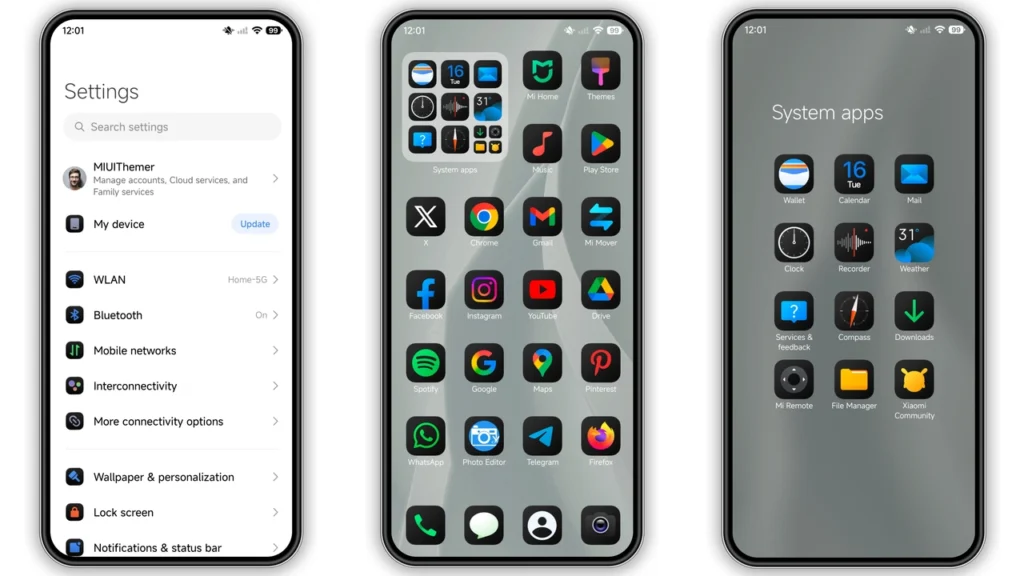
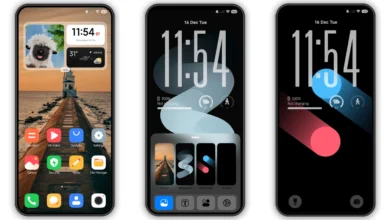
PlayHyper77 is one of those HyperOS themes that instantly makes a Xiaomi phone feel sharper without turning it into a gimmick. It leans into a clean black style, adds redesigned icons, refreshes the status bar, and gives you a dynamic lock screen plus styled Always-on Display. If you like a modern dark setup that still feels practical for daily use, this one lands in a sweet spot: bold enough to feel new, restrained enough to keep your phone usable.
Visual style: what changes, what stays usable
PlayHyper77 follows apure/dark visual direction→ cleaner contrast, less visual noise, better focus on content. It is not trying to imitate iOS 1:1 or overload every screen with effects. Instead, it applies a consistent treatment across core UI areas:
•Icons→ redesigned, cleaner shapes, more uniform weight
•Wallpaper tone→ dark-friendly base that supports AMOLED-style contrast
•Status bar→ customized look, tighter visual identity
•Lock screen→ dynamic presentation with a more premium vibe
•AOD→ styled, cohesive with the rest of the package
The biggest win is consistency. Some themes look good only in screenshots; PlayHyper77 usually holds up in real navigation: settings, app drawer, notifications, quick toggles, and home screen widgets all feel like part of one design language.
If your current setup feels flat or dated, this theme gives that “new phone” feeling without forcing you to relearn UI behavior.
Who will enjoy PlayHyper77 most
Best fit:
• Users who preferdark/minimalover colorful or cartoon styles
• People who want a phone that looks custom but not chaotic
• Xiaomi/Redmi/POCO owners who rotate themes often and want a reliable daily driver
• Users who like lock-screen personality but still want readability
Less ideal:
• Fans of bright, playful, highly saturated themes
• Users wanting heavy skeuomorphic/themed-everything icon packs
• Anyone expecting massive animation mods on every screen
In short:mature black aesthetic → strong daily usability.
Compatibility notes before you install
Theme compatibility is straightforward:
•Primary support: HyperOS (incl. HyperOS 2.0 environments where theme support is active)
•Brand/device family: Xiaomi, Redmi, POCO
•Format available: Store route +.mtzfile route
•Theme size: ~30.33 MB
•Designer: DwPlay77
•Server/region profile: Global-friendly listing context
Real-world rule: ROM type decides install method.
•Global Stable / Stock HyperOS-MIUI path→ usually best through Theme Store app handoff
•Custom ROM path (MIUI/HyperOS-based builds)→ usually best via MTZ import
If you are on custom builds (Xiaomi EU, MIUIRoom, similar), MTZ import is typically the smoother path.
Install expectations: what users should know first
Apply expectations matter. Theme engines can behave differently by ROM, region, and app version.
What to expect:
1.Theme applies in layers(icons, lock screen, status bar, AOD, system accents). 2. Some parts may apply instantly; others may need a quick re-open of apps. 3. Minor overlap glitches can happen after first apply. 4.Reboot often fixes visual leftovers(misaligned text/icons, stale lock screen assets).
If something looks off after install, don’t panic. Most issues are cache/render refresh, not theme failure.
How to install on stock ROM (HyperOS/MIUI Global)
For stock ROM users, the expected flow is Theme Store handoff from browser → app.
1. Open the theme page in a compatible browser. 2. Tap theOfficial Theme Store Linkarea. 3. If a Chinese page opens, use the browser menu and chooseOpen in app. 4. Let it redirect to Xiaomi’sThemesapp. 5. Download, then apply.
If handoff fails in one browser, retry in Chrome or Xiaomi’s default browser. Some browsers block deep-link behavior.
How to install with MTZ (custom ROM users)
If you run MIUI/HyperOS-based custom ROMs, import is usually direct:
1. Download the.mtzfile. 2. OpenThemesapp. 3. Go toThemessection. 4. Scroll down → tapImport. 5. Select the downloaded.mtz. 6. Apply theme. 7. Restart device if UI overlap appears.
This method is favored when store-region restrictions or link handoff issues block normal install.
Practical download notes (important)
• Download label:PlayHyper77 Theme mtz File
• File host: MediaFire
• Expected file type:.mtz
• Expected size range: roughly 30 MB class
Checklist before applying:
• Ensure enough storage (file + temporary extraction overhead).
• Keep Themes app updated.
• Disable aggressive cleaners during import/apply.
• After apply, verify lock screen clock, notification shade, and AOD readability.
If text contrast is too dim for your wallpaper, switch to a simpler dark background. This theme looks best with clean wallpapers, not busy high-detail images.
Daily-use verdict
PlayHyper77 gets the basics right: dark tone, icon polish, lock-screen personality, and a coherent system look without becoming messy. It feels designed by someone who actually uses dark themes every day, not just someone who made a flashy preview.
For Xiaomi/Redmi/POCO users wanting a black HyperOS setup that stays practical, this is an easy recommendation. Install is simple once you pick the right route (Theme Store vs MTZ import), and the final result is stylish enough for enthusiasts while stable enough for regular use.
If your goal is:clean black UI → fresh look + daily comfort, PlayHyper77 is worth keeping in your active rotation.
Theme Preview
Download Links
Use the buttons below to open the theme file and the supporting link.
PlayHyper77 Theme mtz File
Helpful links
More Theme Updates
For more curated HyperOS and MIUI theme updates, visit Hyper OS x MIUI .


