
Introduction to OX F1 HyperOS Theme
The OX F1 HyperOS theme is a stunning customization option designed specifically for Xiaomi and Redmi phones. Developed by oxfury 1, this theme promises to transform your device's interface with its sleek design, fresh wallpapers, and cool lock screen features. In this article, we'll delve into the details of the OX F1 HyperOS theme, exploring its visual style, compatibility, installation process, and download notes to help you decide if this theme is right for you.
Visual Style and Features
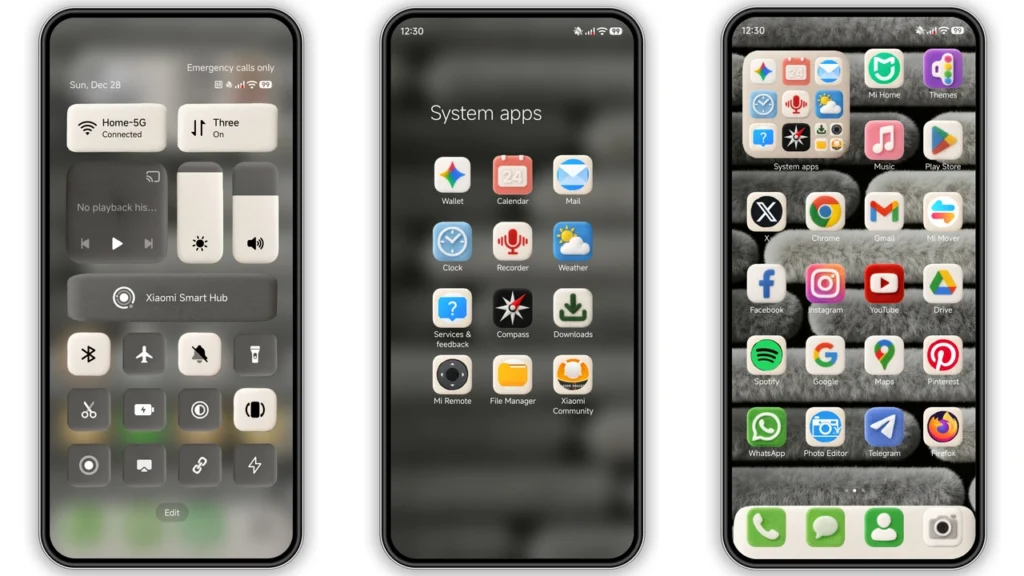
The OX F1 HyperOS theme boasts an attractive and modern design that can completely overhaul the look of your Xiaomi or Redmi phone. It comes with a set of well-designed icons, new wallpapers, a revamped status bar, and a stylish Always-on Display. These elements work together to create a cohesive and visually appealing interface that can make your device stand out. The theme's dynamic lock screen is particularly noteworthy, offering a cool and interactive way to personalize your phone's lock screen.
Who May Like the OX F1 HyperOS Theme?
This theme is ideal for individuals who are looking for a fresh and modern aesthetic for their Xiaomi or Redmi device. If you're someone who enjoys customizing your phone and wants a unique look that sets your device apart from the standard stock themes, the OX F1 HyperOS theme could be an excellent choice. Additionally, fans of sleek and minimalist designs will appreciate the theme's clean and sophisticated visual style.
Compatibility Notes
The OX F1 HyperOS theme is designed to be compatible with HyperOS and works seamlessly on Xiaomi, Redmi, and POCO smartphones. If you're running HyperOS or HyperOS 2.0 on your device, you can easily install and apply this theme. However, it's essential to note that compatibility may vary depending on the specific model of your phone and the version of the operating system it's running. Before downloading the theme, ensure that your device meets the compatibility requirements to avoid any potential issues.
Install Expectations
Installing the OX F1 HyperOS theme is a relatively straightforward process. For users with HyperOS or MIUI Global Stable ROM (Stock ROM), the theme can be downloaded and applied directly through the Theme Store APP. Simply open the theme's page, click on the "Official Theme Store Link," and follow the prompts to download and install the theme. For those with custom ROMs like Xiaomi EU ROM or MIUIRoom, the theme can be installed using the MTZ file. After downloading the MTZ file, open the Theme Store APP, navigate to the "Themes" option, swipe to the bottom, and click "Import" to install the theme.
Practical Download Notes
To download the OX F1 HyperOS theme, you can find the download link provided. The theme's MTZ file is available for download, and the file size is approximately 54.76 MB. It's recommended to download the theme using a stable internet connection to ensure a smooth and successful download process. Additionally, be sure to only download the theme from trusted sources to avoid any potential security risks.
Conclusion
The OX F1 HyperOS theme offers a unique and modern aesthetic for Xiaomi and Redmi phones, complete with sleek designs, fresh wallpapers, and interactive lock screen features. With its compatibility with HyperOS and ease of installation, this theme is an excellent option for those looking to customize their device. By following the installation instructions and downloading the theme from a trusted source, you can elevate your Xiaomi experience with the OX F1 HyperOS theme.
Theme Preview


Download Links
Use the buttons below to open the theme file and the supporting link.
OX F1 Theme mtz File
Helpful links
More Theme Updates
For more curated HyperOS and MIUI theme updates, visit Hyper OS x MIUI .


