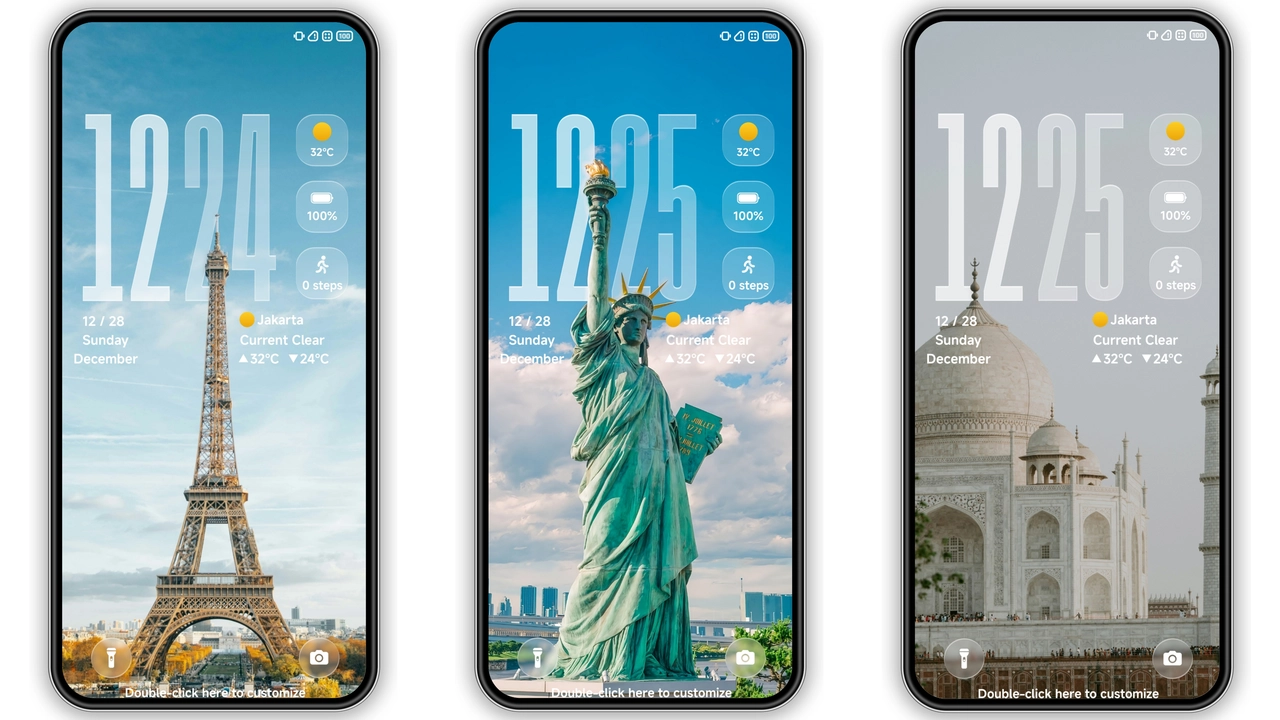
If you want your Xiaomi phone to feel darker, cleaner, and more premium without paying, OX BM is a strong pick. It leans into a black-heavy visual style with depth effects, redesigned icons, a refreshed status bar, and a more stylish lock screen/AOD setup. It is built for HyperOS devices first, but MIUI users on supported builds can still run it with the usual theme import route. In short: stock look out → bold, modern interface in.
Visual style: black, 3D depth, cleaner than stock
OX BM is made for people who like dark UI done properly, not just “dark mode + random icons.” The theme’s core mood is:
• Black-first palette → stronger contrast, less visual noise
• 3D depth touches → layered feel on panels/widgets
• Custom icon pack → tighter shape language, more uniform app grid
• Status bar refresh → cleaner glyph style, better visual rhythm
• Lock screen + AOD styling → more personality than default HyperOS
The icons are one of the best parts. They look intentional, with that slightly premium, “finished” style that makes your home screen look curated instead of accidental. If you care about visual consistency between system icons and third-party app icons, this theme does a decent job keeping the gap small.
Wallpaper pairing also matters here. OX BM works best with low-clutter dark or gradient backgrounds. Busy wallpapers fight the icon clarity; minimal backgrounds make everything pop.
Who will like OX BM (and who probably won’t)
Good fit:
• Users who prefer dark, AMOLED-friendly aesthetics
• People bored with default HyperOS visuals
• Users who want a premium look without paid themes
• Fans of icon-heavy customization and lockscreen polish
Maybe skip if:
• You only use bright, colorful themes
• You want a strict stock/iOS-clone look
• You dislike heavy visual theming across system UI
Practical reality: this is not a subtle theme. It has a style. If you want your phone to feel “different” immediately, OX BM delivers that fast.
Compatibility: what works, what to verify first
At a glance, this theme targets:
• HyperOS
• HyperOS 2.0
• Xiaomi / Redmi / POCO devices
Theme profile notes commonly shared with OX BM:
• Designer: oxfury 0.2
• Size: ~75.16 MB
• Region base: Global-oriented usage
• Feature flags: Premium look, wallpapers, 3D depth, customizable feel, black icon style
Before install, confirm these basics:
1. Your Themes app is working normally. 2. You’re signed into your Xiaomi account. 3. Your ROM type is clear: Global Stable stock vs custom ROM. 4. You have enough free storage (theme file is not tiny).
If your device is heavily modified (font modules, lockscreen mods, third-party status bar tweaks), expect occasional overlaps. That is normal for themed system layers.
Install expectations on stock ROM (HyperOS / MIUI Global)
Stock ROM route is usually easiest if the theme store handoff opens correctly.
Typical expectation:
1. Open the theme page in a browser that passes the link to Xiaomi Themes correctly. 2. Use the official store handoff option. 3. Open in Themes app. 4. Download, apply.
If handoff fails, browser choice often causes it. Xiaomi Browser or Chrome usually behaves better than random third-party browsers for store deep links.
After apply, give the UI a few seconds to rebuild caches (icons, lockscreen resources, AOD assets). First load can feel a bit uneven; second pass usually stabilizes.
Install expectations on custom ROMs (MIUI/HyperOS-based)
If you’re on Xiaomi EU, MIUIRoom, or similar MIUI/HyperOS custom builds, MTZ import is the normal path.
Steps
1. Download the .mtz package. 2. Open Themes app. 3. Go to Themes section. 4. Scroll down → tap Import. 5. Select downloaded MTZ file. 6. Apply theme. 7. Reboot once if elements overlap/miss.
That reboot step matters more than people think. If the status bar or lockscreen appears half-skinned, restart once before troubleshooting further.
What may change after applying
Common post-apply results:
• Home screen icons shift to theme pack
• Notification shade + quick toggles get visual edits
• Status bar indicators adopt custom styling
• Lock screen typography/layout updates
• Always-on display gets theme-specific accents
What may stay stock on some devices:
• Certain third-party app icons
• Some regional system app visuals
• A few widget surfaces tied to firmware version
Theme behavior can vary by build. Same theme, different ROM patch → slightly different output.
Practical download notes (so you don’t waste time)
• Use the MTZ file if store handoff fails.
• Keep a backup theme/profile if you plan to compare.
• Test readability at low brightness (important for dark themes).
• If notification text contrast looks off, try reapplying once.
• If lockscreen/AOD glitches appear, reboot first, then reapply.
Also: this is a fairly full theme package, not a tiny icon-only skin. Give it a proper test window—at least one day/night cycle—before deciding. Dark themes can feel amazing in low light but too dense under harsh daylight if your wallpaper/brightness combo is wrong.
Daily-use verdict
OX BM is a strong “set it and enjoy it” theme for users who want a bold dark identity on HyperOS. The black icon direction, layered visuals, and lockscreen polish make it feel more complete than many quick-release themes. It is free, looks premium, and gives immediate visual payoff.
Best outcome comes from pairing it with:
• Clean wallpaper
• Medium icon grid density
• One reboot after apply
If your goal is: stock fatigue → fresh premium dark UI, OX BM is worth installing.
Download
• OX BM Theme mtz File: `Use the download buttons below instead of copying raw file-host links.
If you apply it, test lockscreen, notifications, and dialer on day one. If all three look good, you’re set.
Theme Preview
Download Links
Use the buttons below to open the theme file and the supporting link.
OX BM Theme mtz File
Helpful links
More Theme Updates
For more curated HyperOS and MIUI theme updates, visit Hyper OS x MIUI .


