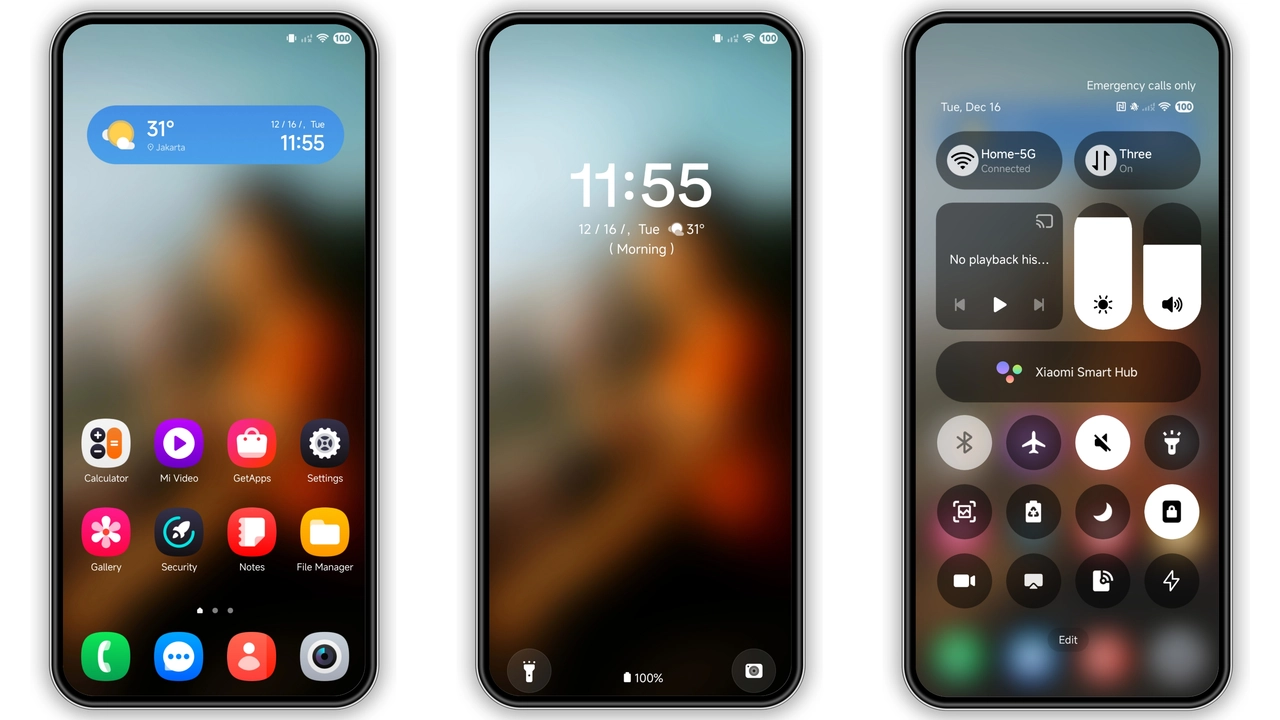
If you want your Xiaomi, Redmi, or POCO phone to feel cleaner, brighter, and a bit more “One UI” without changing ROMs,One + Coloris a solid pick. It leans modern, minimal, and friendly: polished icons, neat status bar, fresher wallpaper tone, plus a lock screen/AOD setup that looks more premium than stock on many devices. It’s lightweight, free, and easy to test for a day before deciding whether it deserves your long-term setup.
Visual style: what One + Color actually changes
This theme sits in that sweet spot between “colorful” and “not chaotic.” You get visible changes, but not the kind that make daily use feel tiring.
What stands out first:
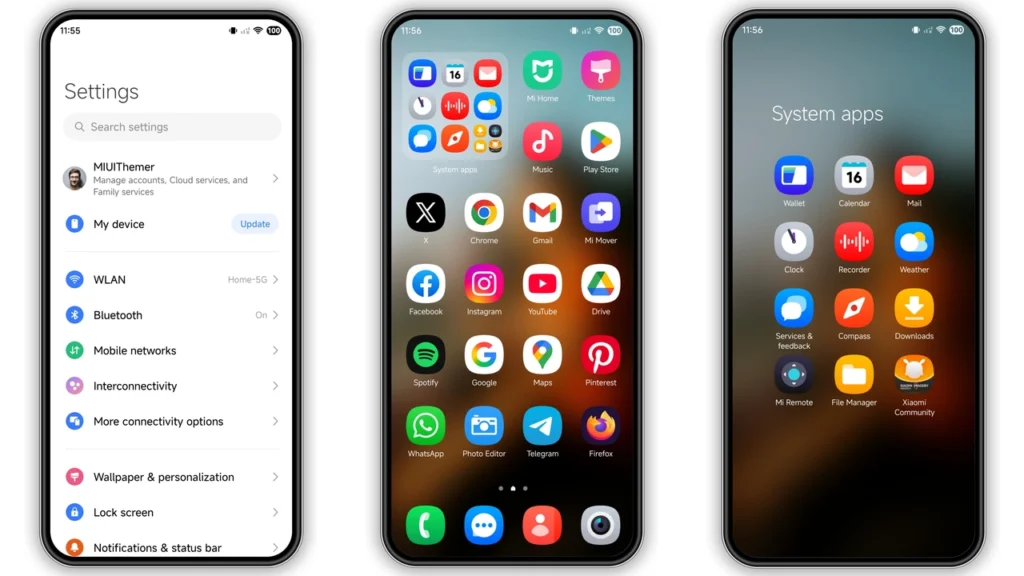
•Icons→ rounded, clean, Samsung-ish vibe.
•Wallpaper pairing→ brighter, softer contrast, less harsh than many dark-heavy packs.
•Status bar polish→ tidier overall look; feels less stock-generic.
•Lock screen→ more designed, less default.
•Always-on Display styling→ nicer glance value if you use AOD often.
The design language is clearly built for people who like a neat home screen without going full “gaming neon.” It has enough personality to feel new, but not so much that notifications, toggles, or text legibility become annoying.
In day-to-day use, that matters more than screenshots. Many themes look great in preview, then become visually noisy after 48 hours. One + Color is closer to practical daily-driver territory.
Who should try it (and who might skip)
Best fit:
• You likeOne UI-inspiredstyling on Xiaomi hardware.
• You want afresh but saferedesign.
• You care abouticon consistencyacross core apps.
• You use lock screen + AOD a lot, want both to feel premium.
• You get bored of stock HyperOS visuals quickly.
Maybe skip if:
• You want ultra-minimal monochrome only.
• You prefer strict iOS-style themes.
• You dislike bright/colored icon sets.
• You need absolute stock behavior everywhere with no UI quirks.
Quick verdict: this theme is for users who want “new phone feeling” without risky modding.
Compatibility notes: HyperOS, MIUI, Xiaomi/Redmi/POCO
Theme is listed forHyperOS / HyperOS 2.0and is commonly used on Xiaomi family devices:
• Xiaomi
• Redmi
• POCO
Also workable on many MIUI bases when imported as MTZ (especially custom ROM ecosystems), but behavior can vary by:
• ROM branch (Global/EEA/China/custom)
• Android base version
• Theme Store version
• regional theme restrictions
Practical expectation:
•HyperOS stock→ usually smoothest experience.
•MIUI 14 stock→ generally fine, but apply method matters.
•Custom MIUI/HyperOS ROMs→ MTZ import often easiest route.
Designer credit:jayesh Nimbara.
Theme package size sits around normal range (about 16.86 MB class), so download/install is quick on stable connection.
Install expectations: stock ROM vs custom ROM
You’ll usually take one of two paths.
1) Stock HyperOS / MIUI Global stable
Typical flow:
1. Open theme page in a browser that hands off correctly to Themes app. 2. Tap official store entry. 3. If it opens Chinese store page, use menu →Open in app. 4. Theme Store launches. 5. Download. 6. Apply.
If a link won’t open properly in your first browser, retry with Chrome or Xiaomi default browser. Some browsers block or fail app handoff.
2) Custom ROM (MIUI/HyperOS based)
Use MTZ import route:
1. Download MTZ file. 2. OpenThemesapp. 3. Go to Themes section. 4. Scroll down →Import. 5. Select downloaded.mtz. 6. Apply theme.
After applying,restart onceif you see overlap, missing text, or odd spacing. One reboot fixes most theme layering glitches.
Real-world quirks you may notice
No theme is perfect on every device/region combo. Expect occasional small mismatches:
• A few third-party icons may stay default.
• Control center elements can differ slightly by ROM build.
• AOD details may render differently on certain panels.
• Font/layout spacing can vary by system font and DPI.
None of that is unusual. If core apps (dialer/messages/settings/notifications) look consistent, that’s already a good implementation.
Download notes that save time
Use the provided MTZ package label:
•One + Color Theme mtz File
Tips:
• Keep a copy of the MTZ in internal storage → easy re-import after reset/update.
• Apply on moderate battery level, not 2% edge case.
• If pieces don’t apply fully, reapply once after reboot.
• Clear Themes app cache only if install UI seems stuck.
And yes, always test a new theme for at least one full day cycle:
• daylight readability
• night lock screen readability
• notification shade clarity
• quick settings legibility
A theme can look amazing for 10 minutes and still fail long-session comfort. One + Color generally passes that comfort check better than many flashy packs.
Final take
One + Coloris a dependable visual refresh for Xiaomi, Redmi, and POCO users who want Samsung-flavored cleanliness on HyperOS/MIUI. It’s attractive without being loud, modern without being experimental, and practical enough for daily use. If your current setup feels stale, this one is worth installing first before you jump into heavier, more stylized themes.
Download: One + Color Theme mtz File
Theme Preview
Download Links
Use the buttons below to open the theme file and the supporting link.
One + Color Theme mtz File
Helpful links
More Theme Updates
For more curated HyperOS and MIUI theme updates, visit Hyper OS x MIUI .


