
Introduction to Noble Dark Leather Theme
The Noble Dark Leather theme is a stunning HyperOS theme designed for Xiaomi and Redmi phones. This theme brings a new level of sophistication and elegance to your device, with its well-designed icons, fresh wallpapers, and sleek lock screen. If you're looking to give your phone a premium look and feel, this theme is definitely worth considering.
Visual Style and Design
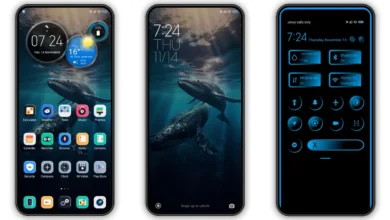
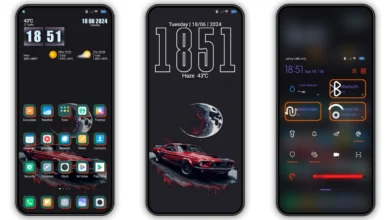
The Noble Dark Leather theme features a simple yet stylish design that is sure to appeal to those who appreciate a minimalist aesthetic. The theme's color scheme is predominantly dark, with accents of leather-like textures that add a touch of sophistication. The icons are well-designed and easy to recognize, making it easy to navigate your phone's interface. The theme also includes a range of wallpapers that complement the overall design, giving you plenty of options to choose from.
Who May Like This Theme
The Noble Dark Leather theme is likely to appeal to anyone who appreciates a clean and elegant design. If you're someone who values simplicity and sophistication, this theme is definitely worth considering. The theme's dark color scheme also makes it a great option for those who want to save battery life on their OLED display. Additionally, the theme's leather-like textures give it a premium feel that is sure to appeal to business users or anyone who wants a professional-looking theme.
Compatibility Notes
The Noble Dark Leather theme is compatible with HyperOS and works on Xiaomi, Redmi, and POCO smartphones. If you're running a custom ROM, you may need to follow additional instructions to install and apply the theme. It's always a good idea to check the compatibility of the theme with your device before downloading and installing it.
Install Expectations
Installing the Noble Dark Leather theme is a relatively straightforward process. If you have a HyperOS or MIUI Global Stable ROM, you can follow the instructions provided to download and apply the theme. If you have a custom ROM, you may need to use an MTZ file to install the theme. In either case, it's a good idea to restart your device after applying the theme to ensure that everything is working properly.
Practical Download Notes
To download the Noble Dark Leather theme, you can click on the download link provided. The theme is available in an MTZ file format, which can be easily installed on your device. The file size is approximately 10.76 MB, so make sure you have enough storage space on your device before downloading. It's also a good idea to check the theme's description and features before downloading to ensure that it meets your needs and expectations.
Tips and Tricks
To get the most out of the Noble Dark Leather theme, it's a good idea to explore the theme's features and settings. The theme includes a range of options for customizing the look and feel of your device, including the ability to change the wallpaper, icons, and lock screen. You can also use the theme's built-in widgets to add additional functionality to your device.
Conclusion
The Noble Dark Leather theme is a stunning HyperOS theme that is sure to elevate your Xiaomi or Redmi phone. With its simple yet stylish design, premium feel, and range of customization options, this theme is a great option for anyone looking to give their device a unique and sophisticated look. Whether you're a business user or just someone who appreciates a clean and elegant design, the Noble Dark Leather theme is definitely worth considering.
Final Thoughts
In conclusion, the Noble Dark Leather theme is a great option for anyone looking to give their Xiaomi or Redmi phone a premium look and feel. The theme's simple yet stylish design, combined with its range of customization options, make it a great choice for anyone who wants a unique and sophisticated theme. With its compatibility with HyperOS and MIUI devices, this theme is sure to appeal to a wide range of users. So why not give it a try and see how it can elevate your mobile experience?
Theme Preview
Download Links
Use the buttons below to open the theme file and the supporting link.
Noble Dark Leather Theme mtz File
Helpful links
More Theme Updates
For more curated HyperOS and MIUI theme updates, visit Hyper OS x MIUI .


