
Introduction to Musci HyperOS Theme
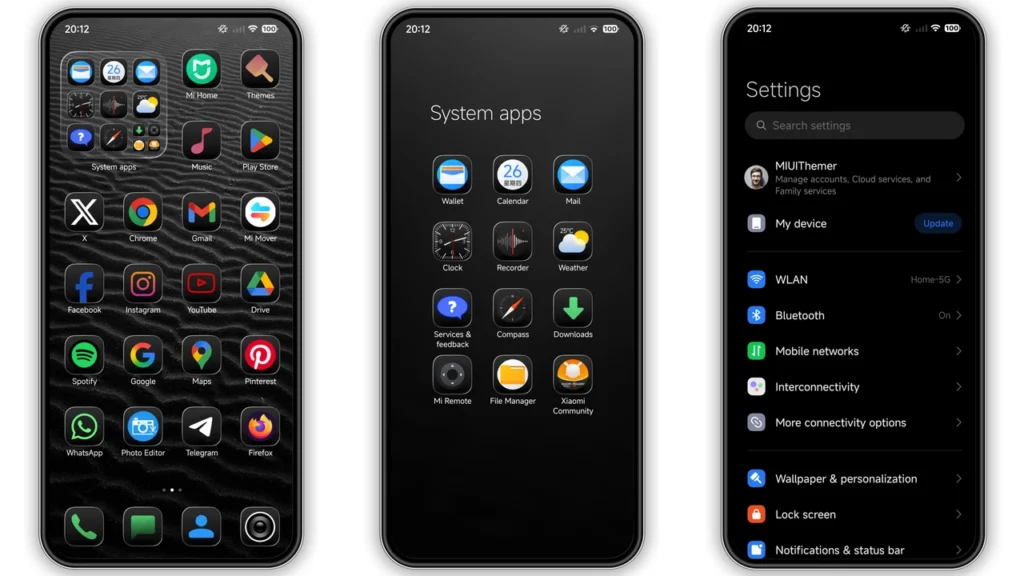
The Musci HyperOS theme is an attractive and well-designed theme for Xiaomi, Redmi, and POCO phones. It brings a fresh look to your device with new icons, wallpapers, status bar, lock screen, and Always-on Display. This theme is completely free to use and is compatible with HyperOS and HyperOS 2.0.
Visual Style
The Musci theme has a unique visual style that sets it apart from other themes. The black background with new icons gives it a sleek and modern look. The fresh wallpapers and cool lock screen add to the overall aesthetic of the theme. The stylish Always-on Display is also a great feature that complements the theme's design.
Who May Like the Theme
The Musci theme is perfect for those who want a clean and minimalist look on their device. It's also great for those who want to personalize their phone with a unique and attractive theme. If you're looking for a theme that's easy on the eyes and has a modern design, then the Musci theme is a great choice.
Compatibility Notes
The Musci theme is compatible with HyperOS and HyperOS 2.0. It works on Xiaomi, Redmi, and POCO smartphones. If you have a device with HyperOS or HyperOS 2.0, you can easily download and apply the theme.
Install Expectations
To install the Musci theme, you'll need to follow a few simple steps. First, you'll need to download the theme file, which is in.mtz format. Then, you'll need to open the Theme Store app on your device and import the theme file. Once the theme is imported, you can apply it to your device. The installation process is straightforward, and you should be able to install the theme without any issues.
Practical Download Notes
To download the Musci theme, you can click on the download link provided. The theme file is approximately 16.21 MB in size, so make sure you have enough storage space on your device. The download process should be quick, and you'll be able to start using the theme in no time.
Tips and Tricks
To get the most out of the Musci theme, you can try a few tips and tricks. First, make sure to restart your device after applying the theme to ensure that everything is working properly. You can also customize the theme to your liking by changing the icons, wallpapers, and other elements. Additionally, you can try combining the Musci theme with other themes or widgets to create a unique look.
Conclusion
The Musci HyperOS theme is a great choice for anyone looking for a clean and modern theme for their Xiaomi, Redmi, or POCO device. With its unique visual style, compatibility with HyperOS and HyperOS 2.0, and easy installation process, it's a theme that's hard to resist. So why not give it a try and elevate your device's look with the Musci theme?
Frequently Asked Questions
• Q: Is the Musci theme free to use?
• A: Yes, the Musci theme is completely free to use.
• Q: Is the theme compatible with HyperOS and HyperOS 2.0?
• A: Yes, the theme is compatible with both HyperOS and HyperOS 2.0.
• Q: How do I install the theme?
• A: You can install the theme by downloading the.mtz file and importing it into the Theme Store app on your device.
• Q: Can I customize the theme?
• A: Yes, you can customize the theme by changing the icons, wallpapers, and other elements.
Final Thoughts
The Musci HyperOS theme is a great addition to any Xiaomi, Redmi, or POCO device. Its unique visual style, ease of use, and customization options make it a theme that's sure to please. So if you're looking for a new theme to elevate your device's look, be sure to check out the Musci theme.
Theme Preview
Download Links
Use the buttons below to open the theme file and the supporting link.
Musci Theme mtz File
Helpful links
More Theme Updates
For more curated HyperOS and MIUI theme updates, visit Hyper OS x MIUI .


