
Liquid 26 gives Xiaomi phones polished, color-rich makeover without heavy setup pain. Theme leans glossy and modern, with redesigned icons, updated status bar, fresh lock screen, and styled Always-on Display. If you run HyperOS on Xiaomi, Redmi, or POCO and want stock look gone fast, this one worth try. Big plus: free MTZ file available, so both stock ROM users and custom ROM users can install with right method.
Visual style and daily feel
Liquid 26 sits in that sweet spot between clean UI and flashy UI. Not cartoon loud. Not ultra-minimal flat. More like liquid-glass vibe with smooth gradients, bright icon edges, and soft depth that pops on modern AMOLED panels.
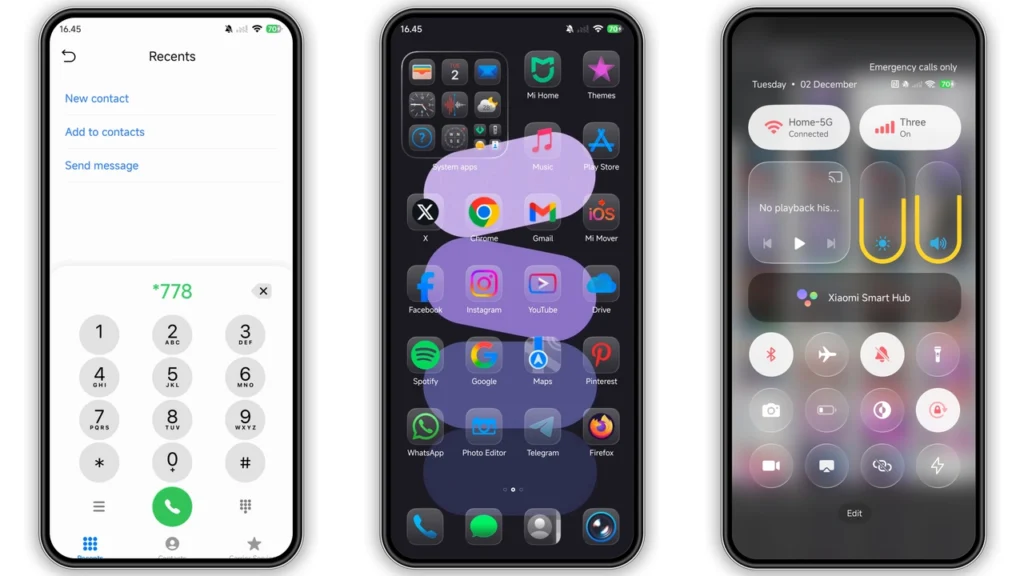
Home screen icons look most changed piece. Shape language feels consistent, and icon pack avoids random mix problem many free themes have. Core system apps blend better with each other, so launcher page feels planned, not patched.
Status bar also gets love. Signal, battery, and tiny indicators look sharper and more current than default on many devices. Changes small on paper, big in daily use, since status bar always in your face.
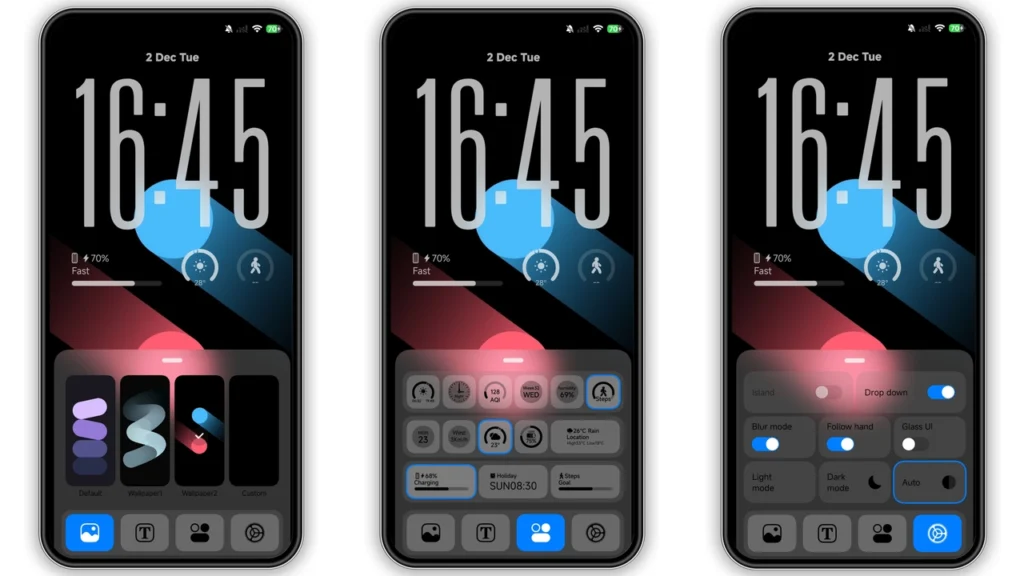
Lock screen design carries premium feel. Expect cleaner clock styling, richer wallpaper interplay, and better visual layering. Always-on Display styling keeps same direction, so lock screen and AOD feel connected, not two different themes glued together.
Wallpaper choice in Liquid 26 supports icon colors well. Contrast tends to stay readable, which matters for notifications and quick glance use. Result: stylish phone that still works as tool.
Who should use Liquid 26
Good match for users who want:
• iOS-like polish without full iOS clone behavior
• Brighter, more “alive” UI than stock HyperOS skin
• Modern icon refresh with consistent pack style
• Lock screen that feels custom, not default template
• Quick makeover without rooting phone
Maybe skip if you want pure black battery-first design only, or ultra-minimal monochrome theme. Liquid 26 is clean, but still expressive and colorful.
For students, creators, and social-first users, this theme lands well. Screenshots look better. Home screen feels newer. Phone feels “mine,” not factory preset.
Compatibility notes before install
Core compatibility target: HyperOS devices across Xiaomi, Redmi, and POCO lineup. Theme also commonly works on newer HyperOS builds where Theme Store import and apply functions stay open.
Practical rule:
•Stock HyperOS / Global stable ROM:use Theme Store route first.
•MIUI 11/12/13/14 or HyperOS-based custom ROMs:MTZ import route usually easiest.
Theme metadata from community listings often mentions HyperOS and HyperOS 2.0 support. Device behavior can still vary by region lock, ROM branch, and Theme Store policy updates. That is normal in Xiaomi theme world.
Designer credit is listed asEto(sometimes shown with variant naming in reposts). Theme package size around18 MB, so download is light and apply speed usually quick.
Install expectations on stock ROM (Global users)
If you run stock global ROM, expect one common friction point: official Theme Store links may open Chinese page first. Not error. Normal behavior.
Typical flow:
1. Open theme page in browser that passes deep-link correctly. 2. Tap official store entry. 3. Use menu option likeOpen in app. 4. Theme Store app launches. 5. Download and apply from Themes app.
If one browser fails, switch browser. Chrome or default Xiaomi browser often handles handoff better than privacy browsers in this specific case.
After apply, give system few seconds to redraw lock screen, icons, and status assets. Some widgets may need manual resize or re-place, depending launcher grid.
Install expectations on custom ROMs (MTZ import)
Custom ROM users usually go direct MTZ import. Fast path, less regional gate issues.
Basic flow:
1. DownloadLiquid 26_Hyper OS x MIUI.mtz. 2. Open Themes app. 3. Go to Themes tab. 4. Scroll down and tapImport. 5. Pick downloaded.mtzfile. 6. Apply theme.
If elements overlap after apply, restart phone once. That one reboot often fixes lock screen layering, font spacing, and icon cache leftovers.
Also expect partial apply cases on some ROM mods. Example: icons apply but lock screen stays stock. Cause usually ROM theme engine limitation, not broken file.
Practical download notes and file safety habits
Download label available:Liquid 26 Theme mtz File.
Use clean flow:
• Download from trusted host page only.
• Verify extension ends with.mtz.
• Do not rename to.zipor unpack manually.
• Keep copy in internal storageDownload/folder for easy import.
Good habit: keep previous theme active backup in case you want rollback fast. Theme changes are reversible, but fast fallback saves time when testing many skins.
No root needed. No bootloader unlock needed. No recovery flash needed. That keeps risk low for regular users.
Real-world performance and usability
On mid-range and flagship Xiaomi devices, theme weight is small enough that performance hit is usually negligible. Icon redraw and animation smoothness depend more on launcher settings than MTZ size.
For best experience:
• Keep system font near default scale.
• Avoid stacking third-party icon packs on top.
• Recheck Control Center readability in bright sunlight.
• Test lock screen notification contrast at night mode.
If you run aggressive battery saver profiles, AOD visuals may show reduced behavior by design. Not theme bug.
What feels best in Liquid 26
Three parts stand out:
1.Icon coherence– home screen looks intentionally designed. 2.Lock screen polish– premium vibe without being cluttered. 3.System-wide consistency– status bar, wallpaper tone, and widget backdrop feel synced.
That consistency is what makes theme stick for daily use. Many themes wow for five minutes then feel messy. Liquid 26 avoids that trap.
Final take
Liquid 26 is strong pick for HyperOS users wanting noticeable refresh with low setup pain. Style feels modern and glossy, but still practical for daily notifications, quick settings, and lock screen use. Compatibility story is good across Xiaomi, Redmi, and POCO, especially if you know right install route for your ROM type.
If your phone feels visually stale and you want one free theme that changes mood fast, Liquid 26 is easy yes. Download MTZ, import or open through Theme Store, apply, reboot once if needed, done.
Theme Preview
Download Links
Use the buttons below to open the theme file and the supporting link.
Liquid 26 Theme mtz File
Helpful links
More Theme Updates
For more curated HyperOS and MIUI theme updates, visit Hyper OS x MIUI .


