
Introduction to Lemon Bluery HyperOS Theme
The Lemon Bluery HyperOS theme is a beautiful, modern theme designed for Xiaomi and Redmi phones. It's a great option for those who want to give their device a fresh new look without compromising on performance. In this article, we'll take a closer look at the visual style of the theme, who it's suitable for, compatibility notes, installation expectations, and practical download notes.
Visual Style
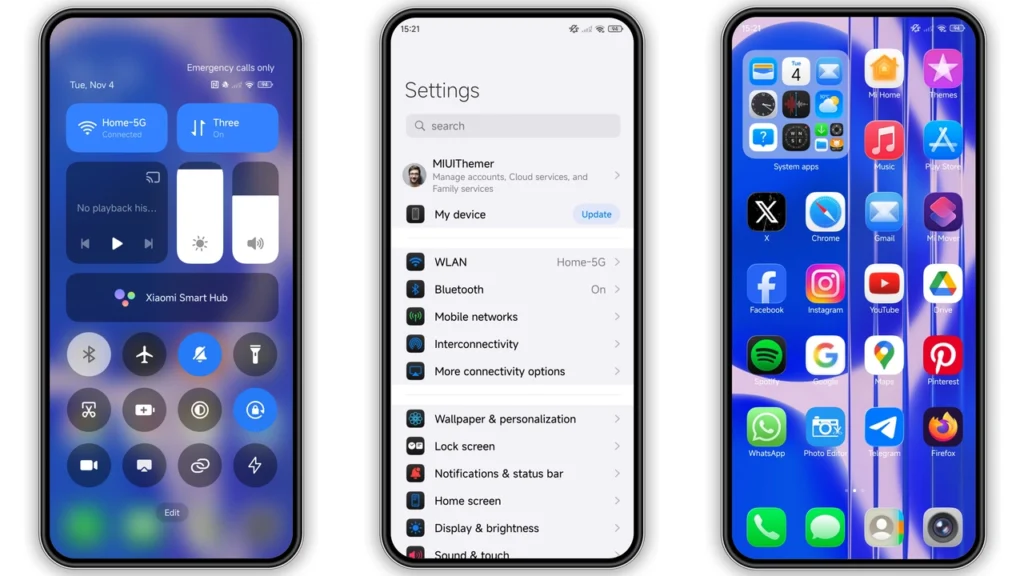
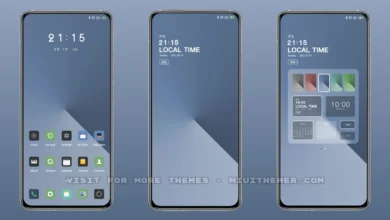
The Lemon Bluery theme has a unique and attractive visual style that's sure to catch your attention. It features a combination of blue and yellow accents, which gives it a bright and cheerful feel. The theme includes new icons, wallpapers, and a redesigned status bar, lock screen, and Always-on Display. The overall design is sleek and modern, making it a great choice for those who want a stylish and sophisticated look for their device.
Who May Like the Theme
The Lemon Bluery theme is suitable for anyone who wants a fresh and modern look for their Xiaomi or Redmi phone. It's particularly ideal for those who:
• Want a theme that's easy on the eyes and not too overwhelming
• Prefer a bright and cheerful color scheme
• Are looking for a theme that's compatible with HyperOS and HyperOS 2.0
• Want a theme that includes new icons, wallpapers, and a redesigned status bar, lock screen, and Always-on Display
Compatibility Notes
The Lemon Bluery theme is compatible with HyperOS and HyperOS 2.0, making it a great option for those who have devices running on these operating systems. It's also compatible with Xiaomi, Redmi, and POCO smartphones, so you can enjoy the theme on a wide range of devices.
Compatibility with Different Devices
The theme has been tested on various devices, including:
• Xiaomi phones
• Redmi phones
• POCO phones It's recommended to check the compatibility of the theme with your device before downloading and installing it.
Installation Expectations
Installing the Lemon Bluery theme is a straightforward process. Once you've downloaded the theme, you can follow these steps to install it: 1. Open the Theme Store app on your device 2. Tap on the 'Themes' option 3. Swipe to the bottom and click on 'Import' 4. Import the theme file (MTZ file) 5. Apply the theme Please note that you may need to restart your device after applying the theme for everything to work properly.
Practical Download Notes
To download the Lemon Bluery theme, you can follow these steps: 1. Look for the download link for the theme 2. Click on the link to download the MTZ file 3. Wait for the download to complete 4. Follow the installation steps outlined above to apply the theme It's recommended to download the theme from a trusted source to avoid any potential issues with your device.
Conclusion
The Lemon Bluery HyperOS theme is a great option for those who want a fresh and modern look for their Xiaomi or Redmi phone. With its unique visual style, compatibility with HyperOS and HyperOS 2.0, and easy installation process, it's a theme that's sure to please. Whether you're looking for a theme that's easy on the eyes or one that includes new icons, wallpapers, and a redesigned status bar, lock screen, and Always-on Display, the Lemon Bluery theme is definitely worth considering.
Final Thoughts
In conclusion, the Lemon Bluery theme is a great choice for anyone who wants a stylish and sophisticated look for their device. With its bright and cheerful color scheme, modern design, and compatibility with a wide range of devices, it's a theme that's sure to appeal to a wide range of users. So why not give it a try and see how it looks on your device?
Theme Preview
Download Links
Use the buttons below to open the theme file and the supporting link.
Lemon bluery Theme mtz File
Helpful links
More Theme Updates
For more curated HyperOS and MIUI theme updates, visit Hyper OS x MIUI .


