
Introduction to Green Tea HyperOS Theme
The Green Tea HyperOS theme, designed by LAREMAT, is a visually stunning and unique theme that can transform your Xiaomi, Redmi, or POCO phone into a device that stands out from the crowd. This theme is part of a growing collection of HyperOS and MIUI themes that offer users a wide range of customization options to personalize their devices.
Visual Style and Aesthetic
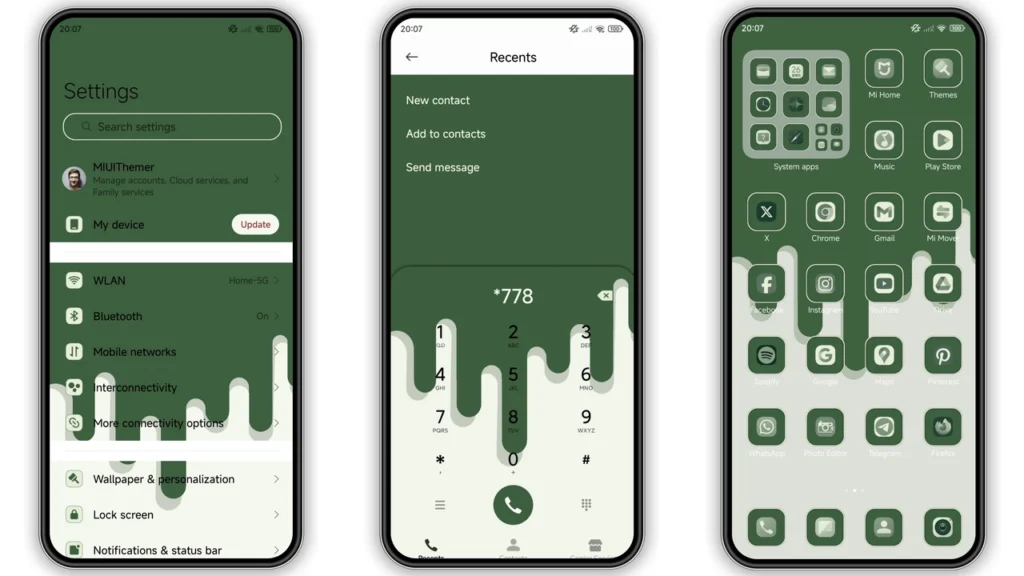
The Green Tea theme boasts an attractive and soothing color scheme, predominantly featuring soft green tea colors that are both calming and refreshing. The theme includes a set of well-designed icons, fresh wallpapers, a new status bar, a cool lock screen, and a stylish Always-on Display. These elements come together to create a cohesive and aesthetically pleasing visual experience that enhances the overall look and feel of your device.
Who May Like This Theme?
This theme is perfect for individuals who appreciate a minimalist yet distinctive design. It's ideal for those who want to give their device a unique look without opting for something too flashy or overwhelming. The soothing green color scheme makes it particularly appealing to those who prefer a calming and natural aesthetic. Whether you're looking for a theme that reflects your personal style or simply want to try something new, the Green Tea HyperOS theme is definitely worth considering.
Compatibility Notes
The Green Tea theme is compatible with HyperOS and works seamlessly on Xiaomi, Redmi, and POCO smartphones. This compatibility ensures that a wide range of users can enjoy the theme without worrying about device restrictions. However, it's always a good idea to check the specific compatibility of the theme with your device's operating system version before downloading and installing it.
Install Expectations
Installing the Green Tea theme is relatively straightforward, especially for those familiar with applying MIUI or HyperOS themes. For users with HyperOS or MIUI Global Stable ROM (Stock ROM), the process involves opening the theme store link, downloading the theme, and then applying it through the Theme Store APP. For those with custom ROMs like Xiaomi EU ROM, MIUIRoom, or other MIUI 11, 12, 13, or 14 based custom ROMs, the theme can be installed using the MTZ file. This involves downloading the MTZ theme file, opening the Theme Store APP, importing the MTZ file, and then applying the theme.
Practical Download Notes
To download the Green Tea theme, users can access the theme's MTZ file, which is approximately 3.16 MB in size. It's recommended to download the file from a trusted source to ensure that the theme is free from any malware or viruses. Once downloaded, the theme can be installed using the steps outlined above. It's also a good idea to restart your device after applying the theme to ensure that all elements are properly implemented and visible.
Conclusion
The Green Tea HyperOS theme offers a unique and refreshing visual style that can enhance the look and feel of your Xiaomi, Redmi, or POCO device. With its compatibility with HyperOS and ease of installation, this theme is a great option for those looking to personalize their smartphones. Whether you're a fan of minimalist designs or simply want to try out a new theme, the Green Tea HyperOS theme is definitely worth exploring.
Additional Tips for Theme Enthusiasts
•Explore Theme Variations: If you like the Green Tea theme, consider exploring other themes by the same designer or similar themes with different color schemes.
•Customize Further: Don't be afraid to customize the theme further by adjusting wallpapers, icons, or other elements to make it truly yours.
•Join Theme Communities: Participating in online communities dedicated to MIUI and HyperOS themes can be a great way to discover new themes, get tips on customization, and share your own favorite themes with others.
Final Thoughts
The world of MIUI and HyperOS themes is vast and constantly evolving, with new and exciting themes being developed all the time. The Green Tea HyperOS theme is just one example of the many unique and high-quality themes available for Xiaomi, Redmi, and POCO devices. Whether you're a seasoned theme enthusiast or just starting to explore the world of smartphone customization, themes like Green Tea offer a fun and creative way to personalize your device and make it reflect your personality.
Theme Preview
Download Links
Use the buttons below to open the theme file and the supporting link.
GREEN TEA Theme mtz File
Helpful links
More Theme Updates
For more curated HyperOS and MIUI theme updates, visit Hyper OS x MIUI .


