
FreeStyle HyperOS Theme by DAMI targets people bored with stock look on Xiaomi, Redmi, POCO phones. Theme pushes colorful visual identity, fresh icon pack, dynamic lock screen feel, updated status bar style, stylish Always-on Display accents. No paid wall. No password lock. File size light at 20.46 MB. Good pick for quick visual reset without deep system mod work.
Visual style and overall feel
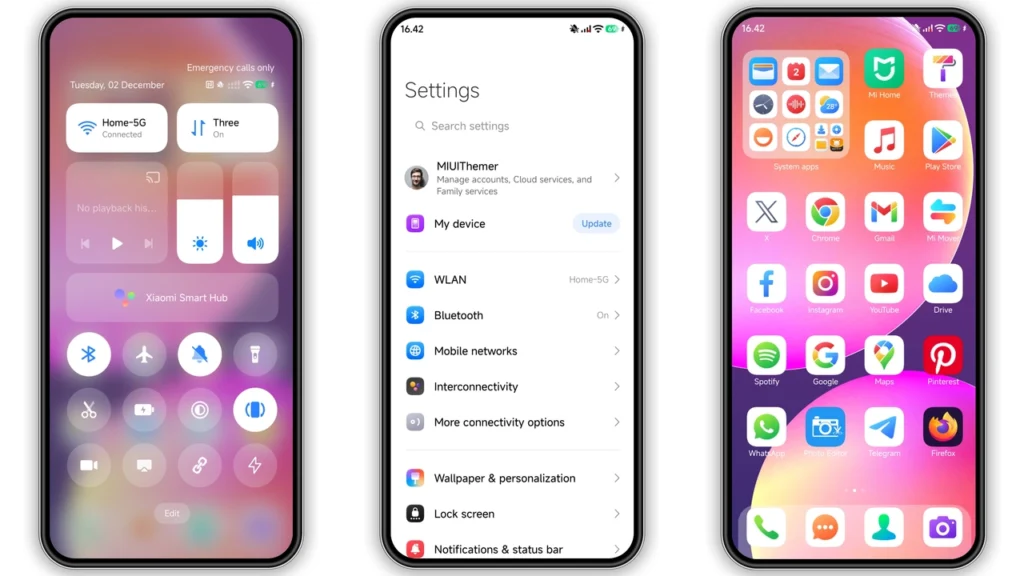
FreeStyle look: bright, playful, modern. Not heavy business minimal. Not dark amoled-first skin. Theme leans color-forward and energetic, so home screen pops fast after apply.
Key visual changes users notice first:
•Icons: redesigned set with cleaner shapes and more saturated tones.
•Wallpaper vibe: fresher background language, built to match icon colors.
•Status bar: small UI refinements that make top area feel less stock.
•Lock screen: dynamic behavior and more styled presentation.
•Always-on Display: extra polish for idle screen personality.
Result: phone feels newer without changing launcher workflow. App grid behavior stays familiar. Muscle memory stays intact. Visual layer changes, core navigation same.
If you rotate themes often, FreeStyle lands in that "daily driver but not boring" category. Enough flair for fun. Not so wild that readability dies.
Who should use FreeStyle theme
Best fit users:
• Want colorful theme, not grayscale minimal.
• Want visible change from stock HyperOS/MIUI quickly.
• Like lock screen movement and modern icon language.
• Prefer free themes over premium packs.
• Switch themes often and need low-friction install.
Maybe skip if you want:
• Pure black battery-save aesthetic.
• Ultra-minimal monochrome icon set.
• iOS clone style with heavy mimic behavior.
FreeStyle sits middle lane: expressive but usable. Good for students, casual users, social-heavy users, anyone wanting phone to look alive each unlock.
Compatibility notes before install
Official compatibility listed forHyperOS, including newer HyperOS builds, on:
• Xiaomi phones
• Redmi phones
• POCO phones
Practical rule:
1. Stock HyperOS/MIUI Global ROM users should install through Themes app route using official theme page handoff. 2. Custom ROM users based on MIUI/HyperOS can import MTZ directly.
Also noted by community workflows: MIUI 11/12/13/14 based custom builds usually accept MTZ import when Themes app import option available.
Theme metadata highlights:
•Designer: DAMI
•Size: 20.46 MB
•Region/Server: Global
•Theme password: Unlimited
•Feature tags: Colorful, Dynamic lock screen, New icons
Compatibility in real life still depends on:
• ROM base and vendor modifications
• Theme Store app version
• Region restrictions on theme endpoints
• Whether import option hidden by ROM policy
So expectation must stay realistic: full package may apply differently device to device. Lock screen or AOD modules sometimes vary across models.
Install expectations on stock ROM (HyperOS/MIUI Global)
Stock ROM path usually smooth when browser handoff works.
Expected flow:
1. Open theme page in browser that passes app handoff correctly. 2. Tap official Theme Store link. 3. Theme page may open in Chinese first. 4. Use menu (three dots) and chooseOpen in app. 5. Theme Store app opens. 6. Download theme. 7. Apply theme.
What users often see:
• Some modules apply instantly.
• Some UI parts refresh after lock/unlock cycle.
• Full consistency may need reboot.
If icons look mixed or status bar overlaps after apply, restart device once. Common fix. Fast.
Install expectations on custom ROM (MTZ import)
Custom ROM users usually use MTZ import method.
Expected flow:
1. Download.mtzfile. 2. OpenThemesapp. 3. Go toThemestab. 4. Scroll bottom, tapImport. 5. Select downloaded.mtzfile. 6. Apply theme.
After apply, reboot recommended if layout overlap, unreadable text, or partial module load appears.
Important: custom ROM theme engines differ. Some disable parts like lock screen animation or AOD assets. Not theme fault every time. Engine limitation common.
Practical download notes and what to check first
Before download, quick checklist saves time:
• Confirm device on HyperOS/MIUI ecosystem.
• Confirm Themes app installed and working.
• Keep stable network for full package pull.
• Leave free storage margin above theme size.
• Note current theme settings in case rollback needed.
Download package available as:
•FreeStyle Theme mtz File
Good practice:
• Keep local backup of MTZ after successful download.
• Screenshot old home/lock setup before switching.
• Test new theme for one full day: sunlight readability, notification clarity, lock screen legibility.
If notification text contrast looks weak in certain apps, switch only icon/wallpaper module and keep stock notification styling where ROM allows mixed components.
Real-world usage tips after applying
FreeStyle looks best when setup supports color balance.
Try these tweaks:
• Use medium icon size to keep detail visible.
• Reduce home clutter; theme colors breathe better with spacing.
• Pair with matching widgets, avoid too many conflicting palettes.
• Check Control Center readability under outdoor brightness.
For battery-conscious users: theme itself not major battery killer. Dynamic lock elements and higher screen-on engagement can still impact daily usage slightly. Monitor for 24–48 hours if battery priority high.
Should you install FreeStyle?
If goal is fast visual upgrade, yes. FreeStyle gives strong style jump without deep technical steps. DAMI design direction feels current, colorful, and friendly for daily use. Compatible range covers main Xiaomi family, and MTZ route gives fallback for many custom ROM users.
Big win: free access, light package size, clear identity. Best for users wanting phone that feels fresh each unlock while keeping familiar MIUI/HyperOS workflow.
If your taste leans dark, muted, or strict minimal, keep FreeStyle as weekend change theme, not permanent base. For everyone else wanting lively interface, this one worth install test.
Theme Preview

Download Links
Use the buttons below to open the theme file and the supporting link.
FreeStyle Theme mtz File
Helpful links
More Theme Updates
For more curated HyperOS and MIUI theme updates, visit Hyper OS x MIUI .


