
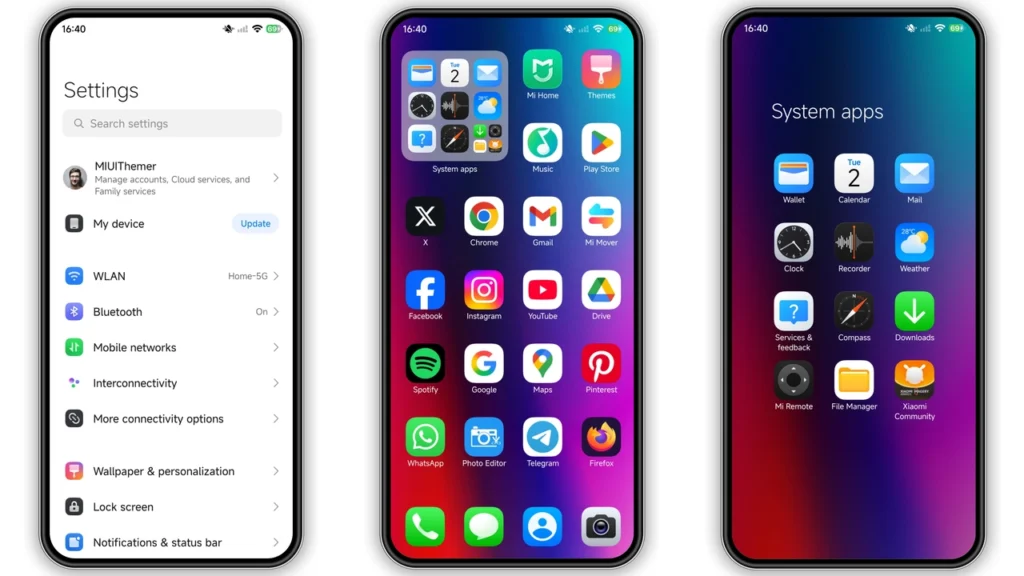
DwBlinOS3 HyperOS theme targets people bored with stock look and wanting fast visual change without paid packs. Theme pushes colorful gradient identity, redesigned icons, cleaner status bar, styled lock screen, and Always-on Display touches. Result: phone feels newer, more playful, less default Xiaomi skin. Good fit for Xiaomi, Redmi, POCO users on HyperOS, plus many MIUI custom ROM users who import.mtzmanually.
Visual style: what DwBlinOS3 changes on screen
DwBlinOS3 leans hard into color and gradient layers. Not flat monochrome theme. Not pure black minimalist pack. Style sits in middle: vibrant but usable for daily driver.
Core look changes:
•Iconsshift to custom set with more personality than stock HyperOS icons.
•Wallpaper directionfollows colorful gradient mood, helps whole UI feel unified.
•Status bargets refreshed symbols and spacing feel, cleaner at glance.
•Lock screenadds dynamic styling, stronger visual than stock static setup.
•AOD (Always-on Display)gains themed elements for better continuity when display sleeps.
Big win here: consistency. Many free themes change icons then leave rest half-stock. DwBlinOS3 touches enough UI zones that transition feels intentional. You unlock phone, open quick settings, check status icons, glance at lock screen — same visual language everywhere.
Gradient lovers will like this most. If you prefer strict minimal black-and-white or business-clean look, this may feel too lively. If you enjoy color-driven UI with modern Android flavor, strong pick.
Who should use this theme
DwBlinOS3 not universal for every taste. Best for specific users:
1.Users tired of stock HyperOS skinand wanting visible change in 2 minutes. 2.People who rotate themes oftenand like testing fresh icon packs and lock screens. 3.Fans of colorful gradient aestheticsover flat, muted palettes. 4.Xiaomi/Redmi/POCO owners on Global ROMwho want free theme with no paid unlock. 5.Custom ROM userscomfortable with manual.mtzimport flow.
Maybe skip if:
• You need strict corporate look.
• You run heavy custom launcher setup and hate theme overrides.
• You want extreme battery-first pure black AMOLED interface.
For most casual themers, though, DwBlinOS3 hits good balance: noticeable style jump, low setup pain, no deep tweaking needed.
Compatibility notes: what works, where, and why
Official compatibility listed forHyperOS, including newer HyperOS generation. Theme also works across Xiaomi ecosystem devices:
• Xiaomi phones
• Redmi phones
• POCO phones
Theme package details:
•Designer:PlayBR77
•Size:~12.57 MB
•Server/Region tag:Global
•Feature tags:Color, Gradient, Dynamic lock screen, New icons
Real-world note. Theme behavior can vary slightly by ROM branch, region lock, Theme Store policy, and device model. Same theme may show full lock-screen effects on one device and partial effect on another. Normal in Xiaomi theming world.
If you runstock HyperOS/MIUI Global Stable ROM, Theme Store route usually easiest. If you runcustom MIUI/HyperOS ROM(like Xiaomi.eu-style builds or similar),.mtzimport route gives more reliable control.
Install expectations on stock ROM (HyperOS/MIUI Global)
Stock ROM users should expect smooth flow, with one common friction point: browser handoff to Themes app.
Typical behavior:
• Theme page opens in browser first.
• You tap official store entry.
• Chinese-language theme page may appear.
• Need menu action likeOpen in app.
• Then XiaomiThemesapp opens and handles install.
If handoff fails, browser choice often cause. Some users get better result with Chrome or default Xiaomi browser than random third-party browsers.
Good expectation: install takes minutes, not hours. No bootloader unlock. No root. No risky system patching.
Install expectations on custom ROMs (.mtz import)
Custom ROM path direct and practical. Process usually:
1. Download DwBlinOS3.mtzfile. 2. OpenThemesapp. 3. Go toThemessection. 4. Scroll down and tapImport. 5. Pick downloaded.mtzfile. 6. Apply theme.
After apply, restart device if elements overlap or disappear. This step fixes many small render glitches (icon mask mismatch, lock-screen clipping, status icon refresh lag).
Custom ROM users already know: theme engine behavior differs by build. If one component fails (example: AOD style not applying), try mix-and-match method:
• Apply full theme first.
• Re-apply lock screen part separately.
• Reboot.
• Recheck Theme components panel.
Practical download notes before you hit install
Few fast checks save headache:
• Keep at least200 MB free storagethough theme file small.
• Use stable network during download/import.
• Confirm file extension stays.mtz(no forced.ziprename).
• Keep old favorite theme as backup for rollback.
• Screenshot current home/lock setup if you may restore manually.
Also remember: free theme updates can change style later. If you love current version, keep local copy of.mtzwhere possible.
Daily use experience: strengths and small caveats
After setup, DwBlinOS3 feels lively and modern. Home screen gains personality fast. Icons look less generic. Lock screen gets more presence. Status bar cleaner than some overdesigned theme packs.
Strengths:
• Strong visual refresh without complicated setup.
• Good coverage across major UI surfaces.
• Free access.
• Works across Xiaomi/Redmi/POCO ecosystem.
Possible caveats:
• Some widgets may clash with theme colors depending on wallpaper.
• Notification shade style may vary by OS version.
• AOD effects can differ by panel type and device restrictions.
• Occasional overlap bug after apply; reboot usually fixes.
None deal-breaker for theme fans. Standard Xiaomi theming quirks.
Is DwBlinOS3 worth trying?
Yes, if goal = colorful redesign with minimal effort. DwBlinOS3 gives big style shift for zero cost and low risk. Not gimmick-only icon swap. Theme touches enough interface layers to feel complete.
If your phone feels stale, this one quick way to make device feel new again. Install, test for day, keep if vibe fits. If not, rollback easy.
For gradient lovers on HyperOS, DwBlinOS3 deserves spot in rotation.
Quick specs recap
•Theme name:DwBlinOS3 HyperOS Theme
•Designer:PlayBR77
•File size:12.57 MB
•Compatibility:HyperOS (Xiaomi, Redmi, POCO), plus many MIUI/HyperOS custom ROM setups via.mtzimport
•Main style tags:Color, Gradient, Dynamic lock screen, New icons
•Price:Free
If you like bright modern UI and easy customization, DwBlinOS3 solid pick for next theme switch.
Theme Preview
Download Links
Use the buttons below to open the theme file and the supporting link.
DwBlinOS3 Theme mtz File
Helpful links
More Theme Updates
For more curated HyperOS and MIUI theme updates, visit Hyper OS x MIUI .


