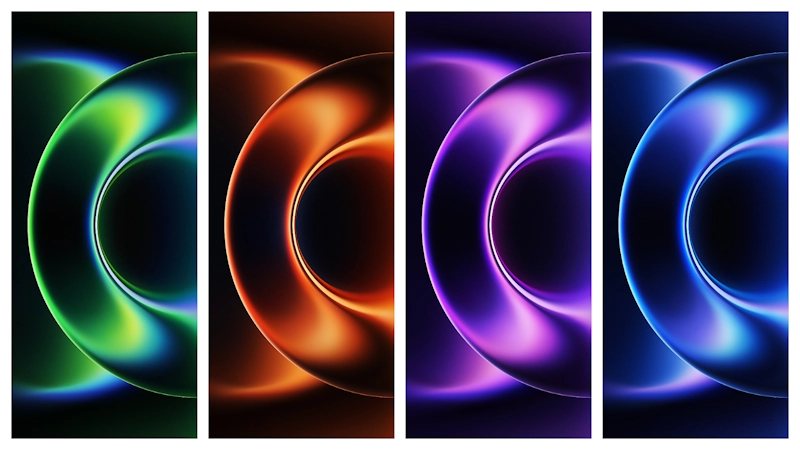
Xiaomi 17 Ultra wallpaper pack now out, and set looks exactly like flagship class should look: polished abstract shapes, soft depth, rich color, strong contrast, zero visual noise. If you like clean home screen with premium feel, this set delivers fast. Pack fits HyperOS and MIUI devices without theme engine tricks. Download folder live, install process easy, and results look good on lock screen plus home screen across Xiaomi, Redmi, Poco panels.
Visual style and why pack stands out
Xiaomi flagship wallpapers usually follow one formula: abstract form, layered light, smooth gradients, controlled saturation. This Xiaomi 17 Ultra set keeps formula but pushes detail harder. Edges look crisp. Blur transitions look intentional, not muddy. Color blend feels tuned for LTPO OLED panels, but still strong on IPS.
What you get in practical terms:
• Abstract premium look without busy pattern
• Balanced colors that don’t kill icon readability
• Depth effect that helps lock screen clock pop
• Good dark/light behavior for both modes
• No cheesy texture or overprocessed HDR mess
Mood of pack sits between minimal and bold. Not plain. Not chaotic. Good middle ground for daily driver phone.
If your setup uses clean icon pack, thin font, minimal widgets, these wallpapers fit instantly. If your setup heavy with dense widgets and bright icons, still usable because background structure stays smooth in center areas where icons usually sit.
Who will like Xiaomi 17 Ultra wallpapers most
This pack not for everyone. If you want anime art, landscapes, cars, or text-based wallpapers, skip. But for users chasing flagship stock aesthetic, this one hits hard.
Best fit users:
• HyperOS users building iOS-like clean layout
• MIUI users tired of noisy third-party wallpaper packs
• AMOLED users wanting punchy but controlled contrast
• Minimal home screen users with 1–2 widget stack
• People who rotate wallpaper weekly but want consistent style
Also good for creators posting home screen setups on Pinterest, Telegram channels, or X threads. Background gives premium vibe in screenshots without stealing focus from widget design.
Compatibility notes for HyperOS, MIUI, Redmi, Poco
Good news: wallpapers don’t need theme compatibility layer. Image file works anywhere because wallpaper engine at system level. That means no dependency on Theme Store region, signed MTZ, or designer account.
Expected device support
• Xiaomi phones on HyperOS
• Xiaomi phones on MIUI 14 / MIUI 13 / MIUI 12 series
• Redmi models on supported MIUI/HyperOS builds
• Poco models running Xiaomi software branch
ROM type
• Global ROM: works
• India ROM: works
• EEA ROM: works
• China ROM: works
• Custom ROM with standard wallpaper picker: usually works
Aspect ratio behavior
Xiaomi 17 Ultra uses tall modern ratio display class. Older phones may crop top/bottom or sides depending panel ratio. Normal behavior. Not pack defect.
Tip: Set wallpaper from Gallery and toggle perspective/scroll effect off if crop looks aggressive. Then reposition focal area manually.
Install expectations: what happens after apply
No magic tweak. No system animation unlock. No icon transformation. It’s wallpaper-only package. Expect clean visual upgrade, nothing else.
Realistic experience after install:
1. Lock screen gains depth first. Clock and notifications become easier to read on most variants. 2. Home screen looks more expensive, especially with transparent or frosted widgets. 3. App icon clutter feels reduced because gradients guide eye better than flat color wallpapers. 4. Battery impact stays normal. Static wallpaper, no live rendering cost.
If you use Always-On Display on AMOLED, choose darker variant from pack for less glare at night. If you use light mode all day, brighter variant can make UI look fresher.
Practical download notes before you start
Download source provided as folder link. Usually means multiple files inside. Check each resolution and pick one that matches your panel class.
Download label: Download Xiaomi 17 Ultra Stock Wallpaper Type: Folder download (multi-file set)
Smart checklist before applying:
• Use stable Wi-Fi before grabbing full set
• Save originals in dedicated /Pictures/Wallpapers/Xiaomi17Ultra/
• Keep one backup in cloud drive
• Rename files if names generic (example: x17u_01.webp, x17u_02.webp)
• Avoid re-compressing in messaging apps before set
If browser opens preview instead of file save, use long-press download or open in Drive app then save to device.
Best setup combos with this wallpaper pack
Want strongest result. Pair wallpaper with layout that respects empty space.
Recommended combo ideas:
• Style 1: Clean flagship
Default icons, Google search pill removed, 4x6 grid, one weather widget.
• Style 2: iOS-like HyperOS look
Rounded icon pack, medium widget stack, blur-heavy control center theme.
• Style 3: Dark productivity
Dark mode on, monochrome icons, calendar + tasks widgets, darker wallpaper variant.
• Style 4: Content-first screen
Big clock on lock screen, minimal home icons, dock only.
Small tuning goes long way. Reduce icon labels if possible. Keep widget transparency moderate. Don’t cover focal gradient center with giant opaque blocks.
Common issues and quick fixes
Wallpaper looks blurry
Cause: Messaging app recompression or low-res save. Fix: Re-download original file from folder. Apply from local storage, not chat app preview.
Colors look dull
Cause: Reading mode, saturated mode off, or auto color profile mismatch. Fix: Check display color settings. Try Original/Standard and Saturated profiles. Compare.
Crop cuts important area
Cause: Different aspect ratio. Fix: Disable scroll/parallax. Reposition wallpaper center in picker.
Lock screen dimmer than expected
Cause: System applies darkening for notification readability. Fix: Test brighter variant for lock screen, darker variant for home screen.
Final take
Xiaomi 17 Ultra wallpapers bring classic Xiaomi flagship identity: abstract, premium, polished, practical. Big win here not flashy gimmick. Big win is usability. Icons stay readable. Widgets sit clean. Screenshots look pro. Pack works across HyperOS and MIUI with near-zero friction, so install effort low and payoff immediate.
If your phone setup feels stale, this is easy refresh without full theme overhaul. Download pack, test 2–3 variants, keep one for day mode and one for night mode. Fast upgrade. Long-lasting look.
Download
• Download Xiaomi 17 Ultra Stock Wallpaper: Use the download buttons below instead of copying raw file-host links.
Theme Preview

Download Links
Use the buttons below to open the theme file and the supporting link.
Download Xiaomi 17 Ultra Stock Wallpaper
Helpful links
More Theme Updates
For more curated HyperOS and MIUI theme updates, visit Hyper OS x MIUI .


