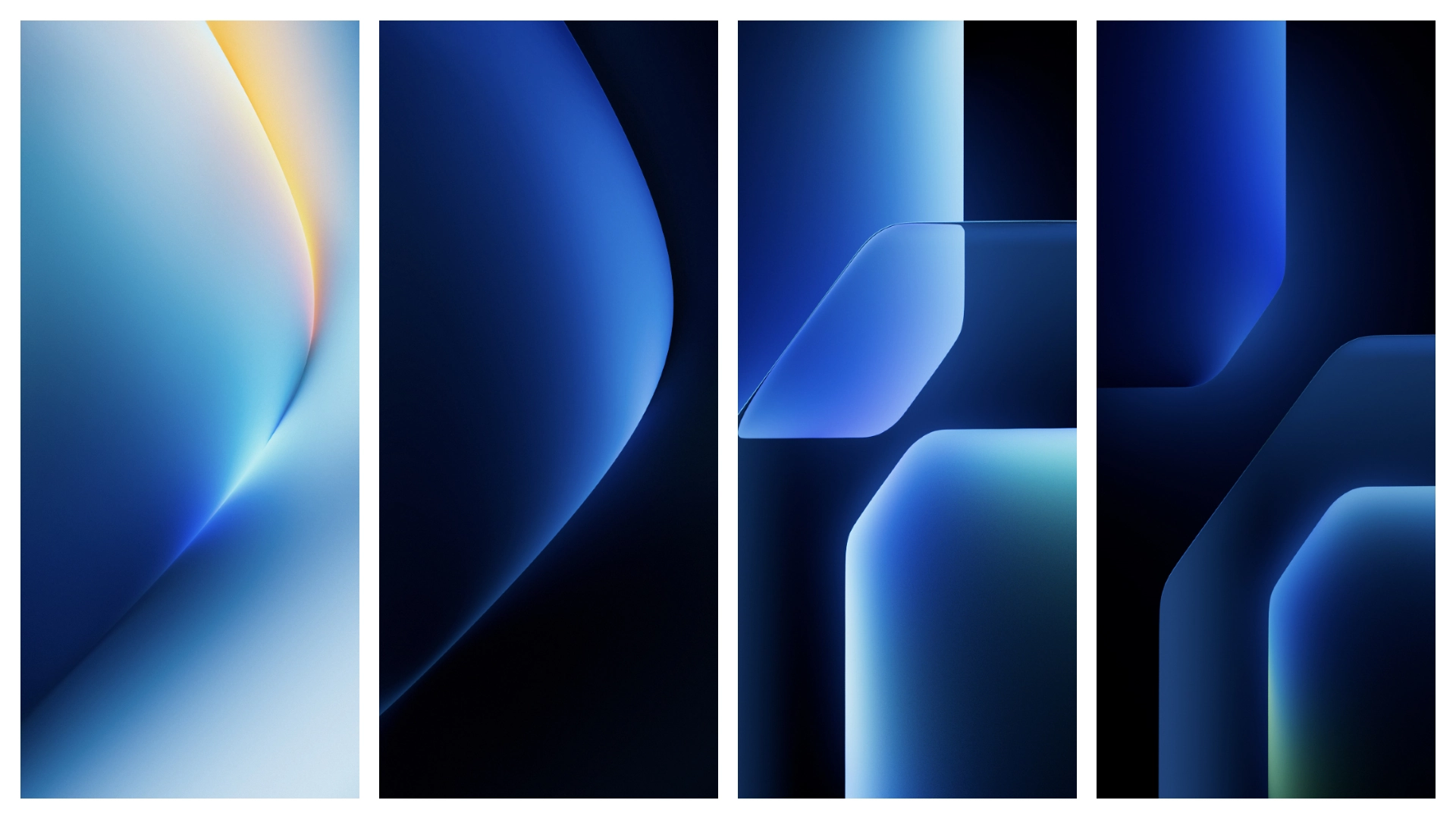
If you want a fresh gaming-style wallpaper pack without going full neon chaos, the Honor Win Wallpapers set is a solid pick. It brings bold sci‑fi energy, strong color contrast, and modern depth that works nicely on HyperOS and MIUI phones. You’re getting stock-style walls in original quality, so they look crisp on high-resolution panels and hold up on lock screen, home screen, and even Always-On Display setups.
Visual style: what Honor Win wallpapers look like
The Honor Win pack leans into a performance-phone aesthetic: angular light trails, deep shadow gradients, layered texture, and saturated accent tones. Think modern gaming hardware design translated into background art.
What stands out:
• Depth-first composition → icons remain readable.
• Strong center focus → lock screen clocks sit naturally.
• High contrast edges → OLED panels look punchy.
• Color pop without noise → less visual fatigue vs busy anime walls.
In practical use, these wallpapers feel premium rather than flashy. They’re not childish, not overly minimal, not too corporate. It’s a middle zone that works for users who want energy on screen but still need daily usability.
If your setup includes custom icon packs, these backgrounds usually cooperate well because the texture fields are controlled. You won’t fight constant icon visibility issues. With MIUI/HyperOS blur effects enabled, quick settings and folders still look clean.
Who will actually like this pack
This set is ideal for a few specific user types:
1. Gaming phone fans who want that “new device launch” vibe. 2. HyperOS users chasing modern, high-contrast visuals. 3. MIUI users bored of flat gradients and generic stock walls. 4. People running dark mode 24/7 who still want color highlights. 5. Minimal customization users who prefer wallpaper-only refreshes.
You may skip this pack if you only use muted pastel styles or heavily illustrated art backgrounds. Honor Win is more about geometry, light, and tech mood than soft aesthetics.
Compatibility notes: HyperOS, MIUI, Redmi, Xiaomi, POCO
Good news: wallpapers are the easiest customization layer. No theme engine dependency, no region lock drama, no imported .mtz handling.
Expected compatibility:
• HyperOS devices → fully compatible.
• MIUI 12/13/14 devices → fully compatible.
• Xiaomi / Redmi / POCO → no brand-specific restrictions.
• Global ROM / China ROM → same wallpaper behavior.
Resolution behavior:
• Original files scale well on FHD+ and QHD+ screens.
• On tall aspect ratios, MIUI/HyperOS may auto-crop slightly.
• Perspective zoom can shift composition; disable if you want exact framing.
If you use super-dense home layouts (5x7, 6x8), test icon contrast on each wallpaper before locking one in permanently.
Install expectations: what happens after applying
Applying these wallpapers is straightforward, but a few small expectations help:
1) Lock screen readability
Most images in this style have bright focal zones. Clock and notification text usually remain readable, but placement can vary by wallpaper. If text gets lost:
• Move clock style in lock screen customization.
• Switch to a bold/outlined clock face.
• Reduce lock screen blur overlays.
2) Home screen icon clarity
Because the pack mixes dark and lit regions, some icon packs will pop more than others:
• White or dual-tone icons → best balance.
• Neon icons on bright sections → can look noisy.
• Transparent widgets → may need subtle background cards.
3) Battery impact
Static wallpapers are lightweight. You should not expect measurable battery drain from this pack itself. Any battery change usually comes from:
• Live widgets
n- AOD animation frequency
• Heavy blur/transparency effects
4) Performance impact
No practical lag risk from normal static wallpaper usage. Even older MIUI devices should handle these just fine.
Practical download notes before you apply
Before setting wallpapers, do a quick prep pass. Saves time, prevents re-download cycles.
• Download full set first → easier side-by-side comparison.
• Check file quality in gallery before apply.
• Keep originals in a dedicated album for later rotation.
• Avoid re-sharing compressed copies from chat apps.
Recommended setup flow:
1. Download pack to local storage. 2. Open each image in default Gallery app. 3. Apply one as lock screen, another as home screen (optional split setup). 4. Recheck icon visibility in daylight + dark room. 5. Save your best two as “daily” and “backup” picks.
That dual-wallpaper method keeps your phone feeling fresh without changing themes weekly.
Best pairing ideas with HyperOS and MIUI themes
These wallpapers pair nicely with several UI directions:
• Dark minimalist themes → clean, premium, battery-friendly vibe.
• iOS-style HyperOS themes → contrast-heavy background adds depth.
• Stock-like MIUI themes → subtle boost without breaking system look.
• Gaming icon packs → cohesive high-performance aesthetic.
Widget pairing tips:
• Use one or two widgets max on home screen.
• Keep widget cards semi-opaque, not fully transparent.
• Prefer white typography for consistency across the pack.
If you run complex KWGT pages, pick the darkest wallpaper variant to reduce visual conflict.
Common issues and quick fixes
Wallpaper looks washed out
Cause: auto-enhancement or color profile mismatch. Fix: disable gallery enhancement; set display profile to Original/Standard.
Image looks too zoomed
Cause: perspective or parallax effect. Fix: turn off wallpaper motion/zoom in settings.
Lock screen text blends into bright area
Cause: focal light behind clock. Fix: change lock clock style/position or swap to darker wallpaper in set.
Downloaded file appears low quality
Cause: preview image saved instead of original file. Fix: re-download from folder item labeled stock/original.
Final take
Honor Win Wallpapers are a smart pickup if you want a modern gaming visual tone without sacrificing daily usability. They’re vibrant but controlled, detailed but not chaotic, and easy to run on basically any HyperOS or MIUI phone. For users who like clean setups with a bit of edge, this pack lands in that sweet spot.
If your current home screen feels stale, this is one of those low-effort changes with high visual payoff: download, apply, tweak clock/icons, done.
Theme Preview
Download Links
Use the buttons below to open the theme file and the supporting link.
Download Honor Win Stock Wallpaper
Helpful links
More Theme Updates
For more curated HyperOS and MIUI theme updates, visit Hyper OS x MIUI .


