
Introduction to DARK8 HyperOS Theme
The world of smartphone customization is vast and diverse, with numerous themes available for various devices. Among these, the DARK8 HyperOS theme stands out for its unique visual style and compatibility with HyperOS and MIUI devices. In this article, we'll delve into the details of the DARK8 theme, exploring its design, compatibility, installation process, and who might appreciate this theme the most.
Visual Style of DARK8 HyperOS Theme
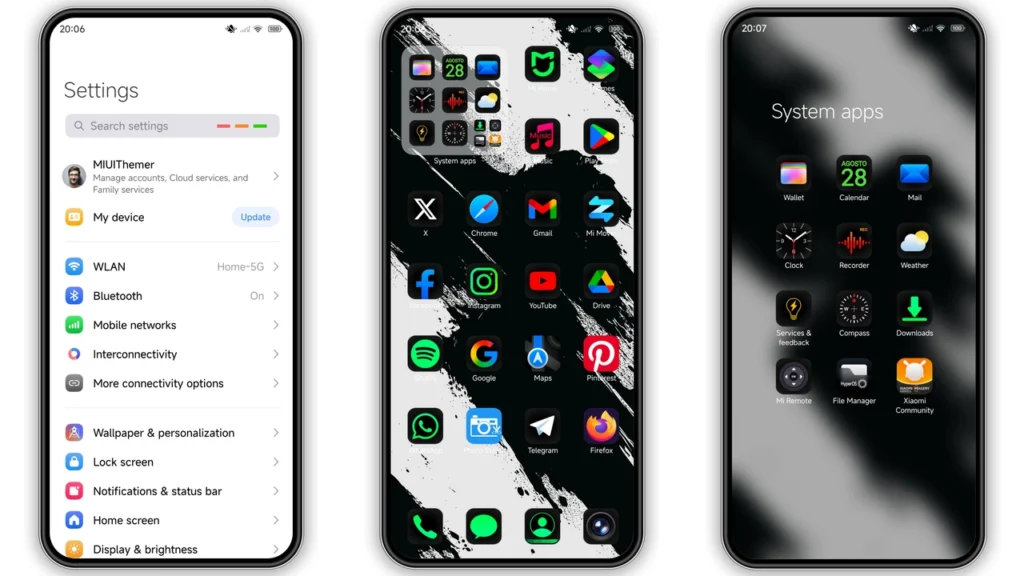
The DARK8 HyperOS theme is designed with a dark and sleek aesthetic in mind. It features new, well-designed icons, fresh wallpapers, a revamped status bar, a cool lock screen, and a stylish Always-on Display. The overall look is modern and sleek, giving your Xiaomi, Redmi, or POCO phone a premium feel. The dark theme is not only visually appealing but also helps in saving battery life, especially on devices with OLED displays.
Who May Like the DARK8 Theme?
The DARK8 theme is ideal for individuals who prefer a minimalist and clean design. It's perfect for those who want to give their device a fresh new look without compromising on functionality. Fans of dark modes will especially appreciate the theme's ability to unify the look of their device under a sleek, black umbrella. Moreover, users who are looking for a theme that can provide a consistent visual experience across their device will find the DARK8 theme very appealing.
Compatibility Notes
The DARK8 HyperOS theme is compatible with HyperOS and works seamlessly on Xiaomi, Redmi, and POCO smartphones. This compatibility extends to both the standard HyperOS and HyperOS 2.0 versions, ensuring that a wide range of devices can benefit from this theme. For users with MIUI Global Stable ROM (Stock ROM), there are specific instructions to follow for successful installation, which will be covered in the installation section.
Installation Expectations
Installing the DARK8 HyperOS theme is relatively straightforward. For users with HyperOS or MIUI Global Stable ROM, the process involves opening the theme page in a compatible browser, clicking on the official theme store link, and then opening it in the Theme Store app. From there, downloading and applying the theme is a matter of following the on-screen instructions. For those with custom ROMs like Xiaomi EU ROM, MIUIRoom, and others based on MIUI 11, 12, 13, or 14, or HyperOS, the theme can be installed using the MTZ file. This involves downloading the MTZ theme file, opening the Theme Store app, importing the MTZ file, and then applying the theme.
Practical Download Notes
To download the DARK8 HyperOS theme, users can find the download link for the MTZ file. It's essential to ensure that the download is from a trusted source to avoid any potential security risks. The theme's size is approximately 13.77 MB, so users should ensure they have enough storage space before proceeding with the download. After downloading, the installation process can begin, following the steps outlined for either stock ROM or custom ROM devices.
Conclusion
The DARK8 HyperOS theme offers a unique and sleek design that can elevate the visual experience of Xiaomi, Redmi, and POCO devices. With its compatibility with HyperOS and MIUI devices, it's an excellent choice for those looking to customize their smartphones. The theme's dark and modern aesthetic, along with its ease of installation, makes it a must-try for anyone seeking to give their device a fresh new look. Whether you're a fan of minimalist designs or just looking to try something new, the DARK8 HyperOS theme is certainly worth considering.
Final Thoughts
Customization is a significant aspect of the smartphone experience, allowing users to personalize their devices to reflect their preferences. The DARK8 HyperOS theme is a testament to the creativity and diversity in the world of themes, offering a distinctive look that can set your device apart. As the world of smartphone customization continues to evolve, themes like DARK8 will play a crucial role in helping users make their devices truly unique.
Recommendations
For those interested in exploring more themes beyond DARK8, there's a wide array of options available. From minimalist designs to elaborate, feature-rich themes, the choice ultimately depends on personal preference. It's also worth noting that the community of theme developers is active and continuously produces new and exciting themes, so there's always something new to look forward to.
Community and Support
The community surrounding HyperOS and MIUI themes is vibrant and supportive. Users can find numerous forums, social media groups, and dedicated websites where they can share their experiences, ask for advice, and discover new themes. This community aspect is invaluable, providing a space for users to interact with theme developers and other enthusiasts, which can lead to the creation of even more unique and tailored themes.
Future of Themes
As smartphones and their operating systems evolve, so too will the world of themes. With advancements in technology, we can expect to see even more sophisticated and interactive themes in the future. The integration of AI, for instance, could lead to themes that adapt to the user's preferences over time, offering a truly personalized experience. Whatever the future holds, one thing is certain - themes will continue to play a vital role in the smartphone ecosystem, providing users with the freedom to customize their devices in ways that reflect their individuality.
Theme Preview
Download Links
Use the buttons below to open the theme file and the supporting link.
DARK8 Theme mtz File
Helpful links
More Theme Updates
For more curated HyperOS and MIUI theme updates, visit Hyper OS x MIUI .


