
DailyDriver from BoZinsky gives Xiaomi, Redmi, and POCO phones a full dark visual refresh with flat styling, blue-gray accents, redesigned icons, new status bar details, and a customizable lock screen. Theme stays light in feel but bold in contrast, so daily use feels cleaner without losing readability. If stock HyperOS look feels stale, this one changes mood fast while staying practical for everyday use.
Visual style and what DailyDriver changes
DailyDriver follows dark city mood. Black base. Gray layers. Blue accent lines. Result: modern, calm, not noisy.
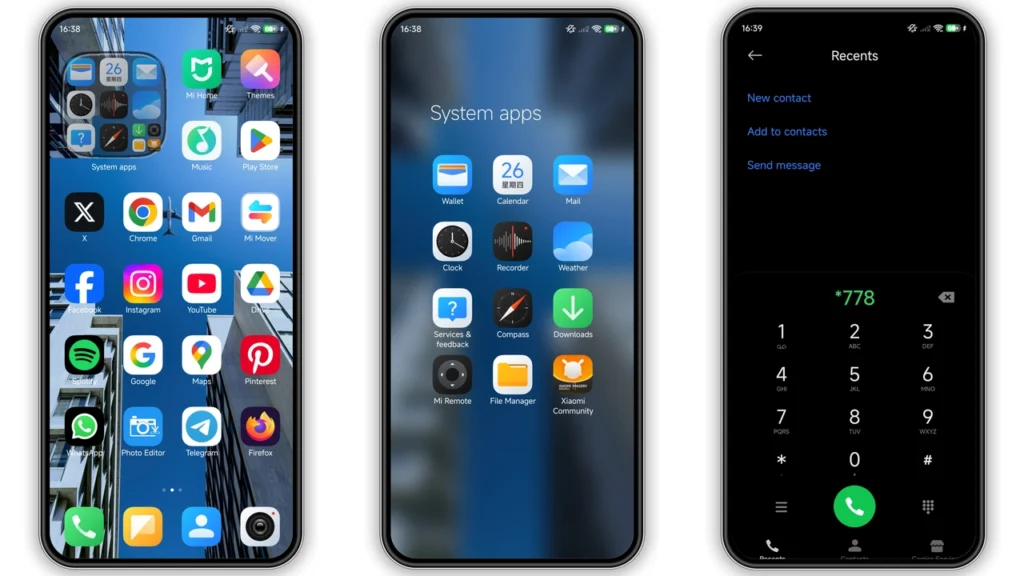
Home screen look shifts first. Icon pack uses flatter geometry with tighter edges and cleaner color blocks. No heavy gradients. No cartoon gloss. App grid looks more unified, especially when mixed with Xiaomi system apps and common social apps.
Status bar gets polished treatment. Icons feel sharper and more balanced against dark backgrounds. Notification shade looks cleaner, with stronger panel separation. Quick toggles fit theme language well, so top area no longer feels like stock piece pasted over custom wallpaper.
Wallpaper direction leans urban and atmospheric. Not over-saturated. Not washed out. Good fit for AMOLED displays and low-light use at night. If you like dark setup that still has personality, this theme lands in sweet spot.
Lock screen has big value here. BoZinsky includes dynamic styling and customization support inside Themes app. You can tweak layout pieces instead of accepting one static design. That matters for daily comfort: clock size, information balance, visual hierarchy.
Always-on Display style also gets refined touch. Not screaming for attention. Clean, legible, cohesive with lock screen and home screen language. Good if you check time and notifications often but hate clutter.
Overall tone: minimalist but not plain. Stylish but not flashy. Easy on eyes in long sessions.
Who should use this theme
DailyDriver fits users who want strong visual change without usability risk.
Good match for:
• People bored with stock HyperOS layout
• Dark theme users who want battery-friendly look on OLED screens
• Users who prefer flat, clean icon style over glossy packs
• People who care about lock screen customization
• Xiaomi/Redmi/POCO owners wanting one balanced everyday setup
Less ideal for:
• Users who want bright, colorful, playful UI
• Fans of heavy iOS-style clone themes
• People who need ultra-large icon labels and high visual density tweaks
Name “DailyDriver” fits product. Theme built for repeat use, not one-day experiment.
Compatibility notes before you install
Core compatibility listed for HyperOS, including HyperOS 2 style direction. Works across Xiaomi, Redmi, and POCO families where Themes app supports imported or store-applied themes.
Theme details at glance:
•Designer:BoZinsky
•Theme size:12.93 MB
•Server/region listing:Global
•Style tags:City, Dark, New Icons, Dynamic Lock Screen
If device runs HyperOS global stable ROM, install path usually easiest through Themes app handoff. If device runs MIUI 14 or other MIUI generation, behavior can vary by region policy, account status, and theme authorization layer.
Custom ROM users (Xiaomi EU, MIUIRoom, other HyperOS/MIUI-based builds): MTZ import method usually works when theme engine remains intact.
Important reality check: theme compatibility never equals 100% identical rendering on all devices. Different screen sizes, DPI, ROM patches, and app versions can shift spacing or icon mask behavior.
Install expectations: what works, what can break
Expect full or near-full transformation in:
• System icons
• Lock screen visuals
• Status bar styling
• Notification shade elements
• Some system app surfaces
Expect partial or no change in:
• Third-party app internal UI (inside app screens)
• Some widgets with fixed vendor styling
• Certain regional system pages with locked theme layers
After apply, first minutes can look inconsistent. Normal. Cache rebuild and UI redraw take time.
If overlap or visibility glitch appears, restart device once. This often fixes:
• Cropped lock screen elements
• Misaligned status icons
• Text contrast mismatch in quick settings
If issue remains, switch to default theme, reboot, then reapply DailyDriver. Clean reapply often resolves stale cache artifacts.
Download and apply notes (practical path)
You have MTZ file option available:
•DailyDriver Theme mtz File
use the download button below
For custom ROM or MTZ-capable setup, flow is straightforward:
1. Download.mtzfile to device storage. 2. OpenThemesapp. 3. Go toThemestab. 4. Scroll down and tapImport. 5. Select downloaded MTZ file. 6. Apply theme. 7. Restart device if any overlap or invisible text appears.
For stock global ROM path through theme store handoff, browser behavior can matter. Some users report one browser opens handoff flow correctly while another fails to pass to Themes app. If apply flow fails first time, retry with different browser available on device.
Real-world use: daily comfort and battery vibe
DailyDriver works best in routine usage: messaging, social feeds, calls, settings navigation, quick toggles, night browsing. Contrast stays readable without bright blast to eyes. If you use phone late at night, dark palette helps comfort.
Battery benefit depends on panel type and brightness habits. On OLED/AMOLED devices, dark UI areas can reduce power draw versus bright themes. Gains small to moderate, not miracle. Still useful over long days.
Performance impact from theme itself stays low due to moderate package size and flat asset style. Heavy live effects not main focus here, so animation burden remains reasonable on mid-range Redmi and POCO models.
Final take
DailyDriver hits good balance: stylish dark UI, practical readability, and enough customization to feel personal. BoZinsky design language stays consistent across icons, lock screen, and system surfaces, which makes phone feel intentionally designed instead of randomly skinned. If target is one dependable dark theme for HyperOS-era devices, DailyDriver deserves spot in rotation.
Theme Preview
Download Links
Use the buttons below to open the theme file and the supporting link.
DailyDriver Theme mtz File
Helpful links
More Theme Updates
For more curated HyperOS and MIUI theme updates, visit Hyper OS x MIUI .


