
Introduction to Crimson Tilt HyperOS Theme
The world of Xiaomi themes just got a bit more exciting with the introduction of the Crimson Tilt HyperOS theme. Designed by the talented moscreen, this theme promises to bring a fresh and attractive look to your Xiaomi, Redmi, or POCO smartphone. Whether you're looking to personalize your device or simply want a change of scenery from the stock theme, Crimson Tilt is definitely worth considering.
Visual Style and Aesthetics
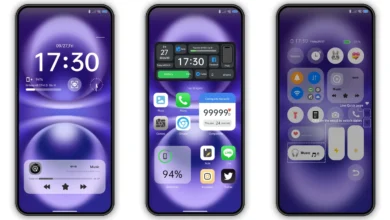
At the heart of any theme is its visual style, and Crimson Tilt does not disappoint. With a dominant black and red color scheme, this theme exudes a sense of sophistication and elegance. The well-designed icons, fresh wallpapers, and cool lock screen all contribute to a cohesive look that is both modern and sleek. The stylish Always-on Display is another notable feature, adding an extra layer of customization to your device.
The black, red, and UI elements blend seamlessly, creating a dynamic visual experience that is sure to appeal to those who appreciate a bold yet refined aesthetic. If you're a fan of dark themes but want something that stands out from the typical monochrome designs, Crimson Tilt's use of red accents could be just what you're looking for.
Who May Like This Theme?
Given its unique blend of dark and bold elements, the Crimson Tilt theme is likely to appeal to a wide range of users. Here are a few groups who might particularly enjoy this theme:
•Young Adults: The vibrant yet sophisticated design of Crimson Tilt makes it an excellent choice for young adults looking to give their device a personalized touch.
•Gamers: The theme's dark background with red highlights can create a gaming-oriented ambiance, perfect for those who spend a lot of time playing games on their smartphone.
•Fans of Customization: Anyone who enjoys tweaking their device's look to stand out from the crowd will appreciate the comprehensive customization options offered by Crimson Tilt.
Compatibility Notes
Before downloading and installing any theme, it's essential to ensure that it is compatible with your device. The Crimson Tilt HyperOS theme is designed to work with HyperOS and HyperOS 2.0, making it a great option for those who have recently upgraded or are planning to upgrade their operating system. Compatibility extends to Xiaomi, Redmi, and POCO smartphones, providing a broad range of devices that can benefit from this theme.
Install Expectations
Installing the Crimson Tilt theme is relatively straightforward, especially for those familiar with the process of applying themes on Xiaomi devices. Here are a few things to keep in mind:
•For Stock ROM Users: If you're using the MIUI Global Stable ROM, you can apply the theme directly from the Theme Store after downloading the.mtz file. Ensure you follow the provided instructions carefully to avoid any issues during the installation process.
•For Custom ROM Users: Those with custom ROMs based on MIUI 11, 12, 13, or 14, or HyperOS, can also install the theme using the.mtz file. The process involves importing the file through the Theme Store app, after which you can apply the theme.
It's worth noting that after applying the theme, it's a good idea to restart your device. This ensures that all elements of the theme are properly implemented and visible, avoiding any potential overlap or display issues.
Practical Download Notes
To get started with the Crimson Tilt HyperOS theme, you'll need to download the.mtz file. Here are some practical tips for the download process:
•Download from Trusted Sources: Always download themes from trusted sources to avoid any potential security risks.
•Check File Size and Integrity: The theme file size is approximately 12.03 MB, so ensure your download matches this to guarantee you're getting the complete and correct file.
•Follow Download Instructions: Pay close attention to the download and installation instructions provided. This will help you navigate any potential issues and ensure a smooth installation process.
Conclusion
The Crimson Tilt HyperOS theme offers a unique and captivating visual experience for Xiaomi, Redmi, and POCO device users. With its blend of black and red accents, comprehensive customization options, and compatibility with a range of devices, it's an excellent choice for anyone looking to personalize their smartphone. Whether you're a fan of dark themes, a gamer, or simply someone who appreciates a well-designed interface, Crimson Tilt is definitely worth exploring. By following the installation instructions carefully and downloading from trusted sources, you can enjoy the full benefits of this theme. So, why not give your device a fresh new look today with the Crimson Tilt HyperOS theme?
Theme Preview

Download Links
Use the buttons below to open the theme file and the supporting link.
Crimson Tilt Theme mtz File
Helpful links
More Theme Updates
For more curated HyperOS and MIUI theme updates, visit Hyper OS x MIUI .


