
Introduction to Colours HyperOS Theme
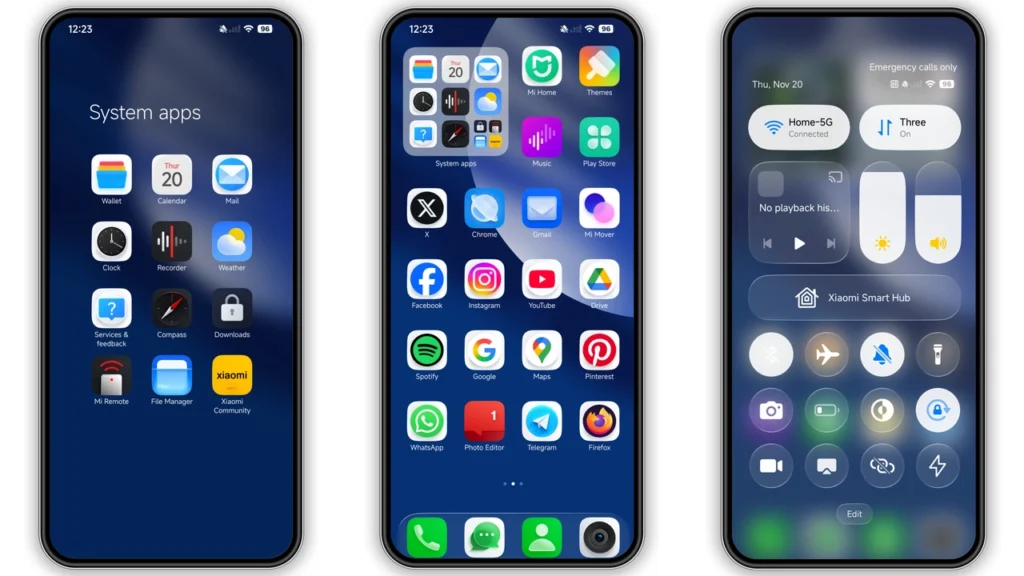
The Colours HyperOS theme is a stunning visual package designed for Xiaomi and Redmi phones, offering users a chance to personalize their devices with a unique and captivating look. This theme, crafted by the talented designer oxfury, is not just about aesthetics; it's an immersive experience that transforms the entire interface of your phone, from the icons and wallpapers to the lock screen and Always-on Display.
Visual Style and Appeal
At its core, the Colours HyperOS theme boasts a vibrant and dynamic visual style that is sure to appeal to a wide range of users. The theme features a well-designed set of icons that are both modern and sleek, giving your phone's home screen a fresh and updated look. The wallpapers included with the theme are equally impressive, offering a mix of abstract and nature-inspired designs that can add a touch of personality to your device.
One of the standout features of the Colours theme is its dynamic lock screen, which not only looks great but also provides a convenient way to access important information and controls without having to unlock your phone. The theme's Always-on Display is another highlight, offering a stylish and minimalistic way to keep track of the time, notifications, and other key details even when your screen is locked.
Who May Like This Theme?
The Colours HyperOS theme is likely to appeal to anyone looking to give their Xiaomi or Redmi phone a distinctive and modern look. Whether you're a fan of vibrant colors and dynamic visuals or simply want to try something new and different, this theme has a lot to offer. It's also a great choice for users who value customization and are looking for a theme that can help them personalize their device to suit their tastes and preferences.
Compatibility Notes
Before downloading and installing the Colours theme, it's essential to ensure that it's compatible with your device. Fortunately, this theme is designed to work with a wide range of Xiaomi and Redmi phones, including those running on HyperOS and HyperOS 2.0. However, as with any theme, compatibility can vary depending on the specific device model and software version, so it's always a good idea to check the theme's compatibility list before proceeding with the installation.
Install Expectations
Installing the Colours HyperOS theme is a relatively straightforward process, but it does require some basic knowledge of how to work with MIUI themes. If you're new to theme installation, don't worry – the process is easy to follow, and there are plenty of resources available online to help guide you through it.
To install the theme, you'll need to download the theme's MTZ file and then import it into your device's Theme Store app. From there, you can apply the theme and start enjoying its many features and customizations. Keep in mind that you may need to restart your device after applying the theme to ensure that all of the changes take effect properly.
Practical Download Notes
To download the Colours HyperOS theme, you'll need to visit a reputable theme download site or the official Xiaomi theme store. Once you've found the theme, simply click on the download link to begin the download process. The theme's MTZ file should be relatively small in size, so the download should only take a few seconds to complete, depending on your internet connection speed.
After the download is complete, you can proceed with the installation process. Make sure to only download themes from trusted sources to avoid any potential security risks or compatibility issues.
Conclusion
The Colours HyperOS theme is a fantastic choice for anyone looking to add some style and personality to their Xiaomi or Redmi phone. With its vibrant visuals, dynamic lock screen, and extensive customization options, this theme has something to offer for every type of user. Whether you're a seasoned theme enthusiast or just looking to try something new, the Colours theme is definitely worth checking out.
So why not give your phone a fresh new look today? Download the Colours HyperOS theme and discover a world of customization and personalization possibilities. With its unique blend of style, functionality, and ease of use, this theme is sure to elevate your Xiaomi experience to the next level.
Theme Preview
Download Links
Use the buttons below to open the theme file and the supporting link.
Colours Theme mtz File
Helpful links
More Theme Updates
For more curated HyperOS and MIUI theme updates, visit Hyper OS x MIUI .


