
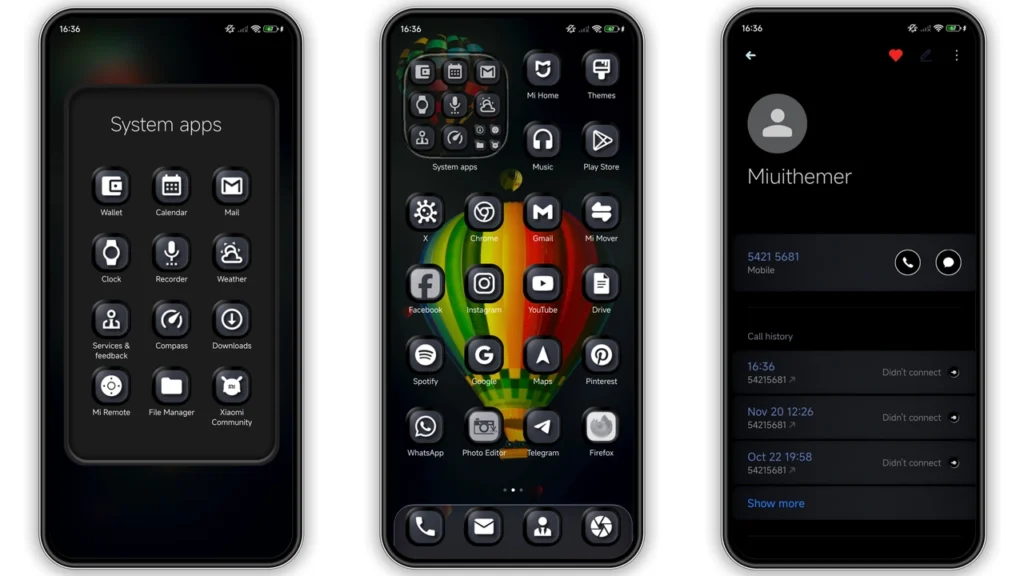
Capiskopo theme gives Xiaomi, Redmi, POCO phones full dark redesign with black-gray 3D base, blue highlight color, polished icons, fresh lock screen, new status bar, Always-on Display tweaks. Theme built for people who want mature business look, not flashy cartoon pack. Good fit for daily use if you like deep contrast UI and cleaner control center visuals.
Visual style and overall feel
Capiskopo leans hard into dark mode. No half-light mix. No pastel gimmick. Core look: black and gray layers with subtle depth effect, then blue accents for focus points. Result feels modern, serious, bit premium.
Big style points:
•Black and gray 3D surfacesfor system panels and app areas
•Blue accent colorfor toggles, highlights, active states
•Redesigned icon packwith cohesive shape language
•Fresh wallpaper directiontuned for contrast and readability
•Updated status bar treatmentfor tighter top-bar look
•Styled Always-on Displayfor better idle-screen personality
Theme sits in “business-dark” category, but not boring. It has enough visual personality to feel custom, still calm enough for work profile, meetings, long reading sessions.
If your phone usually looks cluttered after trying many themes, Capiskopo feels like reset: clean, darker, structured.
Who should use Capiskopo theme
Best audience simple:
• Dark mode fans
• Users wanting non-iOS, non-cartoon style
• People preferring muted pro aesthetic
• Users tired of aggressive color themes
• Xiaomi owners wanting full UI shift without root
You may skip Capiskopo if:
• You prefer bright white UI
• You need highly colorful icons
• You want gaming/anime visual language
• You dislike gray-heavy system palette
Capiskopo strongest point: consistent mood across lock screen, home UI, control center, icons. Theme does not feel like random asset bundle.
Compatibility notes before install
Good news: support wide across Xiaomi family.
Confirmed target stack:
•HyperOS
•HyperOS 2.0
•Xiaomi, Redmi, POCO devices
Package details:
•Designer:BoZinsky
•Theme size:22.09 MB
•Region/server tag:Global
•Format:MTZ available
For custom ROM users, MTZ import path still useful on MIUI/HyperOS-based builds (MIUI 11/12/13/14 and HyperOS custom branches like EU-style ports).
Important behavior note from designer: theme tuned fordark mode only. If you force light mode, visual balance may break.
Setup expectations after applying
Install easy. Fine-tuning matters.
After apply, expect changes in:
• Home screen icon style
• Lock screen layout and controls
• System panel texture and contrast
• Control center background presentation
• Status bar detailing
For best control center background effect, designer recommends turning off two options:
1.Advanced texture(Display settings) 2.Window level blur(Developer settings)
That step improves clean layered look and reduces muddy blur conflicts.
If UI overlap appears after applying, restart phone once. Common MIUI/HyperOS theme cache behavior. Reboot usually fixes missing icons, partial overlays, lock screen glitches.
Download notes and file option
You get direct MTZ package for manual import:
•Capiskopo Theme mtz File
use the download button below
Why MTZ option useful:
• Works when theme-store route fails
• Useful on custom ROMs with import support
• Lets you archive local copy
Basic MTZ import flow:
1. Download.mtzfile to phone storage. 2. OpenThemesapp. 3. Go toThemestab. 4. Scroll down, tapImport. 5. Pick downloaded.mtzfile. 6. Apply theme. 7. Restart phone if any element looks broken.
If official store deep-link route fails on your device/browser, browser switching often fixes handoff to Themes app. On Global ROM devices, stock browser or Chrome commonly works better than random third-party browsers for app-deeplink handoff.
Real-world use: daily strengths and weak spots
Strengths
• Strong contrast helps readability in low light
• Icon set feels coordinated, not mixed style
• Lock screen customization adds practical freshness
• Business-like tone fits work + personal blend
• Pure dark direction can help OLED battery usage in many cases
Trade-offs
• Dark-only design limits flexibility for light-mode users
• Gray-heavy palette may feel too serious for some users
• Best visual output needs extra settings tweak (texture/blur off)
Still, for users chasing polished dark theme with depth, trade-off worth it.
Quick verdict
Capiskopo stands out by doing one thing well: cohesive dark 3D UI with restrained blue accents. No visual chaos. No childish vibe. For Xiaomi/Redmi/POCO users on HyperOS who want professional, clean, high-contrast look, this theme easy recommendation.
Install path straightforward, MTZ file available, designer guidance clear. Apply, disable advanced texture + window blur, reboot if needed, done.
If your current setup feels stale, Capiskopo gives full refresh without heavy learning curve.
Theme Preview
Download Links
Use the buttons below to open the theme file and the supporting link.
Capiskopo Theme mtz File
Helpful links
More Theme Updates
For more curated HyperOS and MIUI theme updates, visit Hyper OS x MIUI .


