
Introduction to Calm HyperOS Theme
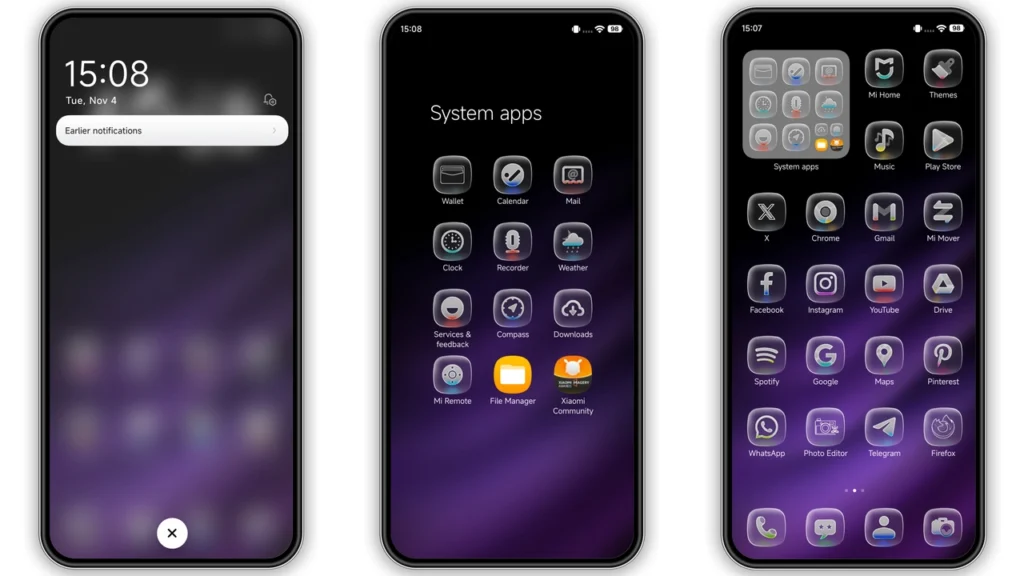
The Calm HyperOS theme is a visually stunning and highly customizable theme designed for Xiaomi and Redmi phones. This theme is perfect for those who want to give their phone a fresh new look without compromising on performance. With its well-designed icons, fresh wallpapers, and stylish Always-on Display, the Calm HyperOS theme is a must-try for anyone looking to elevate their mobile experience.
Visual Style
The Calm HyperOS theme boasts a unique and attractive visual style that is sure to catch your eye. The theme features a combination of dynamic lock screens, colorful icons, and a sleek purple color scheme that gives your phone a premium look and feel. The theme's design is minimalist and clean, making it perfect for those who prefer a simple and elegant look.
Who May Like the Theme
The Calm HyperOS theme is perfect for anyone who wants to give their phone a fresh new look. Whether you're a fan of minimalist designs or prefer a more premium look, this theme has something for everyone. The theme's colorful icons and dynamic lock screens make it a great choice for young people who want to add some personality to their phone. On the other hand, the theme's sleek and simple design makes it a great choice for professionals who want a phone that looks sophisticated and elegant.
Compatibility Notes
The Calm HyperOS theme is compatible with HyperOS and works perfectly on Xiaomi, Redmi, and POCO smartphones. The theme is also compatible with MIUI 14 ROM, making it a great choice for those who want to experience the latest features and improvements. However, please note that the theme may not be compatible with all custom ROMs, so it's always a good idea to check the compatibility before downloading.
Install Expectations
Installing the Calm HyperOS theme is a straightforward process that requires minimal technical knowledge. Once you've downloaded the theme, you can apply it to your phone using the Theme Store APP. The theme comes with a comprehensive guide that walks you through the installation process, making it easy to get started. Please note that you may need to restart your device after applying the theme to ensure that everything is working properly.
Practical Download Notes
To download the Calm HyperOS theme, simply click on the download link and follow the instructions. The theme is available in a single file format (MTZ), which can be easily imported into the Theme Store APP. Please note that the theme is completely free to use, so you don't have to worry about any hidden costs or subscriptions. Also, be sure to download the theme from a trusted source to avoid any malware or viruses.
Tips and Tricks
To get the most out of the Calm HyperOS theme, here are a few tips and tricks to keep in mind:
• Make sure to restart your device after applying the theme to ensure that everything is working properly.
• Use the Theme Store APP to apply the theme, as this will ensure that the theme is installed correctly.
• Experiment with different wallpapers and icons to customize the theme to your liking.
• If you encounter any issues with the theme, be sure to check the compatibility and installation guide before seeking help.
Conclusion
The Calm HyperOS theme is a must-try for anyone looking to elevate their mobile experience. With its unique visual style, compatibility with HyperOS and MIUI 14 ROM, and easy installation process, this theme is perfect for anyone who wants to give their phone a fresh new look. Whether you're a fan of minimalist designs or prefer a more premium look, the Calm HyperOS theme has something for everyone. So why wait? Download the theme today and experience the difference for yourself.
Theme Preview
Download Links
Use the buttons below to open the theme file and the supporting link.
Calm Theme mtz File
Helpful links
More Theme Updates
For more curated HyperOS and MIUI theme updates, visit Hyper OS x MIUI .


