
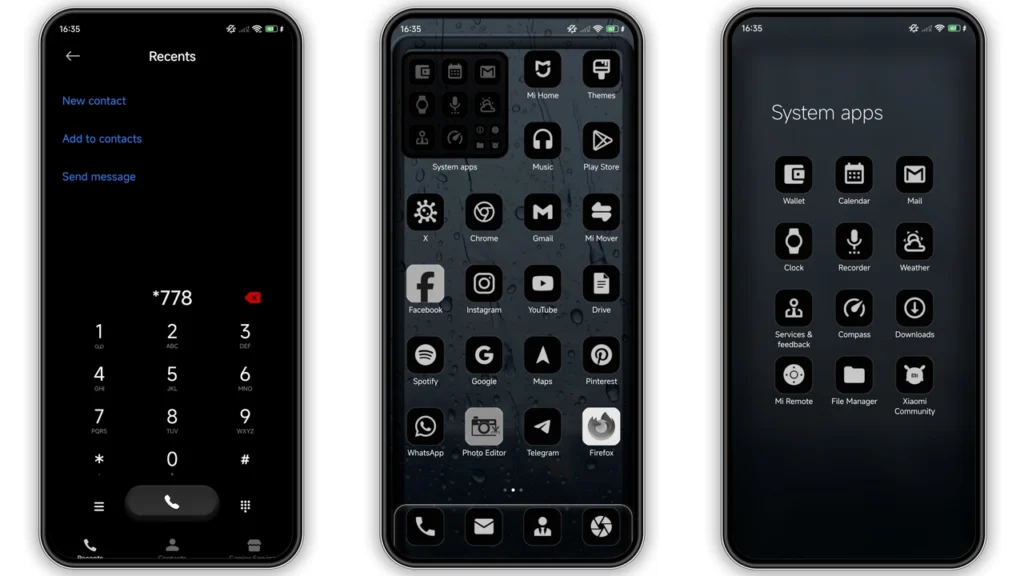
BusinessMamba is a dark, business-style HyperOS theme built for Xiaomi, Redmi, and POCO phones. Big shift from stock look. Pure black base, white and gray accents, cleaner icons, refreshed status bar, new lock screen feel, and AOD styling. If you want minimal distraction, stronger contrast, and a UI that looks sharp at night, this theme fits. It is free, light enough for daily use, and easy to install through Theme Store or MTZ import depending on your ROM.
Visual style and day-to-day feel
BusinessMamba pushes one clear idea:deep black interface first. Not dark gray pretending to be black. Real black backgrounds in key areas. That gives two fast wins on OLED panels: better visual contrast and lower battery draw in many UI screens.
Look profile:
•Color system:black base + white/gray text + restrained accent hints
•Icons:redesigned, more structured, less playful
•Status bar:cleaner symbol language, tighter visual balance
•Lock screen:modernized presentation with stronger hierarchy
•Always-on Display:styled to match dark theme identity
Result: interface looks more mature than colorful trend themes. Good for workday use. Good for users who check phone often and hate noisy UI elements.
No cartoon vibe. No neon overload. No heavy gradient spam. Theme stays focused on readability and shape clarity. That makes notifications, toggles, and text blocks easier to parse fast.
Who should use BusinessMamba
Best match users:
• You wantbusiness-like UIover flashy style
• You use phone in low light often
• You preferminimal visual noise
• You like bold, high-contrast text/icons
• You switch themes often and want one stable daily driver
Maybe skip if:
• You want bright pastel interface
• You like highly animated, playful icon packs
• You need theme elements that mimic iOS very closely
BusinessMamba sits in practical middle: stylish enough to feel new, restrained enough to stay usable after first week. That balance is why dark productivity users tend to keep it longer than trend-heavy themes.
Compatibility details before install
Core compatibility is straightforward:
•Brand family:Xiaomi / Redmi / POCO
•Main target:HyperOS (including HyperOS 2.0 environment)
•Theme type:Dark / business / dynamic lock screen style
•Designer:BoZinsky
•Theme size:23.26 MB
•Region tag:Global
Important reality check: theme behavior can vary by ROM channel and app version. Same MTZ can render slightly different lock screen modules, fonts, or status icons across builds.
Expected variance points:
1.HyperOS vs MIUI branch differences2.Global Stable vs custom ROM behavior3.Theme Store app version4.Device resolution and notch/punch-hole layout
So if one screenshot online looks a bit different on your phone, that is normal. Core design language still lands: pure black UI, structured icons, cleaner top bar.
Install expectations on stock ROM
If device runs Global Stable HyperOS/MIUI stock ROM, easiest path is Theme Store handoff flow. Some users hit browser-related handoff issues. Use supported browser behavior if first attempt fails.
What to expect:
• Theme page may open in Chinese first
• You may need “Open in app” from browser menu
• Theme Store app completes download/apply
• Some modules apply instantly, others after brief UI refresh
If handoff link fails, switch browser and retry. Chrome or default Xiaomi browser usually works better for Theme Store deep links than some third-party browsers.
After apply, check these screens before judging final look:
• Home screen and app drawer
• Notification shade and quick toggles
• Lock screen clock/widgets
• Always-on Display
• Dialer/messages readability
Give system a minute. HyperOS sometimes re-renders theme assets after first unlock cycle.
Install expectations on custom ROMs (MTZ method)
If you run Xiaomi EU, MIUIRoom, or other HyperOS/MIUI-based custom ROM, MTZ import path is usually most reliable.
Typical flow:
1. Download MTZ package. 2. OpenThemesapp. 3. Go toThemessection. 4. Scroll down and tapImport. 5. Select downloaded.mtzfile. 6. Apply theme.
Then restart device once if you see overlap, missing icons, or odd spacing. Restart often fixes partial render leftovers.
Custom ROM note: theme engine permissions and patched modules differ per build. If lock screen component does not fully match preview, test another ROM theme manager version before blaming theme file.
Practical download notes
Use the file below:
•BusinessMamba Theme mtz File
use the download button below
Download hygiene:
• Keep original filename intact
• Do not repackage MTZ
• Store in easy folder (Download root)
• Avoid duplicate old copies with similar names
If import fails:
• Re-download file (possible incomplete transfer)
• Confirm extension is.mtz
• Check Themes app has storage access
• Clear Themes app cache and retry
Performance and usability notes
BusinessMamba is not oversized. At 23.26 MB, package stays moderate. On most mid-range Xiaomi/Redmi devices, apply speed and UI response remain smooth.
Real-world benefits users usually report with this theme style:
• Better night readability
• Less eye fatigue from bright UI blocks
• Cleaner perception of notifications
• Better visual consistency across system screens
Potential tradeoffs:
• Pure black can feel too stark in bright sunlight
• Some third-party app UIs remain unchanged and may clash
• Rare status bar icon mismatch on specific builds
For most users, strengths outweigh edge issues, especially if goal is a serious, minimal, AMOLED-friendly setup.
Final take
BusinessMamba is a strong pick for anyone wanting aclean dark HyperOS identitywithout gimmicks. It looks intentional. It feels stable for daily use. It avoids clutter while still giving enough visual change from stock ROM.
If you like business-like themes, dark AMOLED aesthetics, and practical readability, this one is worth installing first. Apply, restart once if needed, then run it for two days before deciding. Most users who prefer minimal black UI will keep it.
Theme Preview
Download Links
Use the buttons below to open the theme file and the supporting link.
BusinessMamba Theme mtz File
Helpful links
More Theme Updates
For more curated HyperOS and MIUI theme updates, visit Hyper OS x MIUI .


