
Introduction to Black HyperOS Theme
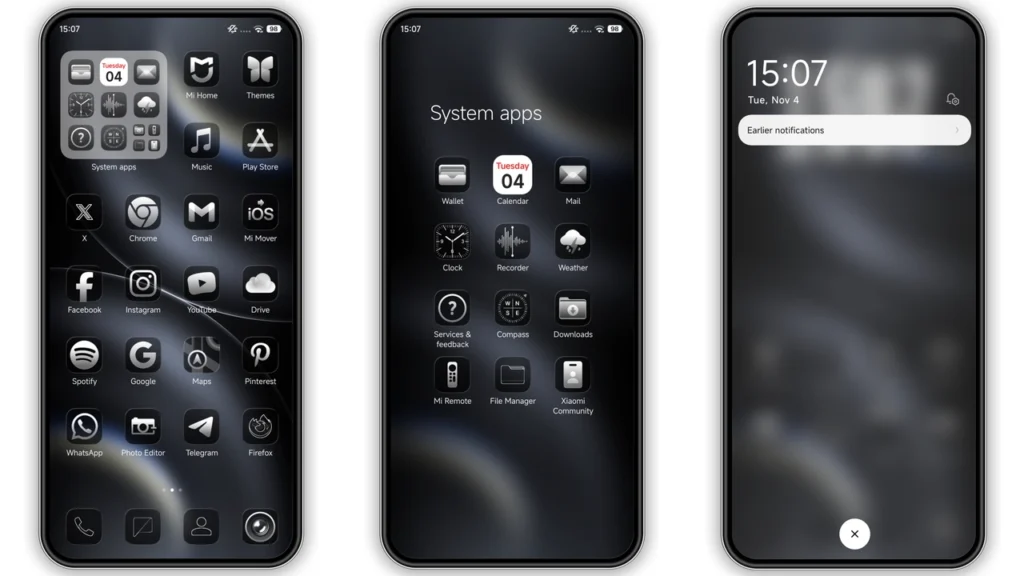
The Black HyperOS theme is a stunning visual package designed to transform your Xiaomi, Redmi, or POCO phone into a sleek, modern device. Crafted by the talented designer Masuod, this theme offers a comprehensive makeover, including beautifully designed icons, fresh wallpapers, a new status bar, a cool lock screen, and a stylish Always-on Display. Whether you're looking to personalize your phone with a unique look or simply want to experience the latest in HyperOS themes, the Black HyperOS theme is an excellent choice.
Visual Style and Aesthetics
At the heart of the Black HyperOS theme is its striking visual style, characterized by a predominantly black color scheme that not only looks sophisticated but also helps in saving battery life on OLED displays. The theme's dark aesthetic is accentuated by cleverly designed icons and graphical elements that add a touch of elegance to your phone's interface. For those who appreciate minimalist designs, the Black HyperOS theme is a dream come true, offering a clean and clutter-free visual experience that enhances the overall usability of your device.
Who May Like the Theme
The Black HyperOS theme is designed to appeal to a wide range of users, but it will particularly resonate with those who have a penchant for dark, sleek designs. If you're someone who values a minimalist aesthetic and wants a theme that can provide a sophisticated look without compromising on functionality, then this theme is tailor-made for you. Additionally, users who are looking for a theme that can help reduce battery consumption on their OLED screens will find the Black HyperOS theme to be an attractive option.
Compatibility Notes
Before downloading and installing the Black HyperOS theme, it's essential to ensure that your device is compatible. The theme is designed to work seamlessly with HyperOS and HyperOS 2.0, making it an excellent choice for users of Xiaomi, Redmi, and POCO smartphones. The theme's compatibility extends to various custom ROMs based on MIUI 11, 12, 13, and 14, including popular options like Xiaomi EU ROM and MIUIRoom. However, it's crucial to note that the theme's performance may vary depending on the specific ROM and device model you're using.
Install Expectations
Installing the Black HyperOS theme is a relatively straightforward process, but it does require some steps to be followed carefully. For users with MIUI Global Stable ROM (Stock ROM), the process involves opening the theme store link, downloading the theme, and then applying it through the Theme Store APP. The process might slightly differ for those using custom ROMs, where the MTZ file needs to be imported into the Theme Store APP to apply the theme. It's also recommended to restart your device after applying the theme to ensure that all elements are properly loaded and visible.
Practical Download Notes
To download the Black HyperOS theme, you can find the MTZ file through the provided download link. It's important to download the file from a trusted source to avoid any potential risks. The theme's size is approximately 16.97 MB, so ensure you have enough storage space on your device before initiating the download. Additionally, be aware of your device's specifications and ensure that it meets the minimum requirements for the theme to function smoothly.
Conclusion
The Black HyperOS theme is a phenomenal addition to the world of Xiaomi and Redmi phone customization. With its sleek design, comprehensive set of features, and compatibility with a wide range of devices and ROMs, it's an excellent choice for anyone looking to elevate their mobile experience. Whether you're a fan of dark themes, a minimalist at heart, or simply someone who appreciates a well-designed interface, the Black HyperOS theme is sure to impress. So, go ahead and download the Black HyperOS theme to give your phone a makeover that reflects your unique style and preferences.
Theme Preview
Download Links
Use the buttons below to open the theme file and the supporting link.
Black Theme mtz File
Helpful links
More Theme Updates
For more curated HyperOS and MIUI theme updates, visit Hyper OS x MIUI .


