
TheBlack Flower HyperOS Themebrings a refined, minimalist aesthetic to Xiaomi, Redmi, and POCO devices. Designed by Masuod, this theme blends deep blacks, subtle floral accents, and clean interface elements to deliver a sophisticated look that stands out without overwhelming. It’s ideal for users who want a polished, professional appearance with a touch of artistic flair — especially those using OLED displays where true black saves battery.
Visual Style → Elegant, Dark, and Cohesive
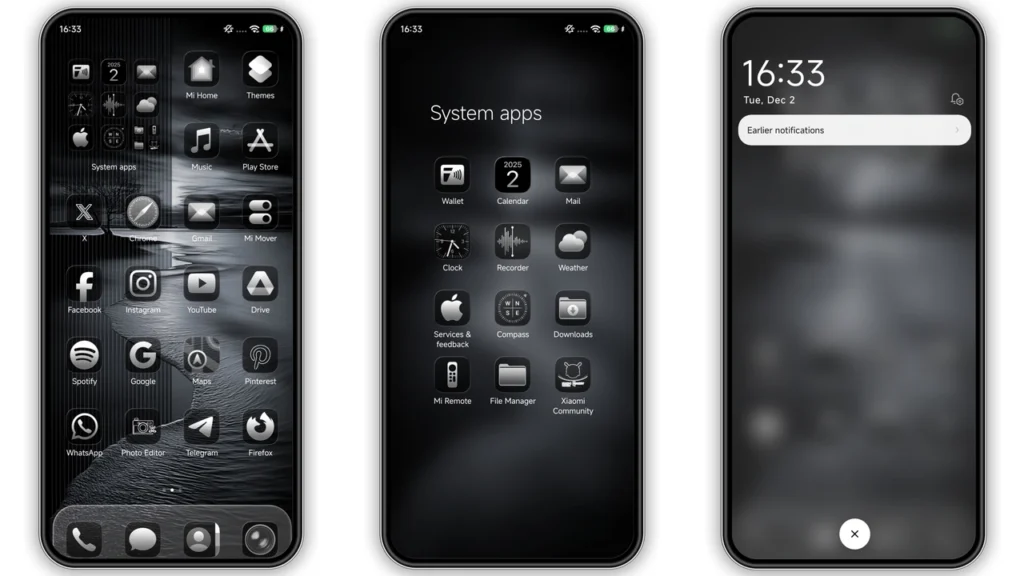
Black Flower leans into amonochrome dark paletteaccented with delicatefloral motifsthat appear across the lock screen, icons, and system apps. The wallpaper features a soft black-and-gray floral pattern with slight gradients, ensuring legibility while maintaining a premium feel. Icons are redesigned in a uniform flat-black style with thin white outlines, giving them a modern, almost engraved look. This consistency extends to system apps like Settings, Phone, Messages, and Calendar — all restyled with matching iconography and UI tweaks.
Thelock screenis dynamic and visually striking. It displays the time in a minimalist font centered at the top, with a faint floral watermark beneath. Notifications appear cleanly below, and the unlock indicator is subtle — a small dot that pulses gently. TheAlways-On Display (AOD)follows suit: time and date shown in thin, elegant numerals over a black canvas with a tiny floral emblem in the corner. It’s understated but memorable.
Status bar and navigation elements are fully black, blending seamlessly into AMOLED screens. Signal, battery, and connectivity icons are simplified and recolored to white or light gray for clarity. Even the charging animation gets a redesign — a blooming flower effect that plays as you plug in, adding a touch of personality without being flashy.
This theme excels invisual cohesion. Every element feels like part of a unified design language — no mismatched icons or jarring transitions. That’s rare in third-party HyperOS themes, where inconsistencies often break immersion.
Who Should Use This Theme?
Black Flower suits users who preferprofessional, business-ready aestheticsbut still want a hint of creativity. It’s perfect for:
• Professionals using their phone for work
• Minimalist design lovers
• OLED device owners wanting AMOLED black
• Anyone tired of default MIUI/HyperOS visuals
• Fans of floral themes that aren’t overly feminine or colorful
It’s not for those who love bright colors, 3D effects, or cartoonish designs. This issophisticated simplicity— think executive office, not anime wallpaper.
Compatibility → HyperOS & Global ROMs Only
The theme is built forHyperOS and HyperOS 2.0, running on Xiaomi, Redmi, and POCO phones withGlobal firmware. It works on devices updated to MIUI 14 and above, but only if they’re on official stock ROMs.
Custom ROM users (e.g., Xiaomi EU, MIUIRoom, CrDroid) can still install it — but must use theMTZ file methodvia Theme Store’s import function. Root or Magisk is not required.
Devices confirmed working:
• Xiaomi 13/14 series
• Redmi K60/K70 series
• Redmi Note 12/13 Pro+
• POCO F5/F6 Pro
Older devices on MIUI 12 or 13 may experience partial theming (icons and wallpaper only). Full UI changes require HyperOS or MIUI 14+.
Install Expectations → Smooth, But Requires Steps
Onstock ROMs, the safest way is through theofficial Theme Store: 1. Open the page inFirefox or Chrome(Xiaomi Browser recommended) 2. Tap "Open in App" from the three-dot menu 3. Let it redirect toThemes app4. Download and apply
If the link fails, download theMTZ file directlyand import: 1. OpenTheme Store2. Go toThemestab → swipe down → tapImport3. Select the downloaded.mtzfile 4. Apply → Restart phone
After applying,reboot your device. This prevents overlapping elements or missing icons — a known quirk in HyperOS theming. Some users report needing to reapply after reboot; if so, tap "Apply Again" in the theme’s info page.
Battery usage remains unchanged. The theme uses static assets — no background services or trackers.
Download Notes → Size, Source, Safety
•File size: 13.59 MB (MTZ)
•Source: Shared via Mediafire (direct download)
•Safe to install: No malware reported, theme-only changes
Always verify the file is namedBlack Flower_Hyper OS x MIUI.mtz— avoid renamed or repackaged versions. The designer, Masuod, is known for clean, functional themes with no intrusive ads or payloads.
No root, no Xposed, no extra tools needed. Just download, import, apply.
Final Verdict → A Classy, No-Frills Upgrade
Black Flower isn’t flashy, but it doesn’t need to be. It offers acohesive, elegant redesignthat elevates the daily user experience. The attention to detail — from the AOD to the charging animation — shows thoughtful craftsmanship.
If you’re on HyperOS and want adark, professional theme with subtle floral elegance, this is a top pick. Free, lightweight, and fully functional — it’s a quiet upgrade that makes your phone feel premium.
Theme Preview
Download Links
Use the buttons below to open the theme file and the supporting link.
Black Flower Theme mtz File
Helpful links
More Theme Updates
For more curated HyperOS and MIUI theme updates, visit Hyper OS x MIUI .


