
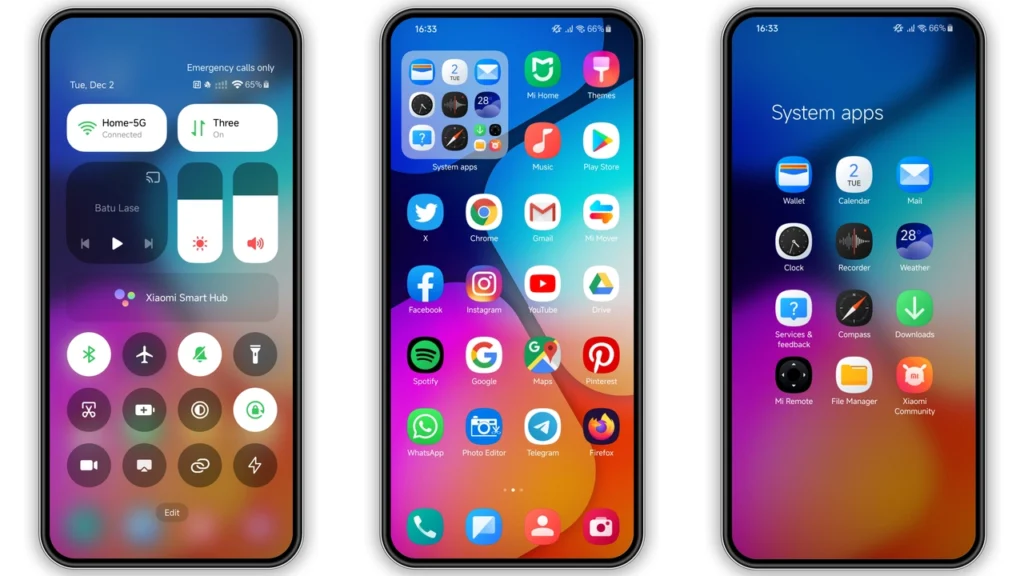
Batu Lase is one of those HyperOS themes that instantly makes a Xiaomi phone feel newer. Visuals lean colorful + tidy, with a light One UI flavor: cleaner icon language, refreshed status bar, polished lock screen, and a styled AOD that feels modern without being loud. If you like stock performance but want a different personality day to day, this one lands in a sweet spot: noticeable change, low friction, free to use.
Visual style: what Batu Lase actually changes
Batu Lase is built for people who wantfresh UI energywithout turning the phone into a novelty skin. It’s not trying to be ultra-minimal, and it’s not over-designed either. Think balanced customization.
What stands out:
•Icons→ cleaner, more uniform app grid, less visual clutter.
•Wallpaper pairing→ brighter, coordinated look; helps the whole theme feel intentional.
•Status bar tweaks→ small but visible polish in daily use.
•Lock screen styling→ more premium first impression every unlock.
•Always-on Display→ stylish enough to feel custom, still readable.
The overall color handling is lively, but not chaotic. You get contrast where it matters (quick glance info), and enough softness in UI panels to avoid eye fatigue. If your current setup feels stale, Batu Lase gives that “new phone” effect fast.
Who will probably like it most
Batu Lase fits a few clear user types:
1.One UI fans on Xiaomi hardwareSamsung-inspired balance → Xiaomi flexibility.
2.Users bored with stock HyperOS visualsSame phone speed, new surface feel.
3.People who switch themes oftenDistinct look, no heavy learning curve.
4.Users who want color without chaosVibrant UI, still practical.
5.POCO/Redmi owners wanting premium polishGood visual uplift, especially on mid-range displays.
If you only like pure-black AMOLED minimal themes, Batu Lase may feel a bit too colorful. But if you want personality + clean structure, it’s a strong pick.
Compatibility notes: what works, what to check
Core support is straightforward:
•HyperOS: supported
•HyperOS 2.0: supported
•Xiaomi / Redmi / POCO: supported
•Region: Global server profile
•Designer: Yunuz Alvarez
•Package:.mtz
•Theme size: ~13.70 MB
For most users on stock Global ROM, install path is easy through Themes app flow. For custom ROM users (Xiaomi EU, MIUIRoom, other MIUI/HyperOS-based builds), MTZ import path usually works fine.
Reality check: theme behavior can vary slightly by device model, panel resolution, Android base, and ROM branch. That’s normal. Minor overlap in widgets or lock elements can happen after first apply.
Install expectations: what happens after apply
Set expectations right, and the process feels painless.
What you should expect:
• First apply may not render every element perfectly in real time.
• Some UI parts update only after reboot.
• A few third-party app icons may stay default.
• Lock screen/AOD animations can differ by device support.
Important:After applying the theme, reboot your phone once. This solves most visual overlap issues and missing elements.
If something still looks off:
• Re-apply theme → reboot again.
• Switch to default theme → apply Batu Lase again.
• Clear Themes app cache (if your ROM allows) → re-import/re-apply.
In most cases, one clean reboot is enough.
Install paths (stock ROM vs custom ROM)
Stock HyperOS/MIUI Global ROM
Typical path:
1. Open the theme page in a browser that hands off correctly to Xiaomi Themes. 2. Open the theme listing in the Themes app. 3. Download. 4. Apply. 5. Reboot once.
If app handoff fails, switch browser (Chrome or Xiaomi default browser usually behaves better than niche browsers).
Custom ROM (MIUI/HyperOS-based)
Use MTZ import:
1. Download.mtzfile. 2. OpenThemesapp. 3. Go toThemestab. 4. Scroll down →Import. 5. Select downloaded MTZ. 6. Apply theme. 7. Reboot device.
Simple flow, high success rate on compatible custom builds.
Practical download notes
Download label:
•Batu Lase Theme mtz File
Direct file:
•use the download button below
Quick safety habits before install:
• Verify file extension is.mtz.
• Keep at least ~200 MB free storage for smooth import/cache handling.
• Avoid renaming the file unless your file manager breaks special characters.
• If import fails, move file to internal root (not deeply nested folders) and retry.
Daily-use feel after a few days
Batu Lase is not just a one-minute visual demo theme. It holds up in routine use:
• Home screen readability stays good.
• Notification shade remains clear.
• Icon consistency improves perceived organization.
• Lock screen gives a premium touch without slowing you down.
The best part is balance. Some themes overcommit to one gimmick; Batu Lase spreads improvements across the full UI. That makes it feel more like a complete skin than a wallpaper pack with extras.
Final take
Batu Lase is a solid “install and keep” option for HyperOS users who want a cleaner, more colorful One UI-adjacent look on Xiaomi/Redmi/POCO. It’s lightweight, visually coherent, and easy to apply through standard theme workflows. Reboot after apply, and you’ll likely get the full effect with minimal tweaking.
If your current setup feels flat, Batu Lase is a low-risk refresh with high day-to-day payoff.
Theme Preview
Download Links
Use the buttons below to open the theme file and the supporting link.
Batu Lase Theme mtz File
Helpful links
More Theme Updates
For more curated HyperOS and MIUI theme updates, visit Hyper OS x MIUI .


