
AIPON KANG IPAK gives Xiaomi, Redmi, POCO phones full visual refresh without paid tools. Theme pushes city-cool style: redesigned icons, new lock screen feel, updated status bar, Always-on Display tweaks, and wallpaper set that makes phone look newer fast. If stock HyperOS skin feels flat, this one gives stronger personality while staying usable day to day.
Visual style and first impression
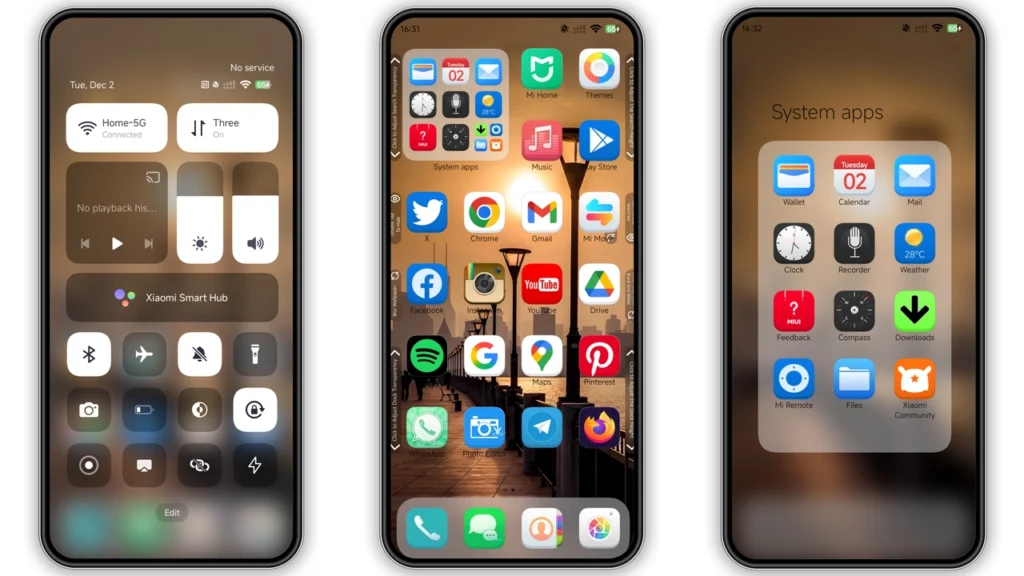
AIPON KANG IPAK feels like modern street aesthetic mixed with clean UI discipline. Not overdone. Not cartoon chaos. Main character here: icon pack and lock screen composition.
What stands out first:
•Icons: custom set with sharper shapes and stronger contrast than default HyperOS icons.
•Wallpaper mood: urban/city vibe, cooler tone, helps icons pop.
•Status bar: adjusted visuals that look more stylized but still readable.
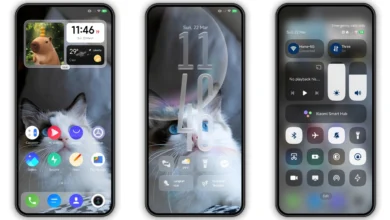
•Lock screen: more designed look, less stock template energy.
•Always-on Display: style layer added, better visual identity when screen idle.
Theme keeps balance: enough change to feel fresh, not so much that navigation becomes confusing. Important for people who want “new phone feeling” but still need quick muscle memory for daily apps.
Who should use this theme
AIPON KANG IPAK fits specific crowd.
Good match if you:
• like bold but clean icon design,
• want city-inspired look,
• use lock screen and AOD heavily,
• rotate themes often and want something free,
• run Xiaomi/Redmi/POCO and prefer Global-friendly options.
Maybe skip if you:
• want minimal monochrome business look,
• prefer ultra-flat stock UI,
• hate any custom lock screen behavior,
• need absolute zero chance of small visual bugs.
Designer note includes honest line about possible bugs. Normal in community themes. Not red flag. Means: expect small edge cases on some devices/ROM builds.
Compatibility notes before install
Core compatibility:
•HyperOSsupported
•HyperOS 2.0expected support
• Xiaomi / Redmi / POCO devices supported
• Global server release mention present
Practical reality: behavior can vary by ROM type.
1) Stock ROM users (Global Stable HyperOS/MIUI)
Best path often through Themes app route opened from browser handoff. Some users get smoother launch when opening link in Firefox first, then selecting app open option. If handoff fails, Chrome or Xiaomi default browser often fixes it.
2) Custom ROM users (MIUI-based custom builds)
If ROM supports MTZ import (common on Xiaomi EU, MIUIRoom, similar builds), direct import method works.
Important: MTZ import support depends on ROM policy and Theme Manager behavior. Some builds block parts of third-party themes, especially lock screen modules.
Install expectations: what changes, what might not
After apply, expect these parts to change:
• home screen icons,
• system accents in some panels,
• lock screen style,
• status bar visuals,
• AOD elements,
• wallpaper bundle.
Possible partial-apply scenarios:
• lock screen stays default,
• status icons partly unchanged,
• AOD not identical to preview,
• notification shade style mixed with stock.
Reason usually one of these:
• ROM restrictions,
• region theme policy,
• theme engine cache,
• old theme overlays conflicting.
Fast fix stack:
1. Reboot phone after apply. 2. Re-apply theme once. 3. Apply default theme, reboot, apply AIPON KANG IPAK again. 4. Check Themes app updates.
If overlap or unreadable text appears after first apply, reboot first. Many small glitches clear there.
Download notes and file details
Theme package details:
•Name: AIPON KANG IPAK
•Designer: Kang Ipak
•Format:.mtz
•Size: ~74.39 MB
•Cost: free
Download label available:
•AIPON KANG IPAK Theme mtz File
Practical tips before downloading:
• Use stable connection; 74MB file can corrupt on weak mobile network.
• Keep at least 300MB free storage for download + extraction/cache.
• Do not rename.mtzextension.
• If import fails, re-download file once before deeper troubleshooting.
How to install on stock HyperOS/MIUI (Global ROM)
Typical flow:
1. Open theme page in browser. 2. Tap official Theme Store entry point. 3. Use browser menu (three dots) and chooseOpen in appwhen shown. 4. Themes Store app opens to theme page. 5. Download theme in app. 6. Apply.
If official entry point fails in one browser, retry with Chrome or Xiaomi default browser. Some browsers block handoff behavior.
How to install with MTZ import (custom ROM path)
1. Download.mtzfile. 2. OpenThemesapp. 3. Go toThemessection. 4. Scroll down and tapImport. 5. Select downloaded.mtzfile. 6. Apply theme. 7. Reboot device if visual overlap appears.
This path works best on ROMs that keep import function active.
Daily usability after setup
Good theme not only pretty. Must survive real use: calls, chats, outdoors brightness, notification scanning.
AIPON KANG IPAK does decent job here.
• Icon contrast helps quick app recognition.
• Status bar style still readable in most light conditions.
• Lock screen style feels polished without huge clutter.
• City mood visuals give identity without heavy battery impact from constant animation.
Still, power users should test three things after apply:
•Notification legibilityon dark/light backgrounds.
•Dialer/contact visibilityfor older family users.
•AOD burn-in risk habits(keep brightness and long static use in check on OLED).
Known quirks and realistic expectations
Community themes often show small differences versus preview screenshots. Device DPI, font choice, region, and ROM version all affect final look.
Normal quirks you might see:
• one or two third-party app icons stay unthemed,
• widget edges not perfect with custom launcher grids,
• lock screen shortcuts differ by device model,
• MIUI/HyperOS update changes part of theme behavior.
None of this means broken file immediately. Theme engines on Xiaomi ecosystem move fast; designers patch over time.
Final take
AIPON KANG IPAK strong pick for users wanting stylish city-tone makeover without paying. Biggest wins: icon set, lock screen personality, cohesive overall mood. Compatibility good across HyperOS-family devices, with best results when install method matches ROM type.
If you like frequent customization and want theme that feels fresh but still daily-driver safe, this one worth try. Download MTZ, import/apply right way, reboot once, then judge after full day use instead of first five minutes.
Theme Preview
Download Links
Use the buttons below to open the theme file and the supporting link.
AIPON KANG IPAK Theme mtz File
Helpful links
More Theme Updates
For more curated HyperOS and MIUI theme updates, visit Hyper OS x MIUI .


